






Learn How to Extend AD Schema for SCCM | ConfigMgr | MEMCM
Let’s dive into the installation guide “Extend AD Schema for SCCM.” Do you want to extend AD Schema to ConfigMgr to work? AD schema extension is not mandatory, but I recommend opening the schema wherever possible.
The Microsoft Active Directory schema includes precise definitions for every object class that can be created within an Active Directory forest and for every attribute that can exist in an Active Directory object.
Extending the Active Directory Schema is an essential process that involves creating new structures within Active Directory. These structures are used by Configuration Manager sites to store crucial data, which greatly streamlines client deployment and configuration processes, and aids clients in locating SCCM site resources.
IDF files play a crucial role in extending the Active Directory schema. This is particularly necessary when installing domain controllers that operate on a newer version of Windows Server than the version running on the current schema master. In such cases, it is imperative to use Adprep.exe to extend the schema to install a new domain controller.

| Index |
|---|
| Prerequisites – Extend AD Schema for SCCM |
| Extend AD Schema for SCCM |
| Results of Extend AD Schema for SCCM |
Related Post – Learn How to create a System Management Container and provide FULL control permission.
NOTE! What changes are expected with the Active Directory Extension? You can refer to the Schema extensions for Configuration Manager.
Prerequisites – Extend AD Schema for SCCM
SCCM AD schema extension the schema is a one-time action for any forest. Also, if the AD schema is already extended for SCCM 2007 and 2012, then no need to open the schema again.
- The user who is performing the AD Schema extension should have Active Directory Schema admin access rights.
- Access to ConfigMgr Source files (as you can see below)
- Act as the Schema Master domain controller server
Extend AD Schema for SCCM
To extend the Active Directory Schema for SCCM, follow the steps below.
- Login to Schema Master DC server with Schema admin access rights
- Copy X64 folder needed for AD Schema extension
- The following folder SMSSETUPBINX64 contains dependent DLL files for the schema extension. So, it’s better to copy the entire X64 folder to the ConfigMgr installation media.
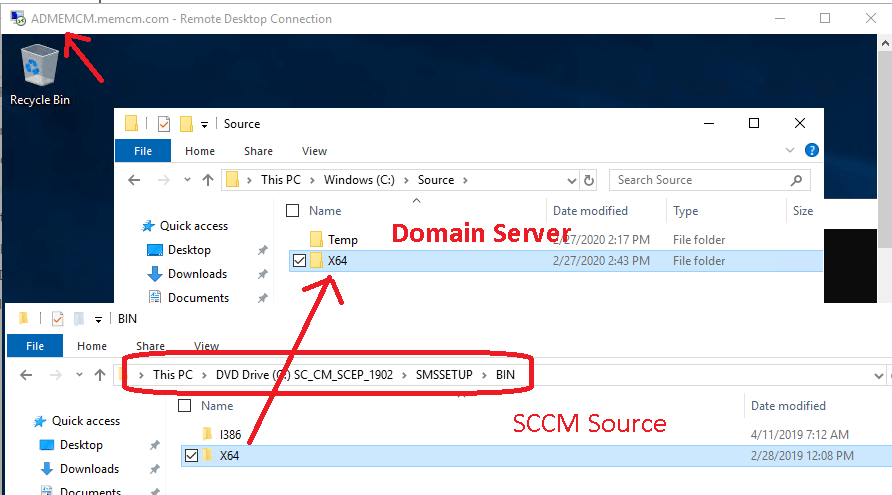
NOTE! – In this example, I will use the tool Extadsch.exe to extend the schema. However, when you have options
- Run the Extadsch.exe tool
- Or use the LDIFDE command-line utility with the ConfigMgr_ad_schema.ldf file.
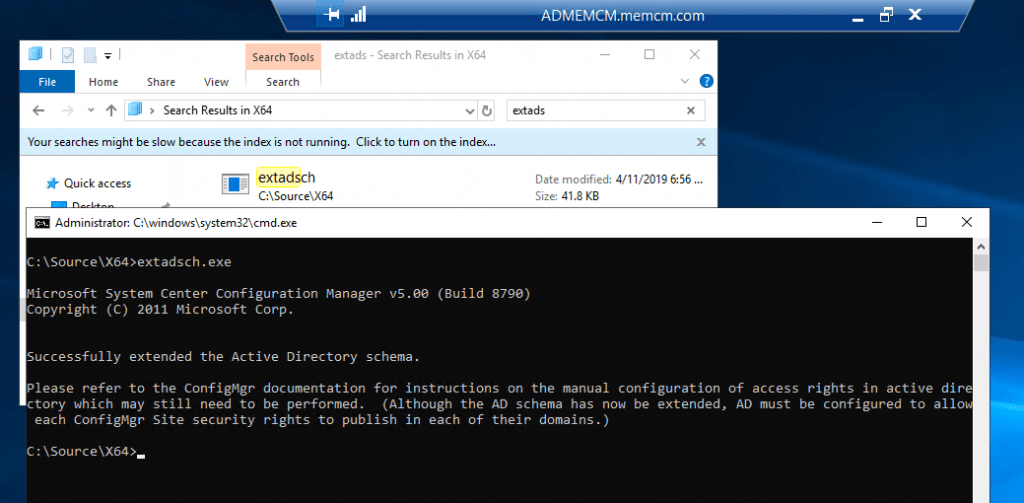
Results of Extend AD Schema for SCCM
Please refer to the ConfigMgr documentation for instructions on manually configuring access rights in the active directory, which may still need to be performed.
(Although the AD schema has now been extended, AD must be configured to allow each ConfigMgr Site security rights to publish in their domains.)
Resources
We are on WhatsApp. To get the latest step-by-step guides and news updates, Join our Channel. Click here –HTMD WhatsApp.
Author
Anoop C Nair is Microsoft MVP! He is a Device Management Admin with more than 20 years of experience (calculation done in 2021) in IT. He is a Blogger, Speaker, and Local User Group HTMD Community leader. His main focus is on Device Management technologies like SCCM 2012, Current Branch, and Intune. He writes about ConfigMgr, Windows 11, Windows 10, Azure AD, Microsoft Intune, Windows 365, AVD, etc.




i have an usb OS device can i connect that device to SCCM as a client sir
Staffwhat is a USB OS device? You are booting from USB and the OS is getting loaded from USB? Windows To Go is a supported scenario from an SCCM perspective I think.