






How to Check Security Copilot is Enabled in your Intune Tenant
Let’s check how to Check Security Copilot is Enabled in your Intune Tenant. Copilot in Intune is an AI-powered assistant integrated into the Microsoft Intune Admin Center. It helps IT administrators manage devices and security more efficiently.
With Copilot, admins can quickly get answers, troubleshoot issues, and configure policies. If Copilot in Intune is available, IT admins can work faster and smarter. Instead of going through logs or multiple menus, they can simply ask questions in natural language and get instant answers.
This speeds up troubleshooting, simplifies policy management, and makes it easier to handle daily device and compliance tasks. Copilot also delivers quick insights by summarising large datasets, spotting trends, and suggesting next steps.
By reducing manual work and surfacing key information instantly, admins can make informed decisions faster, boosting productivity and improving overall IT management efficiency. In this post, you will get all the details you need to check whether Copilot is active in your environment. We will walk through the steps to verify its availability, so you can start getting its features for faster troubleshooting, easier policy management, and smarter decision-making in Microsoft Intune.


Table of Contents
Does Copilot always Provide Accurate Answers?
Not always. Like any AI-powered tool, Security Copilot may sometimes get things wrong, so it is important to double-check its responses before acting on them.
Why does Copilot Sometimes show only Partial Information?
This can happen when your question involves a large amount of data, such as when a resource is assigned to many groups. In such cases, Copilot may return only part of the information.
Does using Security Copilot Cost Extra, and how can I Monitor Usage?
Yes. The cost depends on how much your organization uses it. Your Security Administrator manages the usage limits, and your Security Copilot Owner can check hourly usage in the Security Copilot portal.
How to Check Security Copilot is Enabled in your Intune Tenant
Microsoft Security Copilot is a tool that helps security teams quickly analyze threats and respond faster. It uses advanced AI to process security data, spot potential risks, and guide analysts in taking the right actions. To get the most out of it, you should have a basic understanding of security operations, incident response, and Microsoft security tools and services.
Read More – Step-by-Step Guide How to Enable Copilot in Microsoft Intune
- Steps to Check if Copilot is Available in Your Intune Tenant
- Sign in to the Microsoft Intune Admin Center – Visit https://intune.microsoft.com and log in with your admin credentials.
- Go to Tenant Administration – In the left-hand menu, select Tenant Administration, then choose Copilot.
- Check Copilot Status – On the Copilot page, you’ll see whether Copilot in Intune is available for your tenant.
| Copilot in Intune |
|---|
| Available |

- How to use Explorer in Intune to Find Device User App Compliance and Update Data | Different Categories in Intune Explorer
- How to use Intune Explorer with Security Copilot to Find Windows and MacOS Device Data across your Tenant
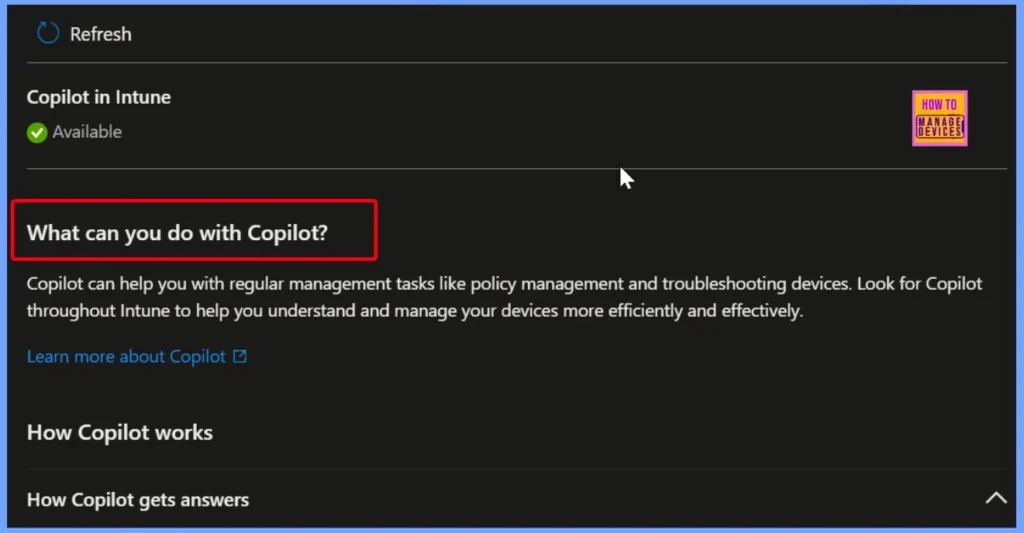
What you Can Do with Copilot in Intune
You can easily use the Copilot in your Intune admin center. It can assist you in everyday management tasks such as policy creation, updates, and troubleshooting devices. You will find Copilot integrated throughout Intune, ready to provide guidance, answer questions, and help you manage your devices more efficiently and effectively.
- Copilot with Endpoint Privilege Manager to Identify Potential Elevation Risks using Intune
- Best Copilot Assistance for Querying Device Inventory Data using KQL in Intune
- Easy way to Disable GitHub Copilot in Visual Studio using Intune
How Copilot Works in Intune
When you ask Copilot something in Intune, it sends your question to Microsoft Security Copilot, which uses your tenant’s data and trusted Microsoft sources to find the answer and then shows it back to you in Intune. You can also view all past questions and answers in your Security Copilot sessions.

Need Further Assistance or Have Technical Questions?
Join the LinkedIn Page and Telegram group to get the latest step-by-step guides and news updates. Join our Meetup Page to participate in User group meetings. Also, Join the WhatsApp Community to get the latest news on Microsoft Technologies. We are there on Reddit as well.
Author
Anoop C Nair has been Microsoft MVP from 2015 onwards for 10 consecutive years! He is a Workplace Solution Architect with more than 22+ years of experience in Workplace technologies. He is also a Blogger, Speaker, and Local User Group Community leader. His primary focus is on Device Management technologies like SCCM and Intune. He writes about technologies like Intune, SCCM, Windows, Cloud PC, Windows, Entra, Microsoft Security, Career, etc.


Discussion