






Track Windows Devices with Compliance Grace Period Ending Before a Set Date in Intune Copilot Explorer
Let’s discuss how to Track Windows Devices with Compliance Grace Period Ending Before a Set Date in Intune Security Copilot. A Compliance Grace Period is the timeframe given to a device to fix compliance issues before it is officially marked as non-compliant.
If your company has set rules and your device doesn’t meet them, it would normally be marked non-compliant. But with a grace period, the system gives you some extra time to fix the problem means 3 days to install updates or change your password etc.
During those days, you can still use your device and access work apps without being blocked. If you fix the issue within that time, everything is fine. If you don’t fix it before the grace period ends, your device becomes non-compliant, and security rules may block your access to company emails, apps, or data etc.
In this post, you will get a complete overview of how to track Windows devices with a compliance grace period ending before a specific date in Intune Security Copilot. This helps IT admins quickly identify which devices are nearing the end of their allowed grace period.

Table of Contents
Track Windows Devices with Compliance Grace Period Ending Before a Set Date in Intune Security Copilot
Exploring your data in Intune Security Copilot is easy. You just need to ask questions in simple, natural language. The system uses intelligent search to match your request with the right query and then provides a clear summary along with suggestions.
- In the Intune admin center, select Explorer. When it opens, you see a prompt input.
- Go to “Show examples for” section and select the category as Devices
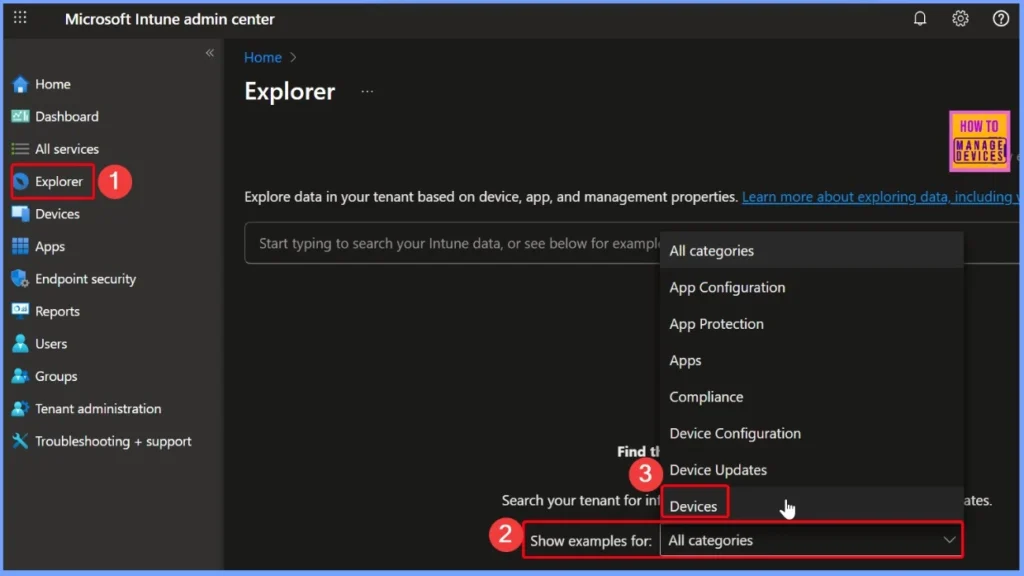
- How to use Intune Explorer with Security Copilot to Access Devices Users Apps Compliance and Update Details
- How to use Intune Explorer with Security Copilot to Find Windows and MacOS Device Data across your Tenant
Select Prompt to Track Devices with Compliance Grace Period Ending Soon
In the Device Category, you will find different prompts such as Get platform devices, Get devices enrolled by user, and more. I selected the prompt “Get platform devices that have a compliance grace period ending before a specific date”. This query helps to identify devices whose grace period is about to expire, allowing admins to take timely action and ensure compliance.
Read More – How to use Intune Explorer with Security Copilot to Access Devices Users Apps Compliance and Update Details
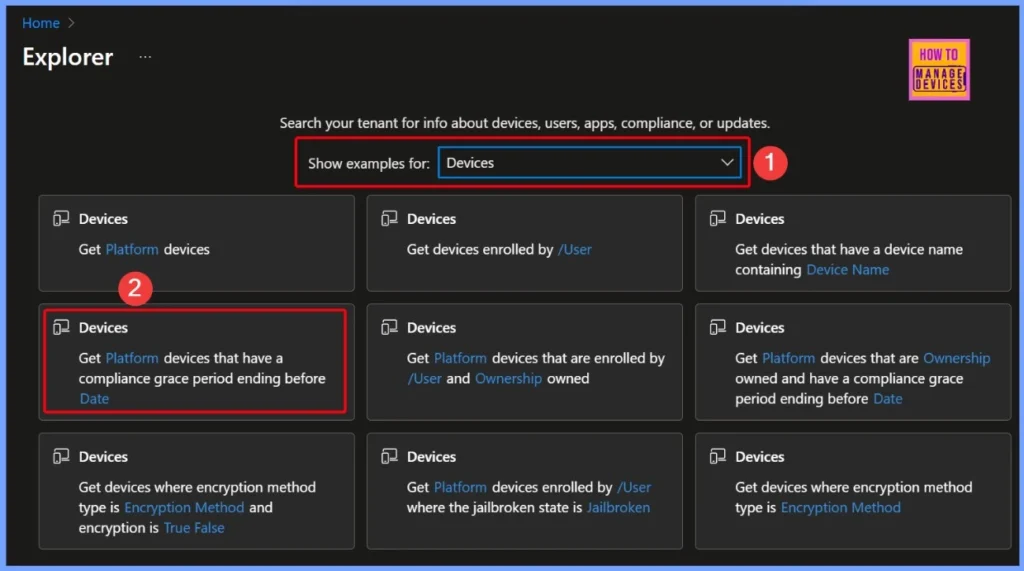
Get Platform Devices that have a Compliance Grace Period Ending before a Specific Date
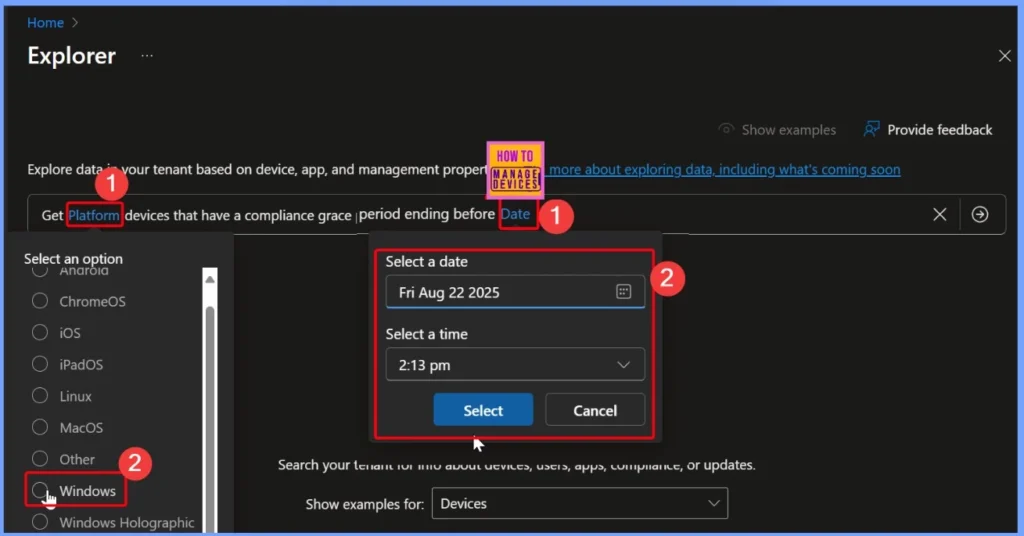
In the “Get platform devices that have a compliance grace period ending before a specific date” prompt, certain required fields need to be filled in, and these fields are highlighted for easy identification. In this case, for the Platform field, I selected Windows, and for the Date field, I entered today’s date, which is Friday, August 22, 2025, at 2:13 PM.
- How to View Managed App Types Details with Intune Explorer and Security Copilot
- How to Get All Managed App Installation Results for User using Intune Explorer with Security Copilot
- How to Get Device Enrollment Details by User in Intune Explorer with Security Copilot
Run the Query and View Results in Intune Security Copilot
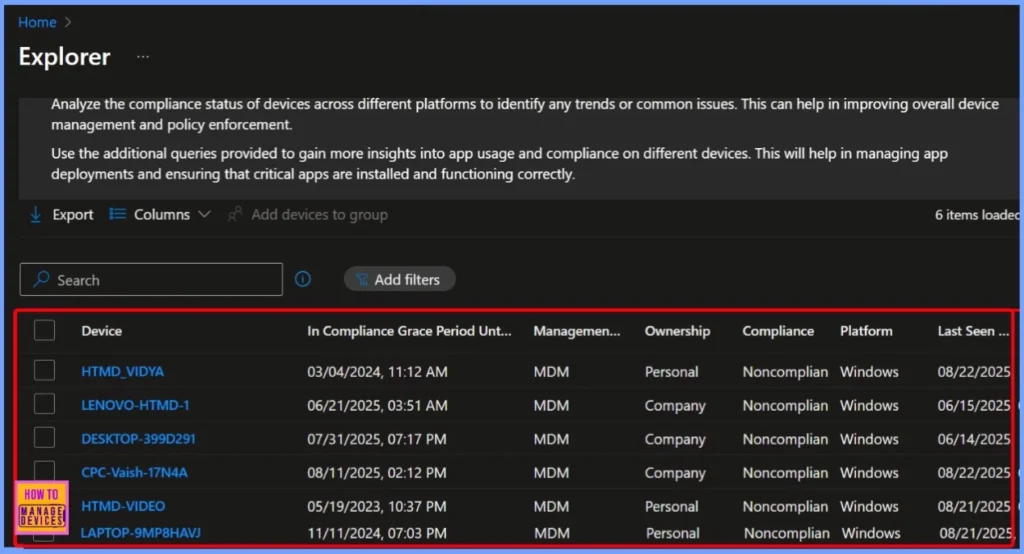
After filling in the required fields, click the arrow next to the query, and Copilot will process the request and generate the results. In this example, the output shows 6 items in the results list. The query is designed to help Intune admins quickly identify devices that are no longer compliant with the organization’s policies.
It specifically filters out devices that are past their compliance grace period while also ensuring they match the selected platform, such as Windows or Android. The results are then presented in a structured format, making it easier for admins to analyze and take appropriate action.
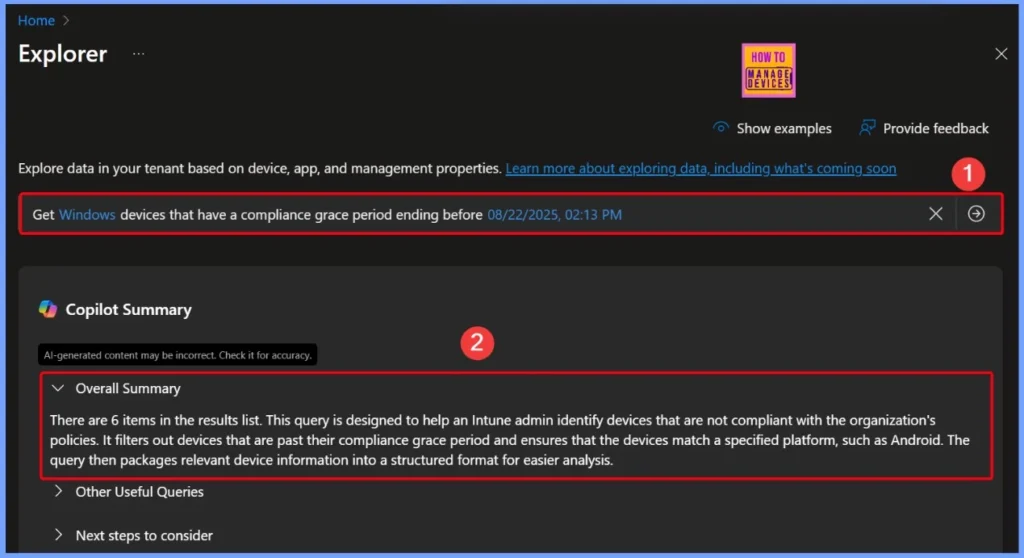
Other Queries and Next Steps
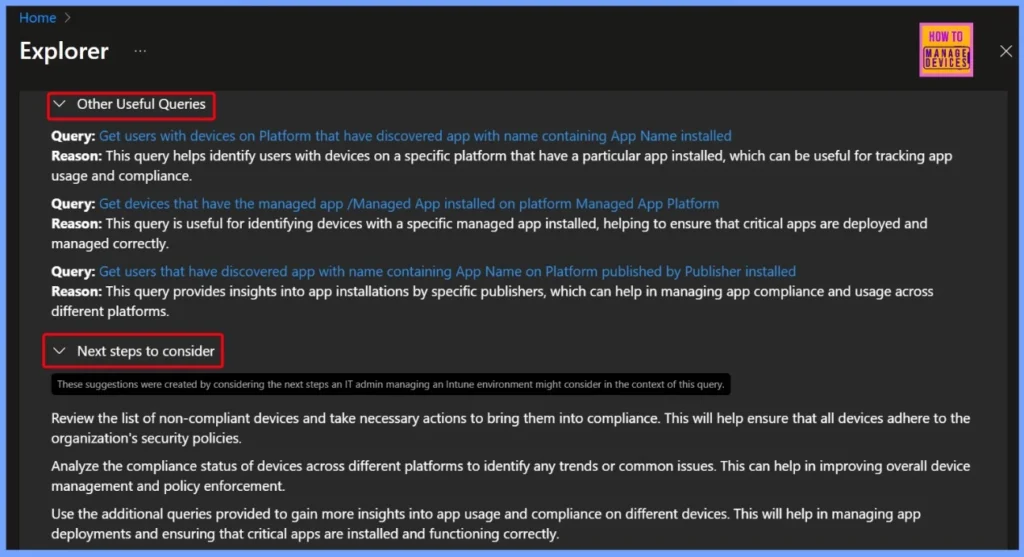
There are also other useful queries available in Intune Security Copilot. For example, you can run a query to find users with devices on a specific platform that have a certain app installed, which is helpful for tracking app usage and compliance.
- Other Useful Queries
- Query: Get users with devices on Platform that have discovered app with name containing App Name installed
- Reason: This query helps identify users with devices on a specific platform that have a particular app installed, which can be useful for tracking app usage and compliance.
- Query: Get devices that have the managed app /Managed App installed on platform Managed App Platform
- Reason: This query is useful for identifying devices with a specific managed app installed, helping to ensure that critical apps are deployed and managed correctly.
- Query: Get users that have discovered app with name containing App Name on Platform published by Publisher installed
- Reason: This query provides insights into app installations by specific publishers, which can help in managing app compliance and usage across different platforms.
| Next steps to consider |
|---|
| Review the list of non-compliant devices and take necessary actions to bring them into compliance. This will help ensure that all devices adhere to the organization’s security policies. |
| Analyze the compliance status of devices across different platforms to identify any trends or common issues. This can help in improving overall device management and policy enforcement. |
| Use the additional queries provided to gain more insights into app usage and compliance on different devices. This will help in managing app deployments and ensuring that critical apps are installed and functioning correctly. |
End Results – Windows Devices in Compliance Grace Period with Key Details
The query results show a list of Windows devices that are currently in their compliance grace period but will soon become non-compliant. Each entry provides details such as the device name, grace period end date and time, management agent (MDM), ownership type (personal or company), compliance status, platform, and last seen time.
| Device | In compliance Grace period until date time | Management Agent | Ownership | Compliance | Platform | Last seen |
|---|---|---|---|---|---|---|
| HTMD-VIDEO | 05/19/2023, 10:37 PM | MDM | Personal | Noncompliant | Windows | 08/21/2025, 06:13 PM |
| CPC-Vaish-17N4A | 08/11/2025, 02:12 PM | MDM | Company | Noncompliant | Windows | 08/22/2025, 04:21 PM |
| DESKTOP-399D291 | 07/31/2025, 07:17 PM | MDM | Company | Noncompliant | Windows | 06/14/2025, 10:55 PM |
| HTMD_VIDYA | 03/04/2024, 11:12 AM | MDM | Company | Noncompliant | Windows | 08/22/2025, 10:31 AM |
| LAPTOP-9MP8HAVJ | 11/11/2024, 07:03 PM | MDM | Personal | Noncompliant | Windows | 08/22/2025, 05:03 PM |
| LENOVO-HTMD-1 | 06/21/2025, 03:51 AM | MDM | Personal | Noncompliant | Windows | 06/15/2025, 06:01 AM |
Need Further Assistance or Have Technical Questions?
Join the LinkedIn Page and Telegram group to get the latest step-by-step guides and news updates. Join our Meetup Page to participate in User group meetings. Also, join the WhatsApp Community to get the latest news on Microsoft Technologies. We are there on Reddit as well.
Author
Anoop C Nair has been Microsoft MVP for 10 consecutive years from 2015 onwards. He is a Workplace Solution Architect with more than 22+ years of experience in Workplace technologies. He is a Blogger, Speaker, and Local User Group Community leader. His primary focus is on Device Management technologies like SCCM and Intune. He writes about technologies like Intune, SCCM, Windows, Cloud PC, Windows, Entra, Microsoft Security, Career, etc.


Discussion