






How to Retrieve Noncompliant Windows Devices with Intune Explorer and Security Copilot
Let’s discuss how to Retrieve Noncompliant Windows Devices with Intune Explorer and Security Copilot. Intune lets you query and explore data using natural language. Copilot matches your request to query views, takes parameters such as platform or device details, and summarises results with recommendations.
This helps you find devices, users with compliance issues, required updates, apps, or policies. You can also use the query output to troubleshoot, create custom reports, and add users or devices to groups for targeted apps and policies.
We have shared many posts about Intune Explorer. One of them explains how to use Intune Explorer with Security Copilot to see details about devices, users, apps, compliance, and updates. This feature makes it easier to search Intune data in simple words, get quick results, and find useful recommendations to manage and troubleshoot your environment.
This query results help IT admins in several ways. It quickly identifies devices that are not meeting compliance policies, such as those with missing updates, weak security settings, or disabled protections. With this information, administrators can take immediate action, such as enforcing updates, applying security baselines, or targeting specific devices with relevant apps and policies.

Table of Contents
How to Retrieve Noncompliant Windows Devices with Intune Explorer and Security Copilot
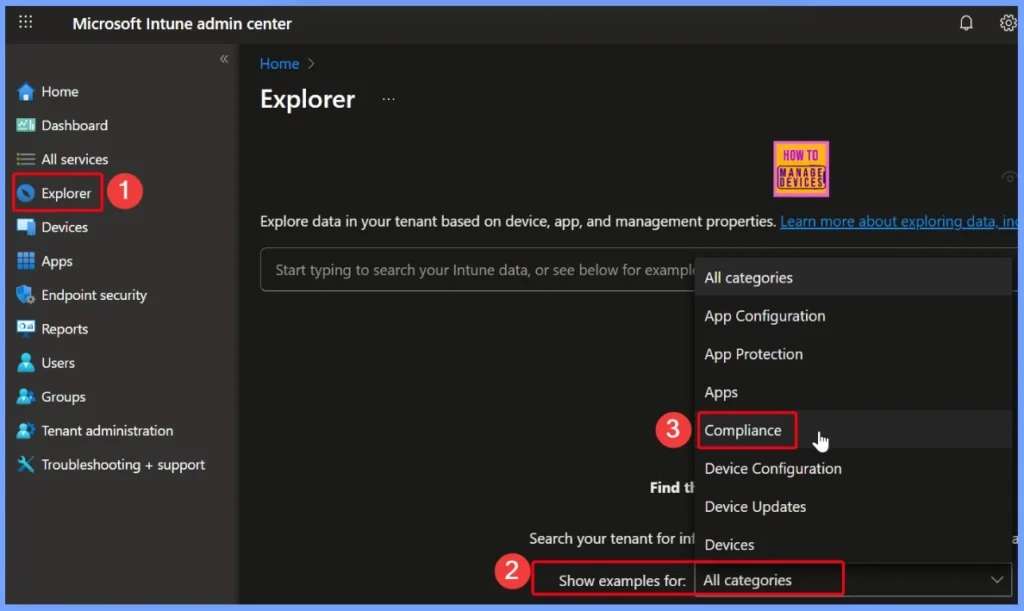
To get the list of noncompliant Windows devices with Intune and Security Copilot, first sign in to the Microsoft Intune admin center. From the left menu, select the Explorer tab. In the “Show examples for” section, choose Compliance from the available options. This will help you quickly find devices that are not meeting your organization’s compliance rules.
- How to use Intune Explorer with Security Copilot to Access Devices Users Apps Compliance and Update Details
- How to use Intune Explorer with Security Copilot to Find Windows and MacOS Device Data across your Tenant
- How to View Managed App Types Details with Intune Explorer and Security Copilot
Get Platform Devices that are Compliance State
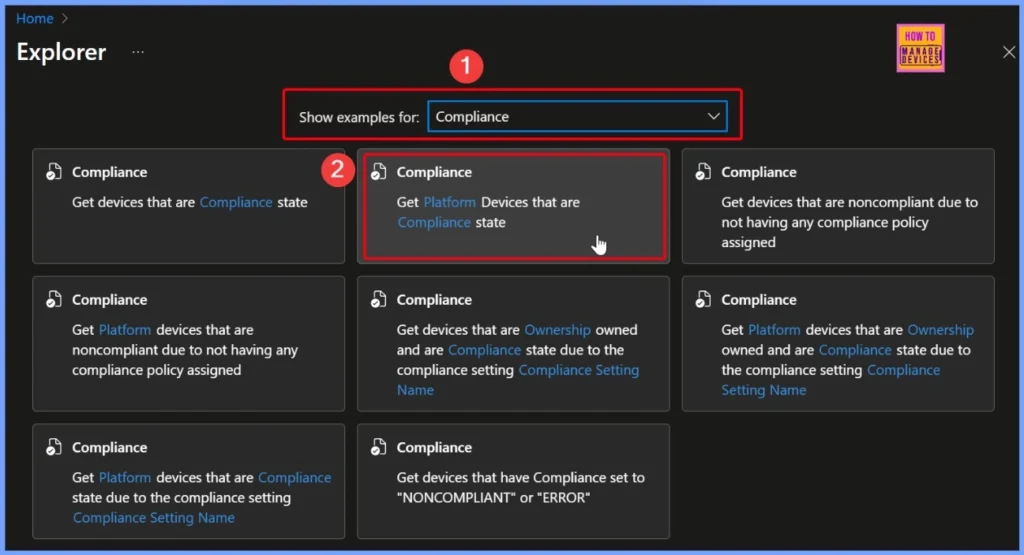
From the list of compliance settings queries, choose the second option: “Get platform devices that are Compliance state.” There are many other queries available that you can explore for different needs. To learn more, check out our post: How to use Intune Explorer with Security Copilot to Access Devices, Users, Apps, Compliance, and Update Details.
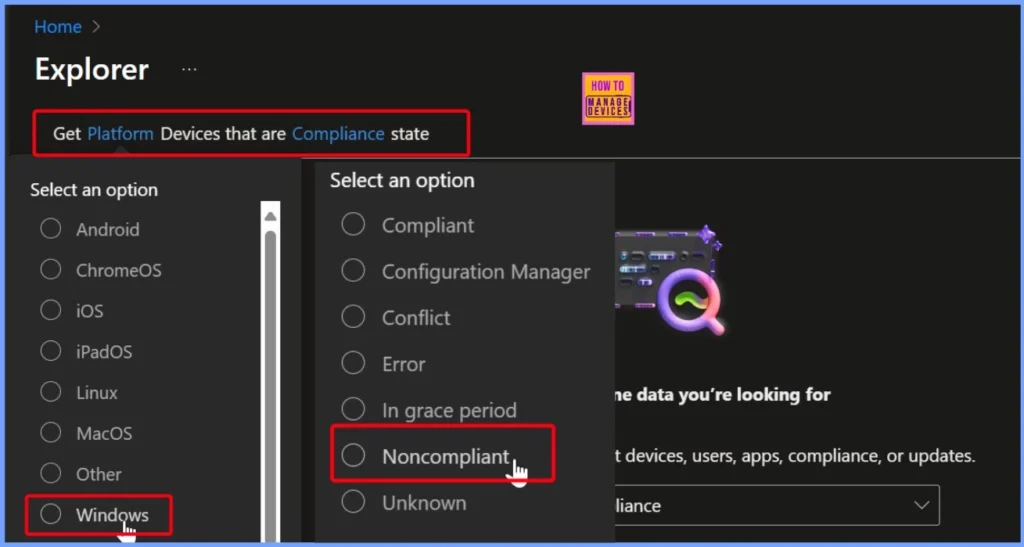
Selecting Required Fields in the Query – Platform and Compliance
In the query, some fields are required and are shown in blue highlights, such as Platform and Compliance. Here, I selected Windows as the platform and Noncompliant as the compliance state to get the list of devices that are not meeting the rules.
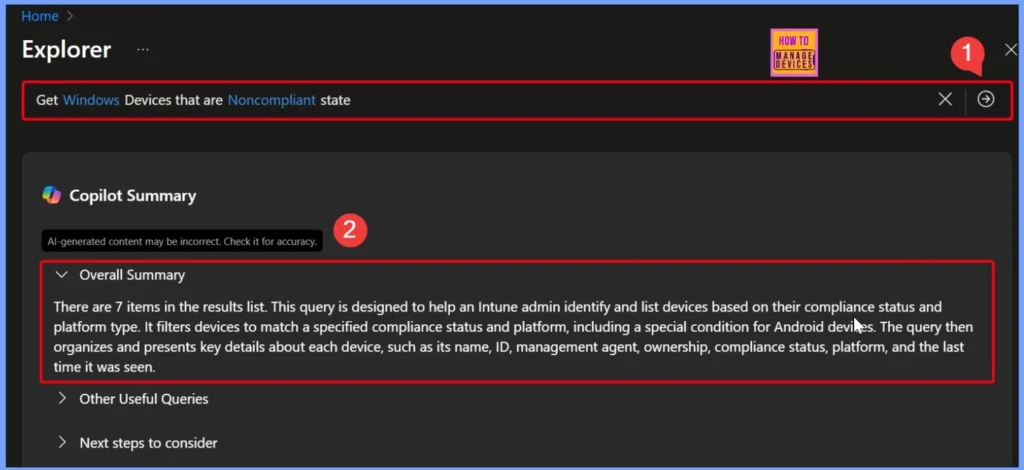
Running the Query to Retrieve Noncompliant Windows Devices and Results Overview
After filling in the required fields, the query is ready as “Get Windows devices that are noncompliant state.” Click the arrow next to the query, and Security Copilot will run it and show the results. In this case, there are 7 items in the results list.
This query helps Intune admins quickly identify devices based on their compliance status and platform. It filters devices to match the chosen compliance state and platform, and then displays important details such as device name, ID, management agent, ownership, compliance status, platform, and the last time the device was active.
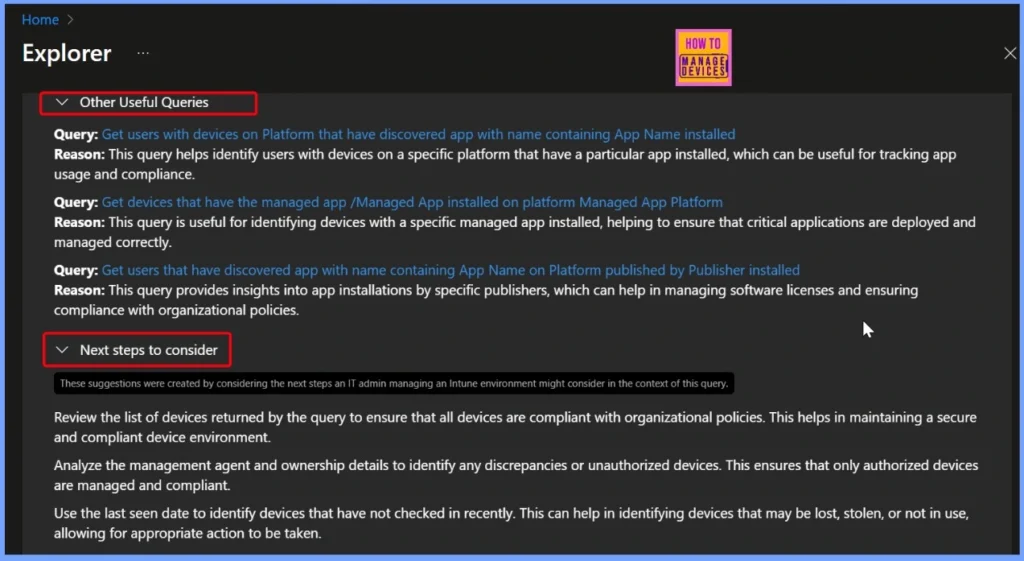
Other Useful Queries
Intune Explorer with Security Copilot provides powerful queries to track app usage and compliance. For example, you can get users with devices on a specific platform that have an app installed, helping identify who is using certain apps. Another query lets you find devices with a specific managed app installed, ensuring critical applications are deployed and managed properly.
- You can also get users with apps from a specific publisher installed on a platform, which helps manage licenses and maintain compliance with organisational policies.
| Other Useful Queries | Next steps to consider |
|---|---|
| Query: Get users with devices on Platform that have discovered app with name containing App Name installed Reason: This query helps identify users with devices on a specific platform that have a particular app installed, which can be useful for tracking app usage and compliance. | Review the list of devices returned by the query to ensure that all devices are compliant with organizational policies. This helps in maintaining a secure and compliant device environment. |
| Query: Get devices that have the managed app /Managed App installed on platform Managed App Platform Reason: This query is useful for identifying devices with a specific managed app installed, helping to ensure that critical applications are deployed and managed correctly. | Analyze the management agent and ownership details to identify any discrepancies or unauthorized devices. This ensures that only authorized devices are managed and compliant. |
| Query: Get users that have discovered app with name containing App Name on Platform published by Publisher installed Reason: This query provides insights into app installations by specific publishers, which can help in managing software licenses and ensuring compliance with organizational policies. | Use the last seen date to identify devices that have not checked in recently. This can help in identifying devices that may be lost, stolen, or not in use, allowing for appropriate action to be taken. |
End Results
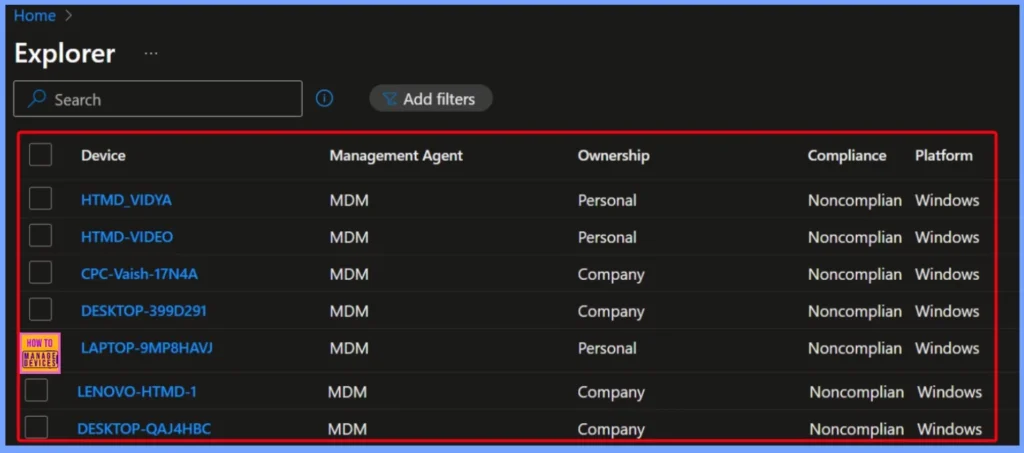
The end results show a list of devices along with key details such as device name, management agent, ownership, compliance status, platform, and last seen date/time. In this case, multiple devices including LENOVO-HTMD-1, LAPTOP-9MP8HAVJ, HTMD_VIDYA, HTMD-VIDEO, CPC-Vaish-17N4A, and DESKTOP-399D29are marked as Noncompliant.
| Device | Management Agent | Ownership | Compliance | Platform | Last seen date Time |
|---|---|---|---|---|---|
| LENOVO-HTMD-1 | MDM | Company | Noncompliant | Windows | 06/15/2025, 06:01 AM |
| LAPTOP-9MP8HAVJ | MDM | Personal | Noncompliant | Windows | 08/24/2025, 04:25 PM |
| HTMD_VIDYA | MDM | Personal | Noncompliant | Windows | 08/29/2025, 10:21 AM |
| HTMD-VIDEO | MDM | Personal | Noncompliant | Windows | 08/29/2025, 06:21 PM |
| CPC-Vaish-17N4A | MDM | Company | Noncompliant | Windows | 08/29/2025, 04:21 PM |
| DESKTOP-399D291 | MDM | Company | Noncompliant | Windows | 06/14/2025, 10:55 PM |
| DESKTOP-QAJ4HBC | MDM | Company | Noncompliant | Windows | 08/23/2025, 05:58 PM |
Need Further Assistance or Have Technical Questions?
Join the LinkedIn Page and Telegram group to get the latest step-by-step guides and news updates. Join our Meetup Page to participate in User group meetings. Also, join the WhatsApp Community to get the latest news on Microsoft Technologies. We are there on Reddit as well.
Author
Anoop C Nair has been Microsoft MVP for 10 consecutive years from 2015 onwards. He is a Workplace Solution Architect with more than 22+ years of experience in Workplace technologies. He is a Blogger, Speaker, and Local User Group Community leader. His primary focus is on Device Management technologies like SCCM and Intune. He writes about technologies like Intune, SCCM, Windows, Cloud PC, Windows, Entra, Microsoft Security, Career, etc.


Discussion