






How to Retrieve Windows Devices Marked as Personal in Intune Copilot Explorer
Let’s discuss how to Retrieve Windows Devices Marked as Personal in Intune Copilot Explorer. Copilot is Microsoft’s AI assistant built into many of its products such as Windows, Intune, Microsoft 365 apps, and Azure. It uses large language models (LLMs) and your organizational data to help you quickly query, summarize, or take action.
The “Get Windows devices that are Personal owned” query in Intune Copilot Explorer gives IT administrators instant visibility into all personal (BYOD) Windows devices enrolled in the tenant. Instead of manually go through reports admins can simply run this natural language query and quickly retrieve ownership details.
You can also learn how to use Intune Explorer with Security Copilot to quickly find Windows and MacOS device data across your tenant. This approach helps IT admins gain instant visibility into all enrolled devices, check their compliance status, and identify any unmanaged or non-compliant devices, enabling more efficient device management and security oversight.
In this post, you will find a complete guide on how to retrieve Windows devices marked as personal using Intune Copilot Explorer. From running the query to understanding the results, this post covers all the details IT admins need to quickly identify personal devices, ensure compliance, and manage BYOD security effectively across the organisation.

Table of Contents
Get Windows Devices that are Personal Owned
The query “Get Windows devices that are Personal owned” helps IT admins see all personal devices in one place. This way, they can check whether these devices are still following the company’s security rules, even if the rules are slightly different from corporate devices.
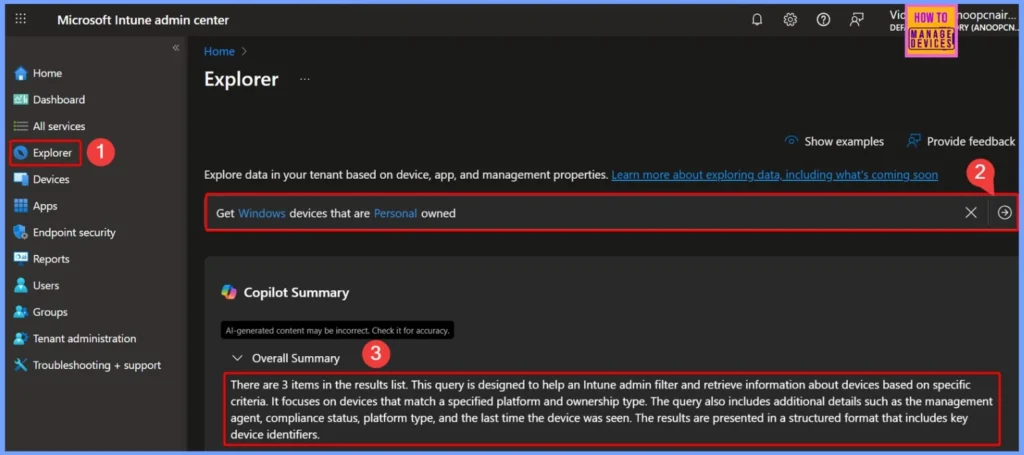
- Sign in to the Microsoft Intune Admin Center.
- On the left-hand side menu, select Explorer to open the tool.
- Enter the Prompt as Get Windows devices that are Personal owned
| Copilot Summary |
|---|
| There are 3 items in the results list. This query is designed to help an Intune admin filter and retrieve information about devices based on specific criteria. It focuses on devices that match a specified platform and ownership type. The query also includes additional details such as the management agent, compliance status, platform type, and the last time the device was seen. The results are presented in a structured format that includes key device identifiers. |
- How to use Intune Explorer with Security Copilot to Access Devices Users Apps Compliance and Update Details
- How to use Intune Explorer with Security Copilot to Find Windows and MacOS Device Data across your Tenant
- How to View Managed App Types Details with Intune Explorer and Security Copilot
- How to Get All Managed App Installation Results for User using Intune Explorer with Security Copilot
- How to Get Device Enrollment Details by User in Intune Explorer with Security Copilot
Next Steps to Consider
After running the query, review the list of devices to ensure they comply with your organization’s policies and identify any unmanaged or non-compliant devices. Use the device identifiers to cross-check with other Intune reports or logs for a complete view of device activities.
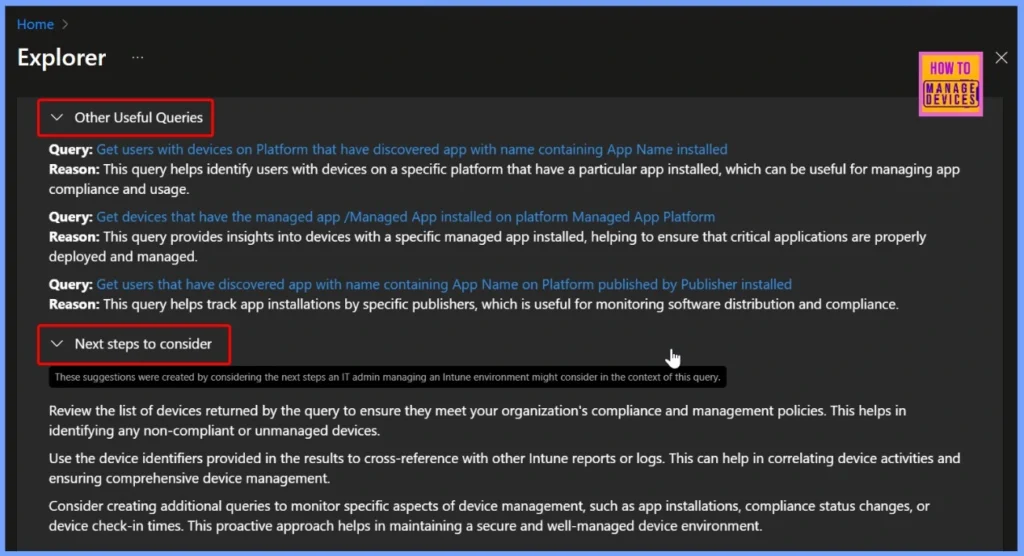
| Other Useful Queries | Next Steps to Consider |
|---|---|
| Query: Get users with devices on Platform that have discovered app with name containing App Name installed Reason: This query helps identify users with devices on a specific platform that have a particular app installed, which can be useful for managing app compliance and usage. Query: Get devices that have the managed app /Managed App installed on platform Managed App Platform Reason: This query provides insights into devices with a specific managed app installed, helping to ensure that critical applications are properly deployed and managed. Query: Get users that have discovered app with name containing App Name on Platform published by Publisher installed Reason: This query helps track app installations by specific publishers, which is useful for monitoring software distribution and compliance. | Review the list of devices returned by the query to ensure they meet your organization’s compliance and management policies. This helps in identifying any non-compliant or unmanaged devices. Use the device identifiers provided in the results to cross-reference with other Intune reports or logs. This can help in correlating device activities and ensuring comprehensive device management. Consider creating additional queries to monitor specific aspects of device management, such as app installations, compliance status changes, or device check-in times. This proactive approach helps in maintaining a secure and well-managed device environment. |
End Results
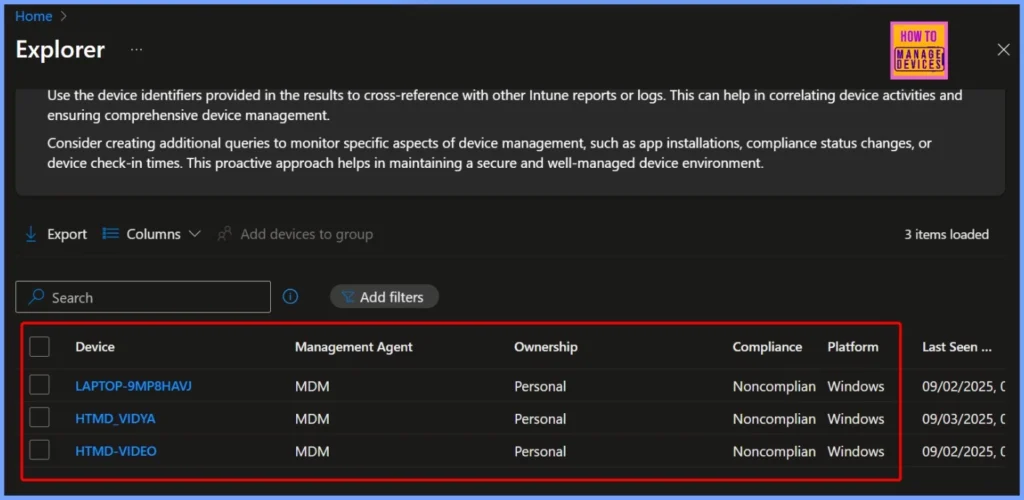
The query results show a list of personal Windows devices managed via MDM, including devices like LAPTOP-9MP8HAVJ, HTMD_VIDYA, and HTMD-VIDEO. All of these devices are marked as personal and are running Windows, but currently appear as non-compliant according to the organization’s compliance policies.
| Device | Management Agent | Ownership | Compliance | Platform |
|---|---|---|---|---|
| LAPTOP-9MP8HAVJ | MDM | Personal | Noncompliant | Windows |
| HTMD_VIDYA | MDM | Personal | Noncompliant | Windows |
| HTMD-VIDEO | MDM | Personal | Noncompliant | Windows |
Need Further Assistance or Have Technical Questions?
Join the LinkedIn Page and Telegram group to get the step-by-step guides and news updates. Join our Meetup Page to participate in User group meetings. Also, Join the WhatsApp Community to get the latest news on Microsoft Technologies. We are there on Reddit as well.
Author
Anoop C Nair has been Microsoft MVP for 10 consecutive years from 2015 onwards. He is a Workplace Solution Architect with more than 22+ years of experience in Workplace technologies. He is a Blogger, Speaker, and Local User Group Community leader. His primary focus is on Device Management technologies like SCCM and Intune. He writes about technologies like Intune, SCCM, Windows, Cloud PC, Windows, Entra, Microsoft Security, Career, etc.


Discussion