






Identify Non iOS General Device Configuration Policies with Intune Copilot Explorer
Let’s discuss how to Identify Non iOS General Device Configuration Policies with Intune Copilot Explorer. Using Intune Copilot Explorer, administrators can quickly identify device configuration policies that apply to platforms other than iOS. By filtering out iOS general profiles, the tool provides a focused view of configurations targeting Windows, Android, macOS, or other supported devices.
This query helps IT admins by showing only the device configuration policies that are important to their environment. This makes policy reviews cleaner, easier to track, and ensures that non-iOS policies are not missed. As a result, admins get better visibility, can troubleshoot faster, and make smarter decisions when managing different types of devices.
One of our posts explains how IT admins can use Intune Explorer together with Security Copilot to find iOS device features configuration policies. This helps admins quickly view and manage the settings that control iOS devices, making it easier to keep them secure and aligned with organizational requirements.
In this post, you will find details on how to identify device configuration policies that are not of the iOS general type using Intune Copilot Explorer. This helps admins focus on policies for other platforms like Windows, Android, and macOS, making it easier to review, manage, and troubleshoot settings across different devices.

Table of Contents
Identify Non iOS General Device Configuration Policies with Intune Copilot Explorer
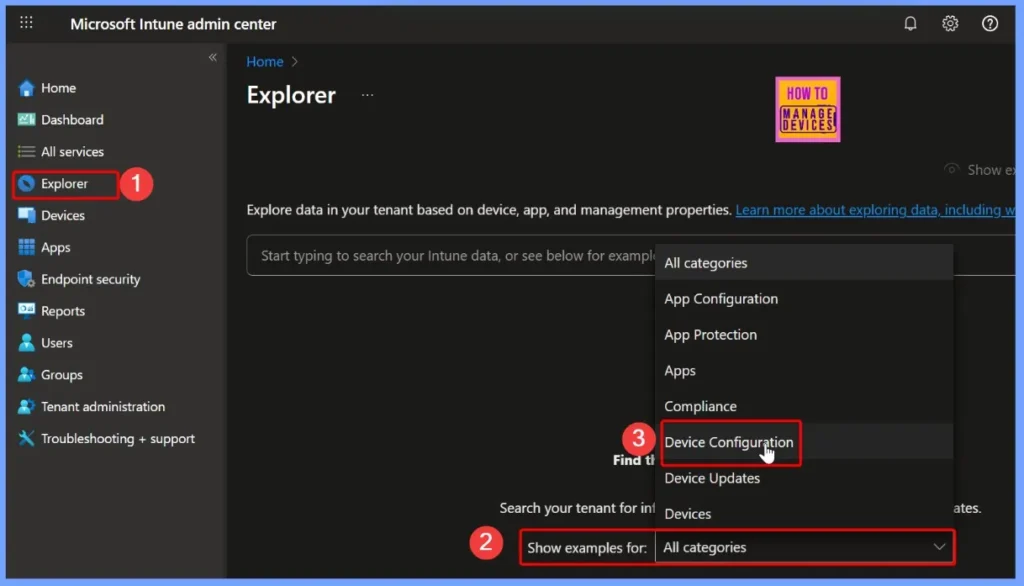
To identify non-iOS general device configuration policies with Intune Copilot Explorer, start by signing in to the Intune admin center. From there, open the Explorer tab on the left-hand menu and choose Device configuration as the category. This will allow you to filter and view the relevant policies more effectively.
- How to use Intune Explorer with Security Copilot to Access Devices Users Apps Compliance and Update Details
- How to use Intune Explorer with Security Copilot to Find Windows and MacOS Device Data across your Tenant
- How to View Managed App Types Details with Intune Explorer and Security Copilot
- How to Get All Managed App Installation Results for User using Intune Explorer with Security Copilot
- How to Get Device Enrollment Details by User in Intune Explorer with Security Copilot
Filtering Device Configuration Policies by Excluding Specific Policy Types in Intune
This query is used to filter and retrieve device configuration policies that do not match a specific policy type in Intune. It helps IT admins narrow down their search and focus on only the policies that are relevant to their task.
- Select the query “Get device configuration policies that are not of the type device configuration policy type name” under Device Configuration.
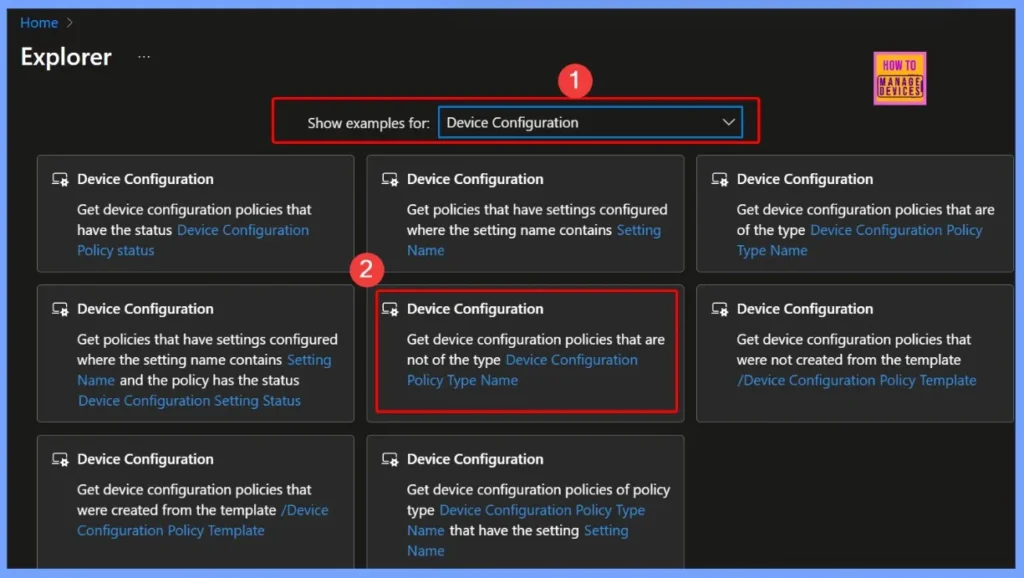
Selecting Device Configuration Policy Type Name in Intune Copilot Explorer
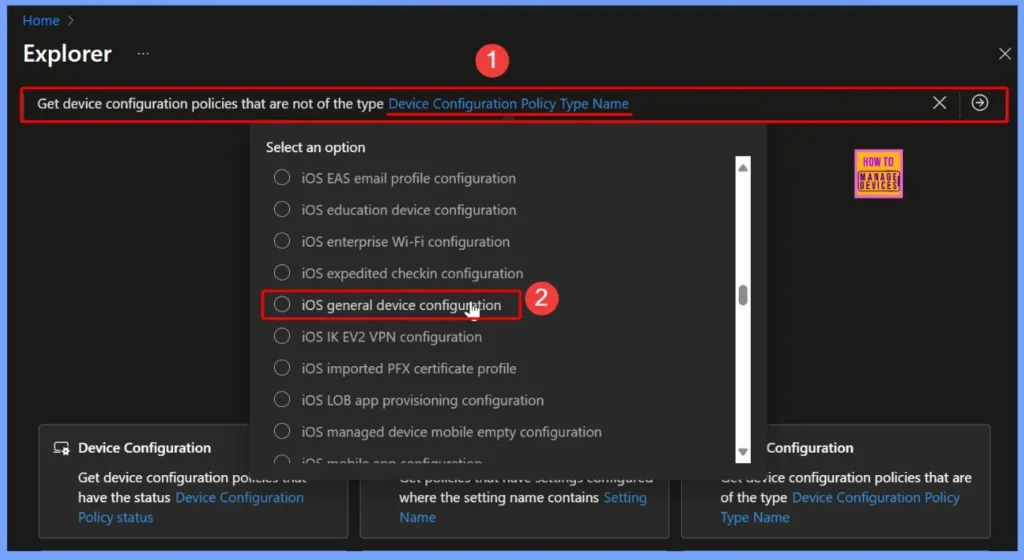
In this query, the Device configuration policy type name field is a required input. For this example, the option iOS general device configuration is selected to filter results. This ensures that only non-iOS general configuration policies are displayed. The screenshot below provides a clearer view of the selection and its details.
Viewing Query Results for Device Configuration Policies in Intune Copilot Explorer
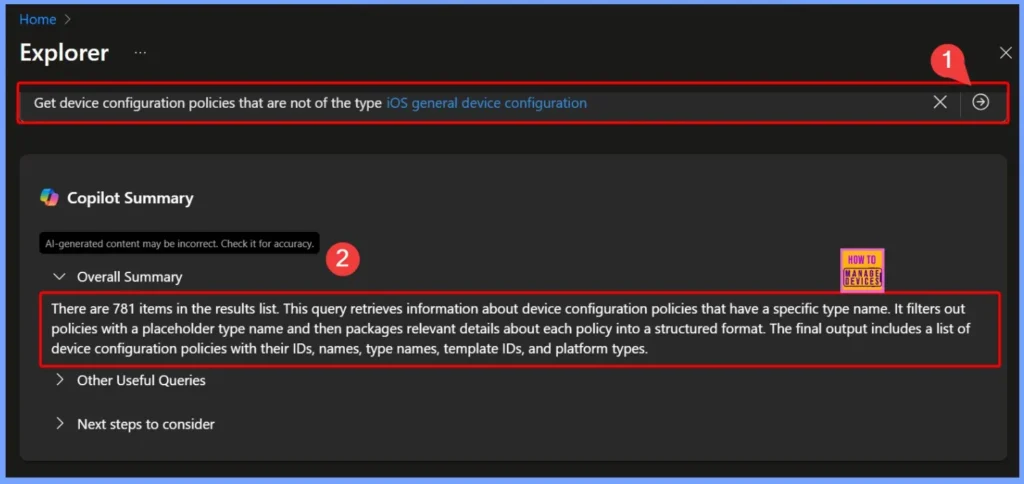
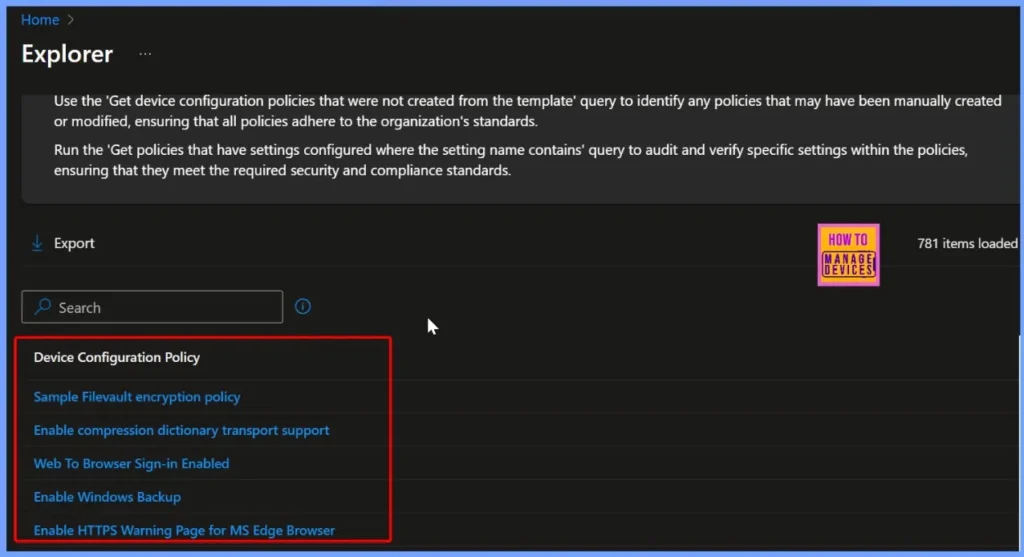
Once the query is filled, click the arrow next to it and Copilot will show the results. In this case, it returned 781 items. The query works by finding device configuration policies with the selected type name and leaving out those with a placeholder type.
The results are then organized into a clear list that includes useful details such as the policy ID, name, type name, template ID, and platform type. This makes it easier for admins to review and understand the policies in their environment.
- Simple Way to Add iOS to Apple Business Manager and Manage in Intune – Part 2
- Simple Way to Add iOS to Apple Business Manager and Manage in Intune Part 3
- How to Get All Managed App Installation Results for User using Intune Explorer with Security Copilot
- How to Get Device Enrollment Details by User in Intune Explorer with Security Copilot
Using Queries to Track Policy Settings and Status in Intune
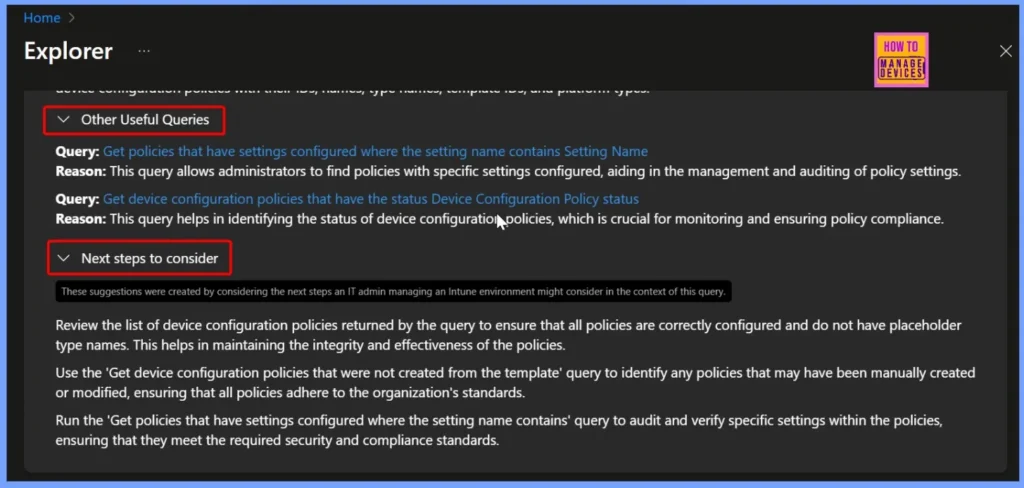
These queries make it easier for administrators to manage and audit device configuration policies. By searching for policies that contain a specific setting name, admins can quickly locate and review configurations tied to that setting.
| Other Useful Queries | Next steps to consider |
|---|---|
| Query: Get policies that have settings configured where the setting name contains Setting Name Reason: This query allows administrators to find policies with specific settings configured, aiding in the management and auditing of policy settings. Query: Get device configuration policies that have the status Device Configuration Policy status Reason: This query helps in identifying the status of device configuration policies, which is crucial for monitoring and ensuring policy compliance. | Review the list of device configuration policies returned by the query to ensure that all policies are correctly configured and do not have placeholder type names. This helps in maintaining the integrity and effectiveness of the policies. Use the ‘Get device configuration policies that were not created from the template‘ query to identify any policies that may have been manually created or modified, ensuring that all policies adhere to the organization’s standards. Run the ‘Get policies that have settings configured where the setting name contains‘ query to audit and verify specific settings within the policies, ensuring that they meet the required security and compliance standards. |
End Results
The query returned 781 results, listing device configuration policies with a specific type name. The table and screenshots below give more details, showing the set of policies that are not related to iOS. This makes it easier to review and understand the configurations applied to other platforms.
Need Further Assistance or Have Technical Questions?
Join the LinkedIn Page and Telegram group to get the latest step-by-step guides and news updates. Join our Meetup Page to participate in User group meetings. Also, Join the WhatsApp Community to get the latest news on Microsoft Technologies. We are there on Reddit as well.
Author
Anoop C Nair has been Microsoft MVP from 2015 onwards for 10 consecutive years! He is a Workplace Solution Architect with more than 22+ years of experience in Workplace technologies. He is also a Blogger, Speaker, and Local User Group Community leader. His primary focus is on Device Management technologies like SCCM and Intune. He writes about technologies like Intune, SCCM, Windows, Cloud PC, Windows, Entra, Microsoft Security, Career, etc.


Discussion