






Steps to Identify Windows Devices with Specific OS Version using Intune Copilot Explorer
Let’s discuss the Steps to Identify Windows Devices with Specific OS Version using Intune Copilot Explorer. You can easily use Intune Copilot Explorer to find Windows devices that have a specific version of the operating system.
Microsoft Intune is a tool that helps manage devices across an organisation, and Copilot Explorer enables you to search and filter devices based on various settings. By using this feature, you can quickly see which devices are running a particular version of Windows without having to check each device one by one.
You will find detailed steps on how to track Windows OS version and build details using the Intune Inventory Policy. This policy helps you collect important information about devices in your organization, such as the exact version and build of the Windows operating system they are running.
By setting up and using inventory feature in Intune, you can easily monitor device configurations, ensure compliance, and plan updates or troubleshooting more effectively. In this post, you will get all the details of the steps to identify Windows devices with a specific OS version using Intune Copilot Explorer.

Table of Contents
Steps to Identify Windows Devices with Specific OS Version using Intune Copilot Explorer
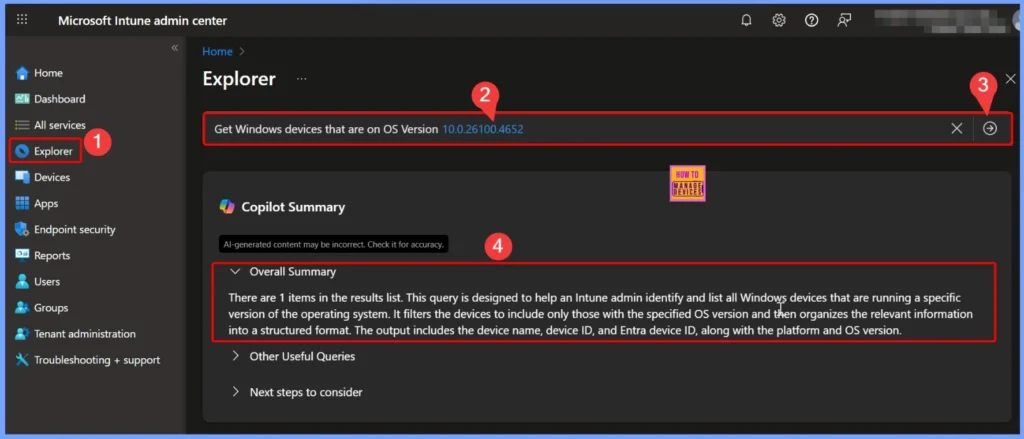
To identify devices with a specific OS version, first open the Microsoft Intune admin center and access the Copilot Explorer from the left-hand menu. In the search or query section, you can enter the Prompt you are looking for, such as “Get Windows devices that are on OS Version”.
- This will allow you to filter and view only those devices that match the OS version you want to check, making it easier to manage and monitor them.
- Here, in the Get Windows devices that are on OS version prompt, the OS Version field is required to be filled.
- In this example, I have selected the latest version, which is 10.0.26100.4652 – Windows 11 version 24H2.
- This allows the tool to filter and display only those devices that are running this specific version of Windows, helping to easily track and manage devices with the latest updates.
| Copilot Results |
|---|
| There are 1 items in the results list. This query is designed to help an Intune admin identify and list all Windows devices that are running a specific version of the operating system. It filters the devices to include only those with the specified OS version and then organizes the relevant information into a structured format. The output includes the device name, device ID, and Entra device ID, along with the platform and OS version. |
- How to use Intune Explorer with Security Copilot to Access Devices Users Apps Compliance and Update Details
- How to use Intune Explorer with Security Copilot to Find Windows and MacOS Device Data across your Tenant
Useful Queries and Next Steps
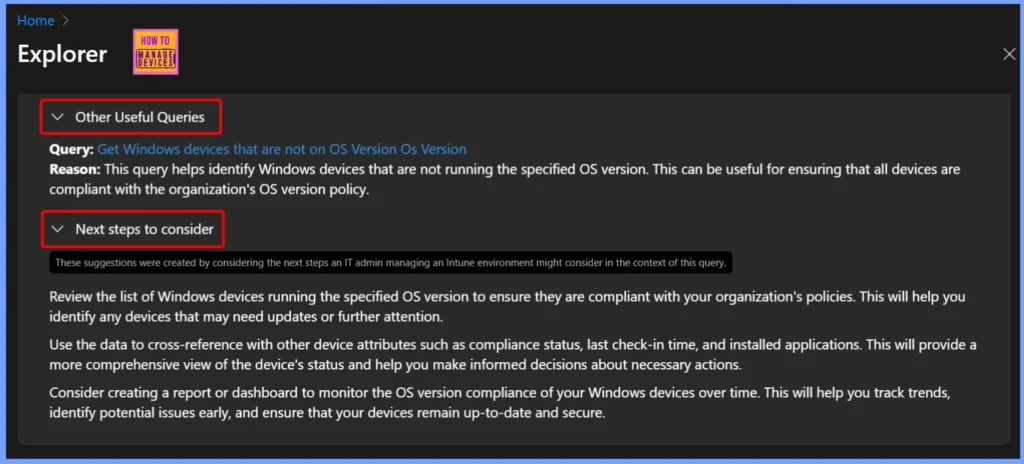
This query “Get Windows Devices That Are Not on OS Version” helps identify Windows devices that are not running the specified OS version. It is useful for ensuring that all devices remain compliant with the organization’s OS version policy. By spotting devices with outdated or unsupported versions, IT teams can take necessary steps to update them and maintain security, stability, and overall performance across the network.
| Next steps to consider |
|---|
| Review the list of Windows devices running the specified OS version to ensure they are compliant with your organization’s policies. This will help you identify any devices that may need updates or further attention. Use the data to cross-reference with other device attributes such as compliance status, last check-in time, and installed applications. This will provide a more comprehensive view of the device’s status and help you make informed decisions about necessary actions. Consider creating a report or dashboard to monitor the OS version compliance of your Windows devices over time. This will help you track trends, identify potential issues early, and ensure that your devices remain up-to-date and secure. |
- How to View Managed App Types Details with Intune Explorer and Security Copilot
- How to Get All Managed App Installation Results for User using Intune Explorer with Security Copilot
- How to Get Device Enrollment Details by User in Intune Explorer with Security Copilot
End Results – Windows Device with Specific OS Version
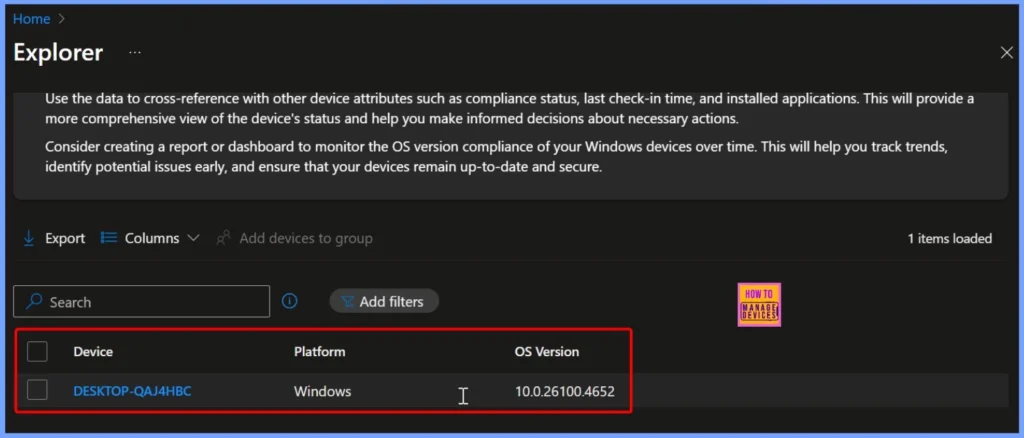
This result shows a device that matches the specified OS version query. The device name is DESKTOP-QAJ4HBC, it’s running on the Windows platform, and the OS version is 10.0.26100.4652, which corresponds to the latest Windows 11 version 24H2. Such results help IT teams quickly verify which devices are up to date and compliant with the organization’s OS version requirements.
| Device | Platform | OS Version |
|---|---|---|
| DESKTOP-QAJ4HBC | Windows | 10.0.26100.4652 |
Need Further Assistance or Have Technical Questions?
Join the LinkedIn Page and Telegram group to get the latest step-by-step guides and news updates. Join our Meetup Page to participate in User group meetings. Also, join the WhatsApp Community to get the latest news on Microsoft Technologies. We are there on Reddit as well.
Author
Anoop C Nair has been Microsoft MVP for 10 consecutive years from 2015 onwards. He is a Workplace Solution Architect with more than 22+ years of experience in Workplace technologies. He is a Blogger, Speaker, and Local User Group Community leader. His primary focus is on Device Management technologies like SCCM and Intune. He writes about technologies like Intune, SCCM, Windows, Cloud PC, Windows, Entra, Microsoft Security, Career, etc.


Discussion