






How to Fix Azureedge.net Certificate Expiration Impacting NuGet and Autopilot
Let’s discuss How to Fix Azureedge.net Certificate Expiration Impacting NuGet and Autopilot. Microsoft Intune Support Team confirmed an issue occurred on SSL certificate for Azureedge.net, which is expired on September 9, 2025.
Due to this issue, NuGet provider failed, which in turn broke the Autopilot provisioning process in Microsoft Intune environments. There are many other root causes are reasons for the Azureedge.net Certificate Expiration.
As you know, azureedge.net is a content delivery network (CDN) domain used by Microsoft Azure to distribute static assets, packages, and updates efficiently across global endpoints. The contents delivered by azureedge.net are scripts, installers, and configuration files for services such as NuGet, Autopilot, and .NET.
Azureedge.net is tied to SSL certificates; any expiration or misconfiguration (like zureedge.net Certificate Expiration Impacting NuGet and Autopilot) can break provisioning workflows that rely on secure downloads.


Table of Contents
How to Fix Azureedge.net Certificate Expiration Impacting NuGet and Autopilot
Microsoft did not renew or rotate the certificate proactively. In June 2025 and earlier, similar certificate lapses were reported. Community feedback suggests there’s no automated tracking or alerting for certificate expiry across critical CDN endpoints.
- How to Fix Intune Autopilot Hardware Hash Null-Valued Expression Error
- Troubleshoot and Fix Issue in Duplicate Device Records in Entra ID During Autopilot Hybrid Join
- How to Resolve Error 0x80070017 on Autopilot Device Setup in Intune
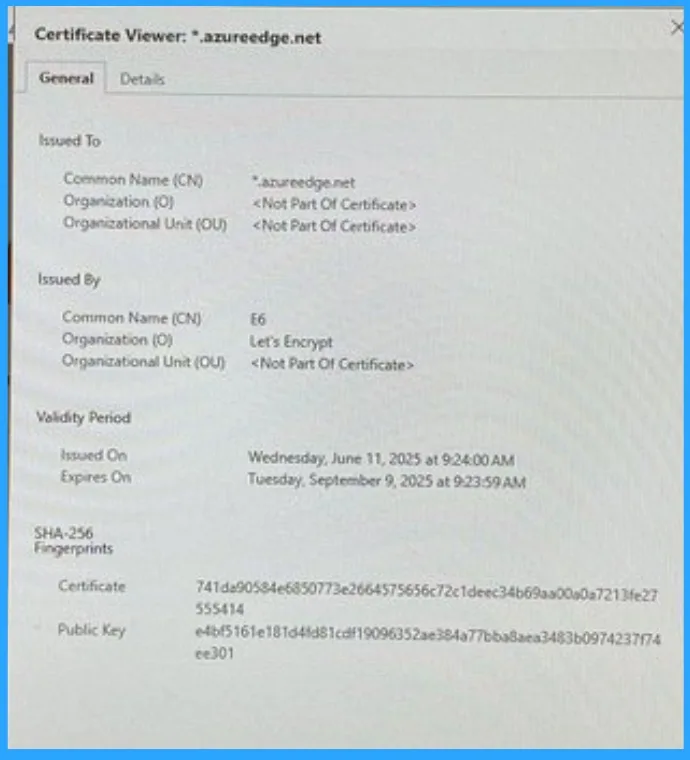
Reasons of Azureedge.net Certificate Expiration
As mentioned, there are many reasons causing the expiration of Azureedge.net Certificate. PowerShell’s NuGet provider relies on this domain to fetch packages during Autopilot provisioning.
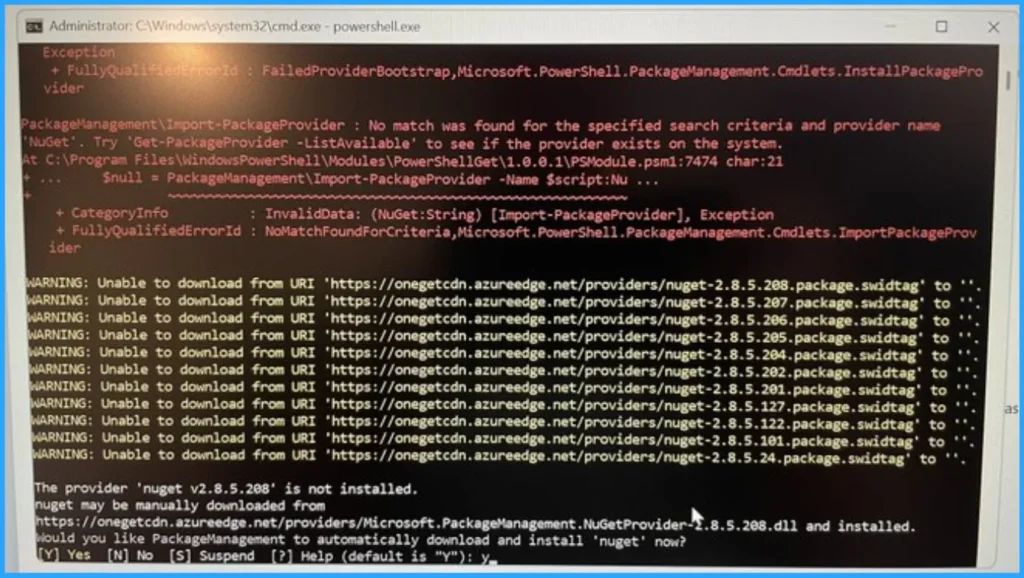
After Effects of Azureedge.net Certificate Expiration
NuGet provider couldn’t be downloaded securely, so autopilot provisioning failed. Admins encountered TLS/SSL validation errors when running scripts that depend on NuGet. The table below shows other effects.
| After Effects | Details |
|---|---|
| Operational Delays | Due to this issue, delays on deploying new devices |
| Security Workarounds | Some admins resorted to bypassing certificate validation using PowerShell callbacks introducing temporary security risks. |
Workaround for this Issue
Microsoft is monitoring this issue and working on a final resolution. Keep an eye on the Azure status page or relevant Microsoft forums and blogs for an official update and confirmation of the fix.
However, you can try some temporary fixes to resolve this issue. If you need to complete the Autopilot process immediately, the most effective solution is to temporarily bypass the certificate validation in your PowerShell script. This allows the NuGet provider to be downloaded and installed successfully.
[System.Net.ServicePointManager]::ServerCertificateValidationCallback = {$true}
Install-PackageProvider -Name NuGet -Force
Need Further Assistance or Have Technical Questions?
Join the LinkedIn Page and Telegram group to get the step-by-step guides and news updates. Join our Meetup Page to participate in User group meetings. Also, Join the WhatsApp Community to get the latest news on Microsoft Technologies. We are there on Reddit as well.
Author
Anoop C Nair has been Microsoft MVP for 10 consecutive years from 2015 onwards. He is a Workplace Solution Architect with more than 22+ years of experience in Workplace technologies. He is a Blogger, Speaker, and Local User Group Community leader. His primary focus is on Device Management technologies like SCCM and Intune. He writes about technologies like Intune, SCCM, Windows, Cloud PC, Windows, Entra, Microsoft Security, Career, etc.


Discussion