






Retrieve macOS Microsoft Defender App ID Publisher and Last Modified Date using Intune Copilot Explorer
Let’s discuss how to Retrieve macOS Microsoft Defender App ID Publisher Platform Assignment and Last Modified Date using Intune Copilot Explorer. The Microsoft Defender app for macOS is a security tool that helps keep Mac computers safe from online threats. It is part of the Microsoft Defender for Endpoint suite.
It offers protection against viruses, malware, and harmful websites. With real-time threat detection and strong security features, it helps ensure that Macs stay protected in today’s workplaces. When IT admins get the macOS Microsoft Defender app details from Intune, the results give them important information such as app version, publisher, platform, and assignment status.
The macOS Microsoft Defender app results help IT admins by making it easy to check whether the app is installed and running on managed Macs. They can also verify the app version to ensure devices are always updated with the latest security features.
In addition, admins can monitor deployment and assignment status to confirm that security policies are applied correctly across all devices. For organizations, the macOS Microsoft Defender app ensures that all Mac devices stay compliant with security standards. It helps reduce the risk of malware, phishing, and other cyber threats while providing teams with clear visibility and centralized control over device security.

Table of Contents
Retrieve macOS Microsoft Defender App ID Publisher and Last Modified Date using Intune Copilot Explorer
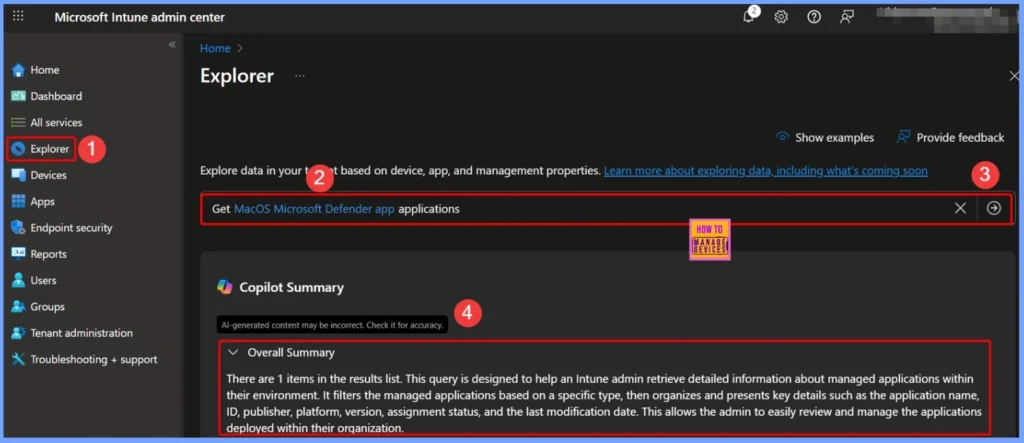
To view details of the macOS Microsoft Defender applications, start by signing in to the Intune admin center. From there, open the Explorer tab on the left-hand menu. In the query box, enter “macOS Microsoft Defender app applications” and then select the arrow next to the query. Copilot will process the request and display the application details for you.
| Copilot Summary Results |
|---|
| There are 1 items in the results list. This query is designed to help an Intune admin retrieve detailed information about managed applications within their environment. It filters the managed applications based on a specific type, then organizes and presents key details such as the application name, ID, publisher, platform, version, assignment status, and the last modification date. This allows the admin to easily review and manage the applications deployed within their organization. |
- How to Access macOS Edge App Name ID Publisher Platform Version Assignment and Modification Date Details in Intune Copilot Explorer
- Get macOS DMG Applications using Intune Copilot Explorer
- Fix macOS Error 100001 SSO Error while using Intune
- How to use Intune Explorer with Security Copilot to Find Windows and MacOS Device Data across your Tenant
Other Important Queries and What is the Next Step
Updating Microsoft Defender for Endpoint on macOS is important to ensure devices stay protected with the latest security improvements, bug fixes, and new features. Microsoft releases regular updates to keep the app reliable and secure.
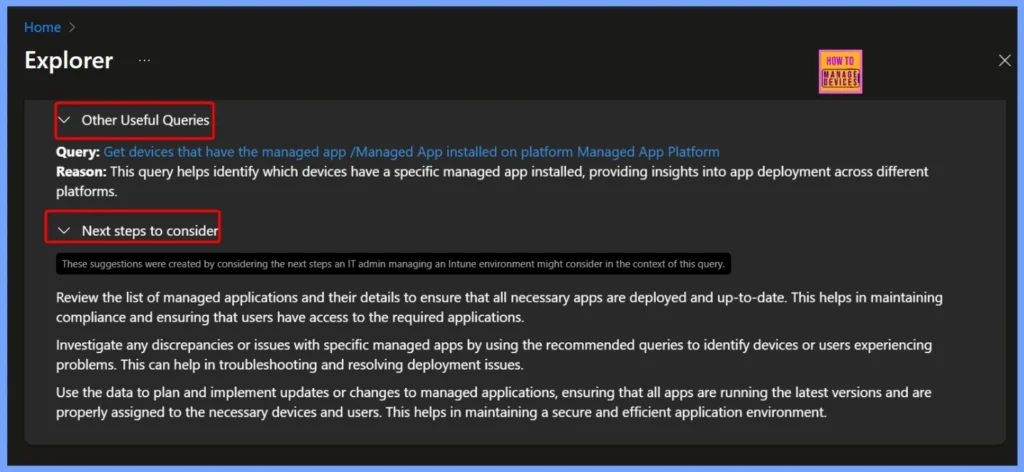
| Other Useful Queries | Next steps to consider |
|---|---|
| Query: Get devices that have the managed app /Managed App installed on platform Managed App Platform Reason: This query helps identify which devices have a specific managed app installed, providing insights into app deployment across different platforms. | Review the list of managed applications and their details to ensure that all necessary apps are deployed and up-to-date. This helps in maintaining compliance and ensuring that users have access to the required applications. Investigate any discrepancies or issues with specific managed apps by using the recommended queries to identify devices or users experiencing problems. This can help in troubleshooting and resolving deployment issues. Use the data to plan and implement updates or changes to managed applications, ensuring that all apps are running the latest versions and are properly assigned to the necessary devices and users. This helps in maintaining a secure and efficient application environment. |
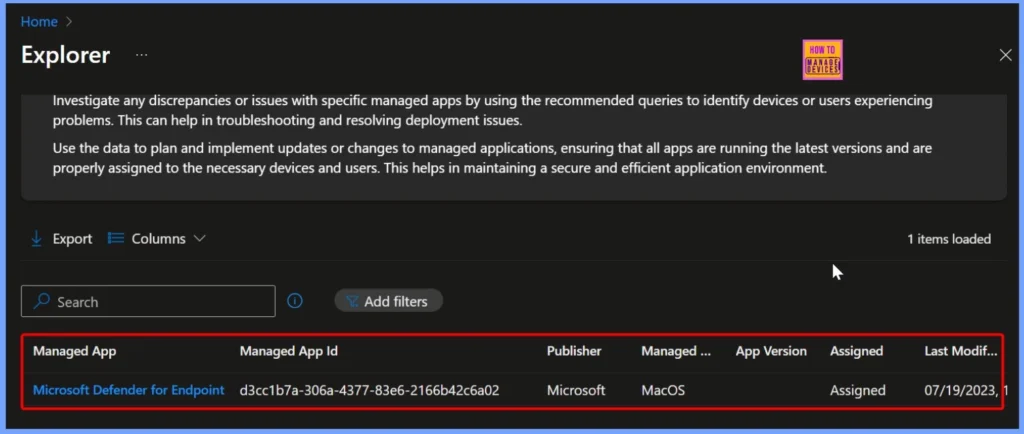
Get macOS Microsoft Defender Applications – End Result
When you run the query to get macOS Microsoft Defender app applications in Intune, the results display key details about the managed app. This includes the application name, publisher, managed app ID, platform (macOS), version, assignment status, and the last modified date. The below shows more details.
| Managed App | Managed App ID | Publisher | Managed App Platform | Assigned | Last Modification Date |
|---|---|---|---|---|---|
| Microsoft Defender for Endpoint (macOS) | d3cc1b7a-306a-4377-83e6-2166b42c6a02 | Microsoft | MacOS | Assigned | 07/19/2023, 12:36 AM |
Need Further Assistance or Have Technical Questions?
Join the LinkedIn Page and Telegram group to get the latest step-by-step guides and news updates. Join our Meetup Page to participate in User group meetings. Also, Join the WhatsApp Community to get the latest news on Microsoft Technologies. We are there on Reddit as well.
Author
Anoop C Nair has been Microsoft MVP from 2015 onwards for 10 consecutive years! He is a Workplace Solution Architect with more than 22+ years of experience in Workplace technologies. He is also a Blogger, Speaker, and Local User Group Community leader. His primary focus is on Device Management technologies like SCCM and Intune. He writes about technologies like Intune, SCCM, Windows, Cloud PC, Windows, Entra, Microsoft Security, Career, etc.


Discussion