






How to Fix Conditional Access Misconfiguration Causing Edge Authentication Loop in Intune
Let’s discuss How to Fix Conditional Access Misconfiguration Causing Edge Authentication Loop in Intune. Admins facing issue with an Azure AD Conditional Access Policy that seems to be causing a loop when users access Office 365 resources using Microsoft Edge on Windows 11 24H2 BYOD devices.
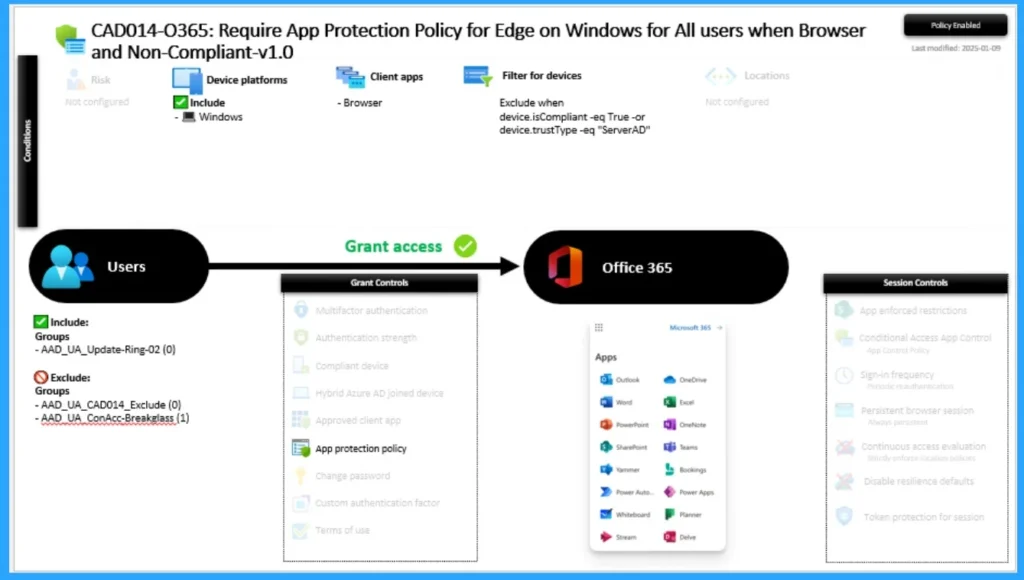
The policy is titled “Require App Protection Policy for Edge on Windows for All Users when Browser and Non-Compliant-v1.0” and continuously prompts users to switch profiles in Edge. These devices are BYOD and intentionally excluded from full Intune management (non-compliant by design).
However, Edge repeatedly requests authentication or profile switching, creating a frustrating experience. Admin applied this policy to Windows devices using browsers (primarily Edge) and includes Office 365 applications. Admin excluded Compliant devices or those with trustType = ServerAD.
To fix the issue admins tried several methods but the issue is not resolved yet. Admin confused that, could this be an issue with how Edge handles profile authentication in Conditional Access scenarios? In this blog post, i will help you to resolve the issue.


Table of Contents
How to Fix Conditional Access Misconfiguration Causing Edge Authentication Loop in Intune
With this issue, admins goal is to secure access using App Protection Policies (MAM) for BYOD scenarios without requiring full device enrollment in Intune. As mentioned above admins tried several resolution methods. The table below shows the methods tried by Admin.
| Methods |
|---|
| With this issue, admins goal is to secure access using App Protection Policies (MAM) for BYOD scenarios without requiring full device enrollment in Intune. |
| Checked Azure AD Sign-In Logs for errors or repetitive authentications. |
| Cleared Edge browser cache and cookies. |
| Ensured Edge is configured to use Windows sign-in information. |
| Adjusted the App Protection Policy settings for Edge. |
- Prevent Unauthorized Access By Configuring Screen Saver Lock Timing Using Intune Policy
- How to use Microsoft Entra Conditional Access in Edge for Business to Restrict Access to Compliant Devices
- How to Enable Token Protection in Entra Conditional Access for Windows App to Secure AVD and Windows 365
- How to use Entra Require App Protection Policy in Conditional Access for Secure Access
Causes of the Issue
There are different causes are reasons for the issue. Edge may be unable to persist the correct work profile when switching between personal and corporate contexts. This leads to repeated prompts to switch profiles or re-authenticate, especially when Conditional Access policies require App Protection.
How to Fix Issue
You can follow several methods like Compliance verification steps, Edge browser configuration, Sign-in log analysis. App Protection Policy adjustments etc to resolve this issue. The following are the other methods.
Use Report-Only Mode First
Set the Conditional Access policy to Report-only mode to monitor impact before enforcing. This helps identify which users or devices are triggering the loop without blocking access.
Refine Policy Filters and Assignments
Exclude BYOD user groups explicitly from the policy. Use device filters to better target unmanaged devices without triggering MDM enrollment. Consider segmenting policies by device trust type or registration status.
Need Further Assistance or Have Technical Questions?
Join the LinkedIn Page and Telegram group to get the latest step-by-step guides and news updates. Join our Meetup Page to participate in User group meetings. Also, Join the WhatsApp Community to get the latest news on Microsoft Technologies. We are there on Reddit as well.
Author
Anoop C Nair has been Microsoft MVP for 10 consecutive years from 2015 onwards. He is a Workplace Solution Architect with more than 22+ years of experience in Workplace technologies. He is a Blogger, Speaker, and Local User Group Community leader. His primary focus is on Device Management technologies like SCCM and Intune. He writes about technologies like Intune, SCCM, Windows, Cloud PC, Windows, Entra, Microsoft Security, Career, etc.


Discussion