Skip to content
Fix Connection Point Server Status Changed to Disconnected in SCCM Admin Console

Fix Connection Point Server Status Changed to Disconnected in SCCM Admin Console

Written By Anoop C Nair
Last Updated October 2, 2025
Posted In SCCM
SHARE

Let’s discuss Fix Connection Point Server Status Changed to Disconnected in SCCM Admin Console. Some SCCM beginners reporting an issue which s faced on SCCM Admin Console. The connection status is changed to disconnected.

Due to this issue, the SCCM Admin Console shows error messages. The environment includes three on-prem hosts: SCCMMEM, SCCMDP01, and SCCMDP02, all of which can ping each other and access the internet. No immediate operational impact observed.

User cannot know the time of disconnection. As a beginner in SCCM he is Unclear when the status changed and also user cannot know the exact reason of the issue. But Suspected root causes are Expired CMG (Cloud Management Gateway) certificate and DNS resolution failure for CMG address.

There are some other causes are also reasoning for Connection Point Server Status Changed to Disconnected. Service Principal credentials used for Azure integration may have expired or become invalid, disrupting authentication.

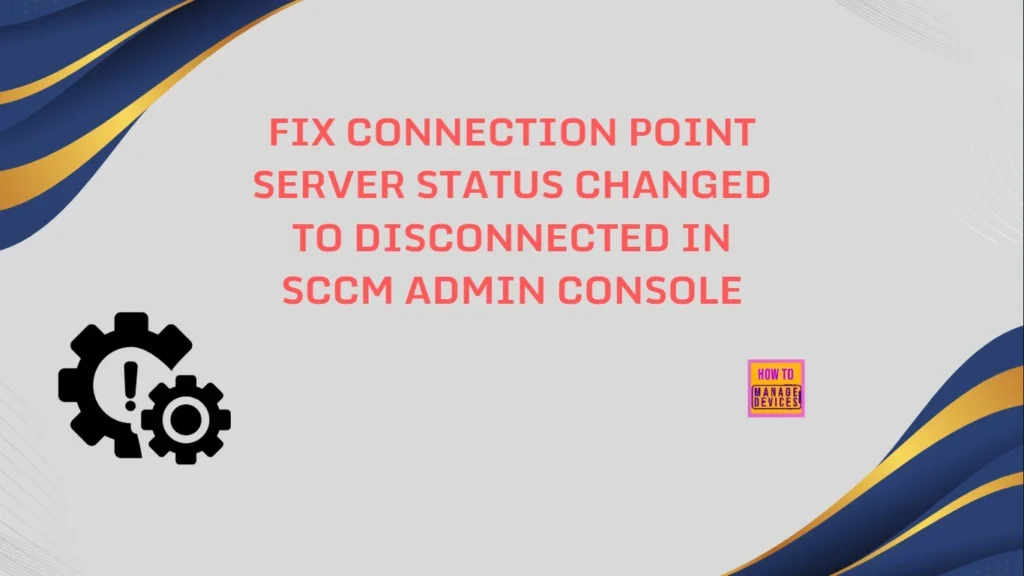
Patch My PC
Fix Connection Point Server Status Changed to Disconnected in SCCM Admin Console - Fig.1
Fix Connection Point Server Status Changed to Disconnected in SCCM Admin Console – Fig.1

Fix Connection Point Server Status Changed to Disconnected in SCCM Admin Console

Due to this issue user face many inconveniences. Loss of Cloud Management Capabilities. Devices relying on CMG for policy updates or remote actions may stop receiving instructions. Other after effects are shown on the table below.

After effectsDetails
Failed Client CommunicationRemote or internet-based clients may fail to check in, affecting compliance and reporting.
Delayed Troubleshooting or EscalationWithout clear alerts, admins might overlook the issue until users report degraded service.
Fix Connection Point Server Status Changed to Disconnected in SCCM Admin Console – Table.1
Fix Connection Point Server Status Changed to Disconnected in SCCM Admin Console - Fig.2 - Creds to MS
Fix Connection Point Server Status Changed to Disconnected in SCCM Admin Console – Fig.2 – Creds to MS

How can We Avoid this Issue

Mainly, Admins Monitor CMG Certificate Lifecycle. Set up alerts for certificate expiration in Azure. Use Azure Key Vault or a centralized certificate management tool to track renewal dates. Automate renewal if possible, or schedule manual renewal well before expiry.
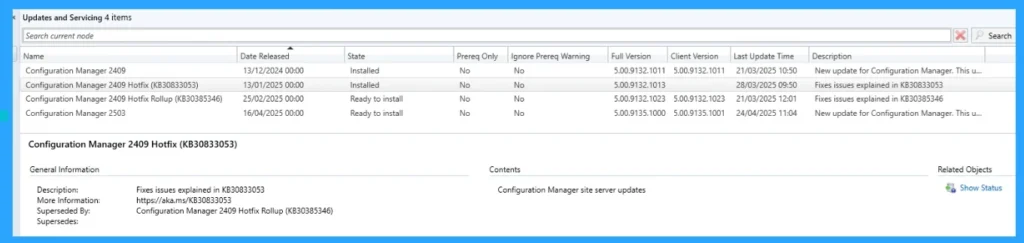
Fix Connection Point Server Status Changed to Disconnected in SCCM Admin Console - Fig.2 - Creds to MS - Creds to MS
Fix Connection Point Server Status Changed to Disconnected in SCCM Admin Console – Fig.3

Resolution Steps

Some Troubleshooting steps are suggested from a Microsoft Certified Trainer which is given here. Check certificate validity in the Azure portal. Test-Net Connection FQDN -Port 443 to verify connectivity. Ensure Service Principal credentials haven’t expired.
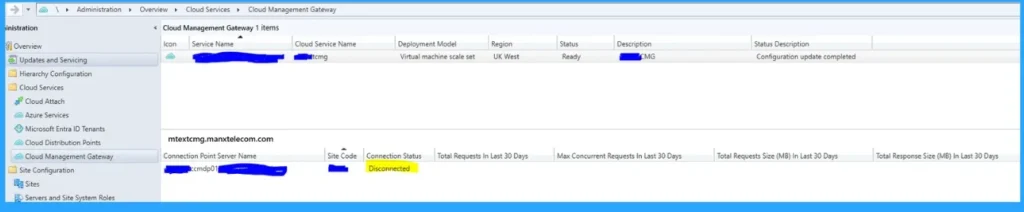
Fix Connection Point Server Status Changed to Disconnected in SCCM Admin Console - Fig.4 - Creds to MS
Fix Connection Point Server Status Changed to Disconnected in SCCM Admin Console – Fig.4 – Creds to MS

Need Further Assistance or Have Technical Questions?

Join the LinkedIn Page and Telegram group to get the latest step-by-step guides and news updates. Join our Meetup Page to participate in User group meetings. Also, Join the WhatsApp Community to get the latest news on Microsoft Technologies. We are there on Reddit as well.

Author

Anoop C Nair has been Microsoft MVP for 10 consecutive years from 2015 onwards. He is a Workplace Solution Architect with more than 22+ years of experience in Workplace technologies. He is a Blogger, Speaker, and Local User Group Community leader. His primary focus is on Device Management technologies like SCCM and Intune. He writes about technologies like Intune, SCCM, Windows, Cloud PC, Windows, Entra, Microsoft Security, Career, etc.

Written by

Anoop C Nair is Workplace Technology solution architect with 25+ years of experience in global enterprise organizations such as JP Morgan, Capgemini, etc. Microsoft Certified Trainer. Microsoft MVP from 2015 onwards for consecutive 11+ years! He also conducts Intune and modern workplace tech training for enterprise organizations. He is Blogger, Speaker, and Founder of HTMD Community and HTMD Conference. His main focus is on Device Management technologies like Intune, Windows, Cloud PC. He writes about technologies like Intune, SCCM, Windows, Cloud PC, Windows, Entra, Microsoft Security.

Discussion

Join the discussion

Your email address will not be published. Required fields are marked *

Related guides

Intune

Windows 11 KB5101650 KB5099414 July 2026 Patch and 3 Zero Day Vulnerabilities and 570 Flaws

Key Takeaways Windows 11 KB5101650 KB5099414 July 2026 Patch and 3 Zero Day Vulnerabilities and 570 Flaws! In the July 2026 Patch, Microsoft introduced new features designed to improve the overall Windows experience. The update adds enhancements to Windows Update for more flexible update management and introduces Point-in-Time Restore, providing an additional recovery option for […]

AC Anoop C Nair 9 min read
Intune

2026 June KB5094126 KB5093998 Windows 11 Patch | 3 Zero Day Vulnerabilities and 200 Flaws

Key Takeaways 2026 June KB5094126 KB5093998 Windows 11 Patch | 3 Zero Day Vulnerabilities and 200 Flaws! The June 2026 Windows 11 Patch Tuesday update brings several improvements to File Explorer. It adds support for additional archive formats, including UU, CPIO, XAR, and NuGet Packages (NUPKG). The update also preserves View and Sort preferences in […]

AC Anoop C Nair 10 min read
Intune

2026 May KB5089549 KB5087420 Windows 11 Patch | 0 Zero Day Vulnerabilities and 120 Flaws

Key Takeaways The Windows 11 May 2026 Patch KB5089549 KB5087420 Update brings important security fixes, performance improvements, and reliability enhancements across the operating system. The update introduces new features such as Xbox Mode for gaming, File Explorer improvements, enhanced input and sharing experiences, better taskbar and Windows Hello reliability, and additional enterprise management capabilities for […]

AC Anoop C Nair 8 min read
SCCM

ConfigMgr 2603 Introduces New Early Update Enrollment Process

Key Takeaways In this post we are discussing the ConfigMgr 2603 Introduces New Early Update Enrollment Process. Microsoft has officially released Configuration Manager version 2603 to the Early Update Ring, giving organizations an opportunity to test upcoming improvements before the global production rollout. The release is targeted at enterprises running ConfigMgr version 2409 or later […]

AC Anoop C Nair 3 min read