






FIX SCCM Pre-Release Features are Grayed Out | Enable | ConfigMgr
Let’s understand SCCM pre-release features, why they’re called pre-release features, and whether enabling them in production is okay. Pre-release features are in the SCCM CB for early testing in a production environment. Microsoft support teams fully support these features, but Microsoft thinks they are not fully developed.
You need to agree and give consent to use prerelease features in SCCM. This is a bit of a scary step for some SCCM admins and organizations, so most admins are confused about whether this is fully supported for use in production.
You can’t turn on the pre-release features until you give your consent. This means you can’t use any new pre-release features included with the latest version of SCCM until you have enabled the consent checkbox explained in the below section of this post.
Let’s see how to fix the SCCM Pre-Release Features being Grayed Out issue. The option “Turn On” is greyed out when you try to enable the “Orchestration Group” pre-release feature of SCCM. In this post, we learn how to fix this issue.

Related Post – SCCM List of Full Features Vs Pre-Release Features | 2002
Why Pre-Release Tag for Some SCCM Features
As per Microsoft documentation, the Pre-release features are currently for early “testing” in a production environment. However, you can use these features in a production environment, and they are fully supported.
But then why it’s still called Preview features or Pre-Released Features?
Because those features are still in active development. They might receive changes until they move out of the pre-release category.
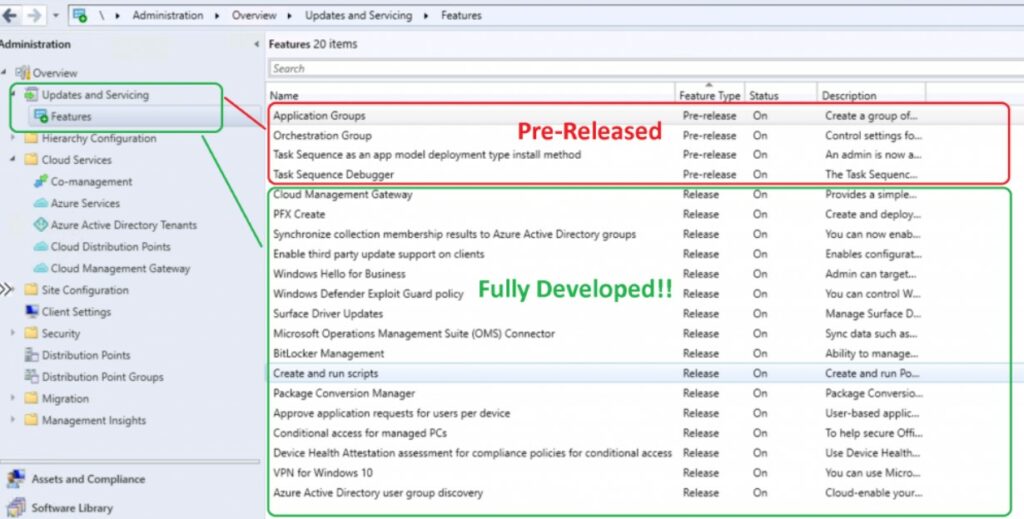
SCCM Pre-Release Features
Configuration Manager Pre-release features are in the current branch for early testing in a production environment. Microsoft fully supports these features. Why have some features been in pre-release status for a long time?
The only reason that Microsoft provides for a feature being in the pre-release category is that it’s still in active development. Those features might receive changes until they move out of the pre-release category.
Issues Statement
Let’s see what is the issue or feature we are trying to fix.
- Navigate to \Administration\Overview\Updates and Servicing\Features
- Right-Click on any of the pre-release Features and select Turn on
- But the Turn button is Grayed Out as you can see in the below screen capture
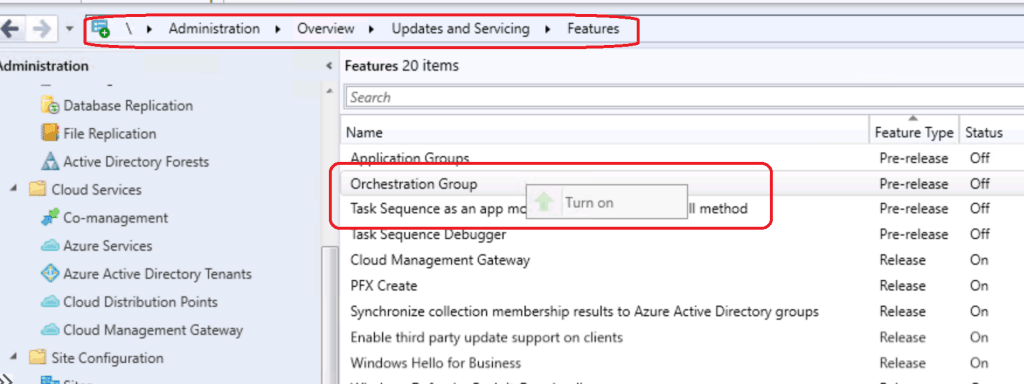
Fix Pre-Release Features are Grayed Out
The turn-on option is enabled only if you have already consented to use pre-release features. So, let’s agree to the terms for using pre-release features in your SCCM production environment.
NOTE! – Giving consent is a one-time action per ConfigMgr hierarchy that you can’t undo. And after you turn on a pre-release feature, you can’t turn it off.
- Launch ConfigMgr console
- Go to the Administration workspace, expand Site Configuration, and select the Sites node.
- Click Hierarchy Settings in the ribbon.
- Enable the consent option to use pre-release features on the General tab of Hierarchy Settings Properties. Click OK.
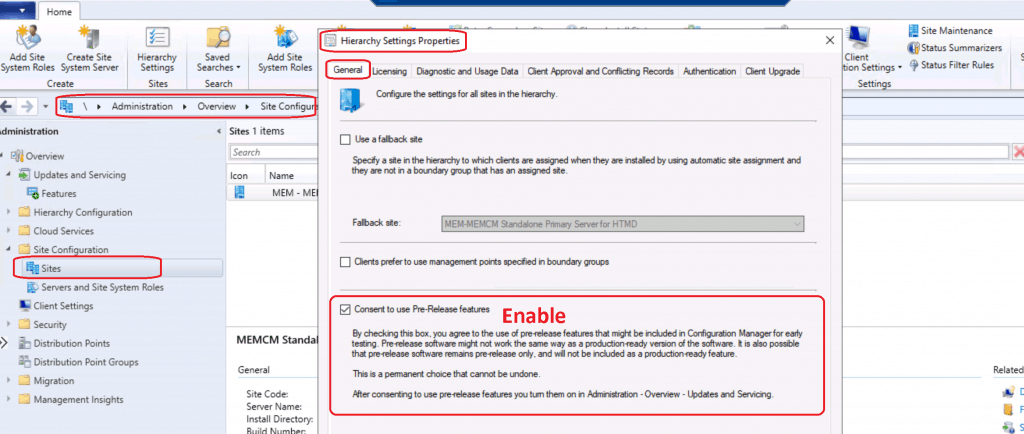
Turn On – Pre-Release Feature
Let’s turn on the pre-release feature now!
- Navigate to Administration workspace – Updates and Servicing node.
- Click on the Features node.
- Select a feature (orchestration group, Application Group, or Task Sequence as an app model deployment type install method), and then click Turn on in the ribbon.
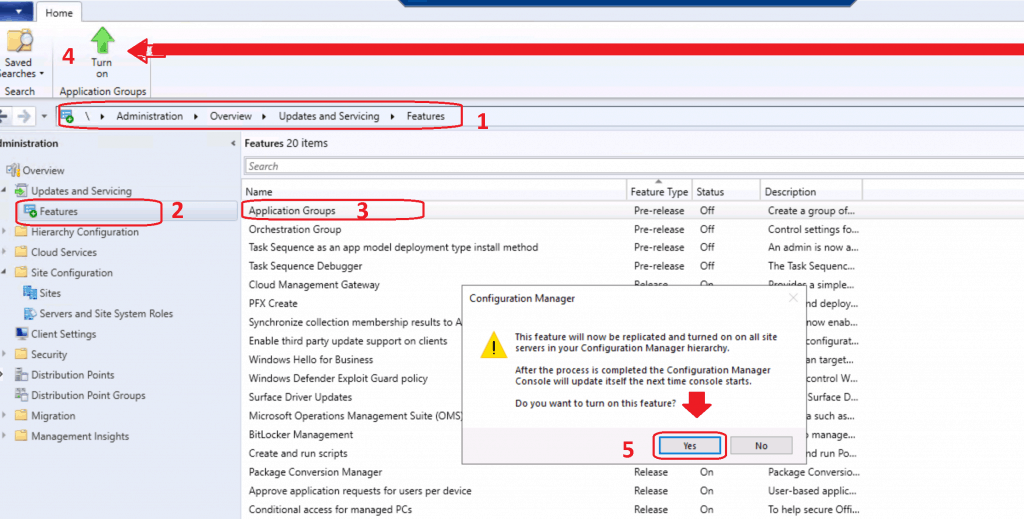
This feature will now be replicated and turned on on all site servers in your configuration manager hierarchy. After the process is completed, the Configuration Manager console will update itself the next time console starts.
Click on Yes to Turn on the feature.
NOTE: The log file HMAN.log is your friend for checking pre-release feature-related issues. You need to restart the console to make the new pre-release features visible (after Turning on activity).
Orchestration Group is missing from the console? Let’s TURN ON the pre-release feature as mentioned above.
Results
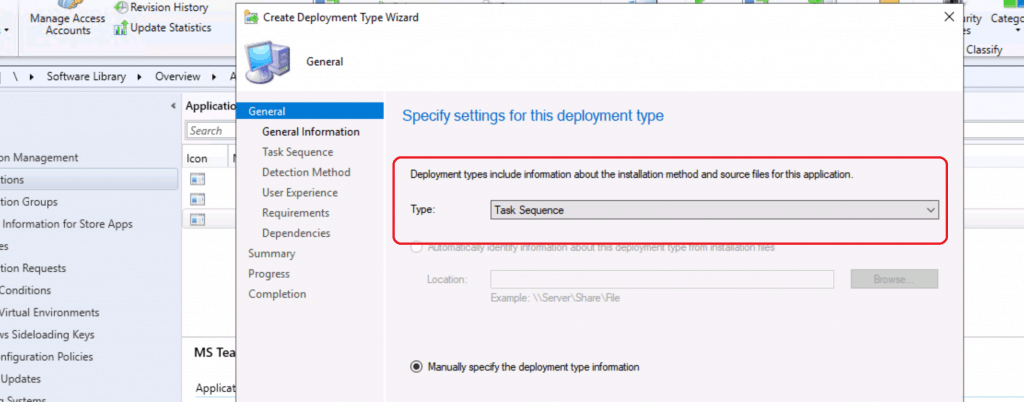
After restarting the SCCM 2002 console, I could see the pre-release feature “Task Sequence as an app model deployment type install method” available in the console.
List of Full Features of SCCM 2002
Let’s use the list of fully supported or fully developed features of SCCM 2002 as an example.
| Feature | Added as pre-release | Added as a Full Feature |
|---|---|---|
| Azure Active Directory user group discovery from SCCM | Version 1906 | Version 2002 |
| Synchronize collection membership results to Azure AD | Version 1906 | Version 2002 |
| CMPivot standalone | Version 1906 | Version 2002 |
| SMS Provider administration service | Version 1810 | Version 1906 |
| Enhanced HTTP site system | Version 1806 | Version 1810 |
| Client apps for co-managed devices (previously known as Mobile apps for co-managed devices) | Version 1806 | Version 2002 |
| Package conversion manager | Version 1806 | Version 1810 |
| Phased deployments | Version 1802 | Version 1806 |
| Windows Defender Application Control management | Version 1702 | Version 1906 |
List of Preview Pre-Release Features
The following is the list of pre-release features of SCCM 2002 (updated on April 2nd, 2020).
| Feature | Added as Pre-Release | Added as a Full Feature |
|---|---|---|
| Orchestration groups | Version 2002 |  |
| Task sequence deployment type | Version 2002 | |
| Remove the central administration site | Version 2002 | |
| Task sequence debugger | Version 1906 | |
| Application groups | Version 1906 | |
| Servicing a cluster-aware collection (Server groups) | Version 1602 | |
Resources
- SCCM 2002 Installation Step-by-step guide
- ConfigMgr 2002 List of New Features Enhancements MEMCM SCCM
We are on WhatsApp. To get the latest step-by-step guides and news updates, Join our Channel. Click here –HTMD WhatsApp.
Author
Anoop C Nair is Microsoft MVP! He is a Device Management Admin with more than 20 years of experience (calculation done in 2021) in IT. He is a Blogger, Speaker, and Local User Group HTMD Community leader. His main focus is on Device Management technologies like SCCM 2012, Current Branch, and Intune. He writes about ConfigMgr, Windows 11, Windows 10, Azure AD, Microsoft Intune, Windows 365, AVD, etc.




Discussion