






SCCM Preferred Management Points | Selection Criteria | ConfigMgr
This is a quick post about SCCM Preferred Management Points options and their usefulness in many scenarios. A similar discussion came into “How to Manage Devices Live Digital Events.” In this post, let’s see how the ConfigMgr Preferred MP setting helps clients contact the MPs in the particular boundary group.
The management point efficiently delivers clients’ policy and content location information and seamlessly receives configuration data from them. Additionally, SCCM clients effectively utilize a service location process to locate site system servers.
Related Post – ConfigMgr DP Selection Criteria Content Source Location Priority List
| Index |
|---|
| SCCM Preferred Management Points |
| Management Point Selection Criteria |
| SCCM Preferred Management Points |
| Enable Preferred Management Point |
SCCM Preferred Management Points
The following two paragraphs were from the blog “FIX SCCM Management Point Rotation Issue with AllowedMPs” registry entry for SCCM 2012 and the current branch versions until the preferred MP concept was introduced in SCCM 1802.

The SCCM MP rotation issue has been a big headache for many folks like me. SCCM comes with a workaround for the Management Point Rotation issue. More details about the MP rotation issue in SCCM “Workaround for Untrusted Forest SCCM 2012 MP Rotation Issue“.
Microsoft introduced a registry key called “AllowedMPs.” With this key, you can force the client to communicate with a specific MP, which you’ve mentioned in the registry key’s value.
Management Point Selection Criteria
The following are the SCCM Management Point Selection criteria as per Microsoft document. SCCM Preferred Management Points setting can significantly change the MP selection criteria from the client-side.
NOTE! – This is applicable only if you have NOT enabled the “Client prefers to use Management Points specified in boundary group” for the preferred Management point option.
- Proxy MP if the client is part of a secondary server
- HTTPS capable in a trusted or local forest
- HTTPS capable NOT in a trusted or local forest
- HTTP capable in a trusted or local forest
- HTTP capable NOT in a trusted or local forest
- Local MP (within boundary groups if the client is part of multiple boundary groups all boundary groups will be considered as local).
- HTTPS capable in a trusted or local forest
- HTTPS capable NOT in a trusted or local forest
- HTTP capable in a trusted or local forest
- HTTP capable NOT in a trusted or local forest
- Assigned: Any SCCM MP that is a site system for the client’s assigned site
- HTTPS capable in a trusted or local forest
- HTTPS capable NOT in a trusted or local forest
- HTTP capable in a trusted or local forest
- HTTP capable NOT in a trusted or local forest
NOTE! – Reference of some old client-side Locationservices.log.
Attempting to retrieve lookup MP(s) from AD LocationServices
Lookup Management Points from AD: LocationServices
Name: 'ACNCMMP1.XYZ.DMZ.com' HTTPS: 'N' ForestTrust: 'N' LocationServices
Name: 'ACNCMMP2.ABC.DMZ.com' HTTPS: 'N' ForestTrust: 'N' LocationServices
Retrieved lookup MP(s) from AD LocationServices
Refreshed security settings over AD LocationServices
Default Management Points from AD: LocationServices
Name: 'ACNCMMP1.XYZ.DMZ.com' HTTPS: 'N' ForestTrust: 'N' LocationServices
Name: 'ACNCMMP2.ABC.DMZ.com' HTTPS: 'N' ForestTrust: 'N' LocationServices Persisting the default management points in WMI LocationServices
SCCM Preferred Management Points
Configuration Manager preferred Management Point is the best option Microsoft introduced (in the 1802 version of ConfigMgr) to avoid MP Rotation and AllowedMPs registry keys from previous versions.
The Preferred MP option from hierarchy settings enables a client to identify a management point that’s associated with its boundary.
When configuring preferred management points, an SCCM client places them at the top of its list!
Enable Preferred Management Point
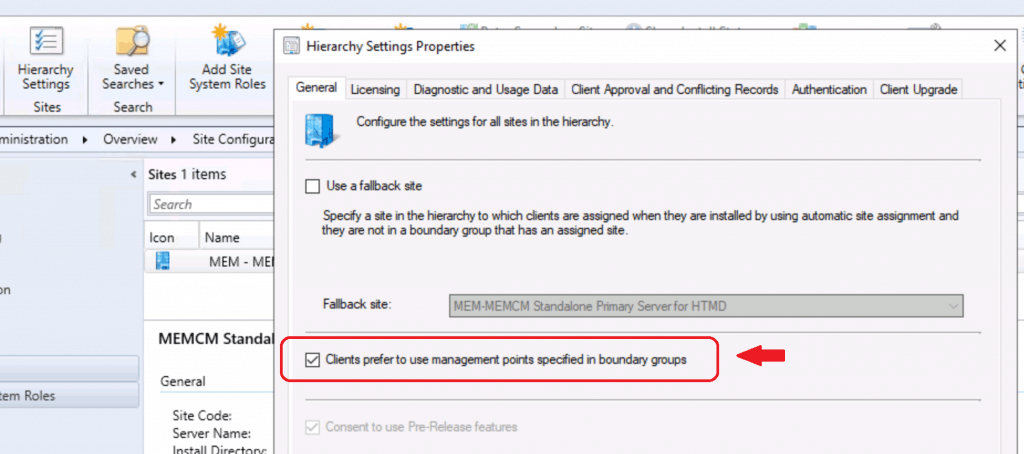
Enable SCCM preferred Management Points with the following steps.
- Launch Console
- Navigate to the Administration – Site Configuration – Sites node
- Select Hierarchy Settings from the site server
- Select Clients prefer to use management points specified in the boundary groups option from the General tab
- Select OK to save the configuration.
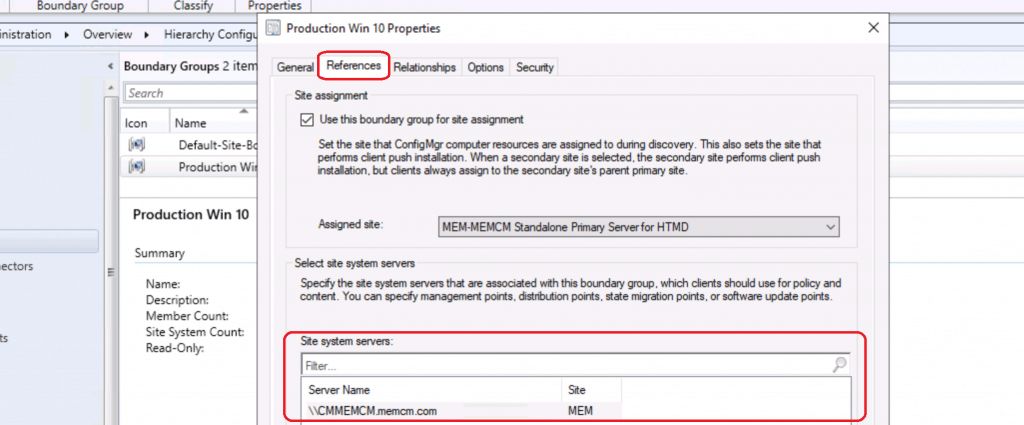
Make sure boundary group configurations are appropriate with Site system servers. SCCM Preferred Management Points should be part of boundary group Site system servers to make this work as expected.
We are on WhatsApp. To get the latest step-by-step guides and news updates, Join our Channel. Click here –HTMD WhatsApp.
Author
Anoop C Nair is Microsoft MVP! He is a Device Management Admin with more than 20 years of experience (calculation done in 2021) in IT. He is a Blogger, Speaker, and Local User Group HTMD Community leader. His main focus is on Device Management technologies like SCCM 2012, Current Branch, and Intune. He writes about ConfigMgr, Windows 11, Windows 10, Azure AD, Microsoft Intune, Windows 365, AVD, etc.




Hello!
Im my scenario I have two MPs, the main MP is acting as a DP as well, so if I put my MP on another boundary, of a different country, when a client on that boundary group (in thos caase in another country), downloads something, it does it from the MP/DP, and not from its DP. How could I do in this case? Is there any way to specify that this boundary uses the main MP as just an MP and not the DP role?
Thanks!
StaffFeel free to use our new forum to get real-time interactions and quick answers https://forum.howtomanagedevices.com
Hello,
Using SCCM Current Branch 2010.
1. One of the computer at USA New York and another computer at Switzerland, Arabia
2. There is one primary at USA
3. There are 20 Site System which host Management point role in USA region
4. There are 18 Site System which host Management point role in Europe region
5. I see that Proxy Management Point for a computer in USA contact the site system at Hungry at Europe Region
6. Also there is one Proxy Management Point role installed site system at Switzerland of Europe Region. Few computers contact proxy management point at Hungry at Europe Region
7. These computers are connected in Office network and reaches the correct AD Site and boundary group
8. Hungry site system is not mapped to boundary group of Switzerland and USA
9. Stopped the Hungary site SMS Executive service
10. Restarted SMS Agent service in few of the computers in other sites
11. Then other computers contact its own proxy management point
12. Computers are getting the correct boundary group and AD Site
Please help to find know why the computers in Switzerland and USA get the proxy management point which is at Hungary.
Because when the OSD happens in the computers at USA New York, Switzerland, Arabia those computer took the management point and distribution point as Hungary Management and Distribution Point.