






Get SCCM Baseline Version Installation Media | ConfigMgr | VLSC | Download
Configuration Manager Current Branch version 2002 (SCCM Baseline Version) is available as an in-console update and baseline version. SCCM version 2002 update is available for the infra that runs any of the following versions 1902, 1906, 1910. Let’s see how to download the latest SCCM installation media version.
When do you install the new ConfigMgr infrastructure? Do you need a copy of the latest version of SCCM source files? Isn’t it? How did you get the latest version of supported source files?
So, basically, the SCCM source files that can be used to install new SCCM infrastructure are called the baseline version of ConfigMgr. Does that mean that the Baseline version of SCCM is the latest installation media? Yes, you can download installation media!
Baseline versions are available as downloadable media on the Microsoft Volume License Service Center. Various installation methods can be used when setting up a new Configuration Manager (Current Branch) site in a new hierarchy.

New Configuration Manager (A.K.A SCCM) baseline version is released annually as part of 02 (February version release).
| Index |
|---|
| Why Use the SCCM Baseline Version? |
| Download the SCCM Baseline Version of ConfigMgr |
| More Details about VLSC Download Installation Media |
Why Use the SCCM Baseline Version?
The following are the scenarios where you must use the latest source files to install the Configuration Manager infrastructure.
The following table will help you understand the scenarios. You should use the baseline version of Configuration Manager.
| Scenario | Baseline Version | In-console Update | CD.Latest Folder |
|---|---|---|---|
| New CAS Server | Yes | No | No |
| New Standalone Primary Server | Yes | No | No |
| Migration from SCCM 2012 | Yes | No | No |
| New Site Existing Hierarchy | No | No | Yes |
| Restore Site | No | No | Yes |
| Upgrade Existing Hierarchy | No | Yes | No |
Download the SCCM Baseline Version of ConfigMgr
You can download the latest production version (Baseline Media = Installation Media) from any of the following Microsoft offerings:
- Eval Center (Available now Free Download – Trail Versions)
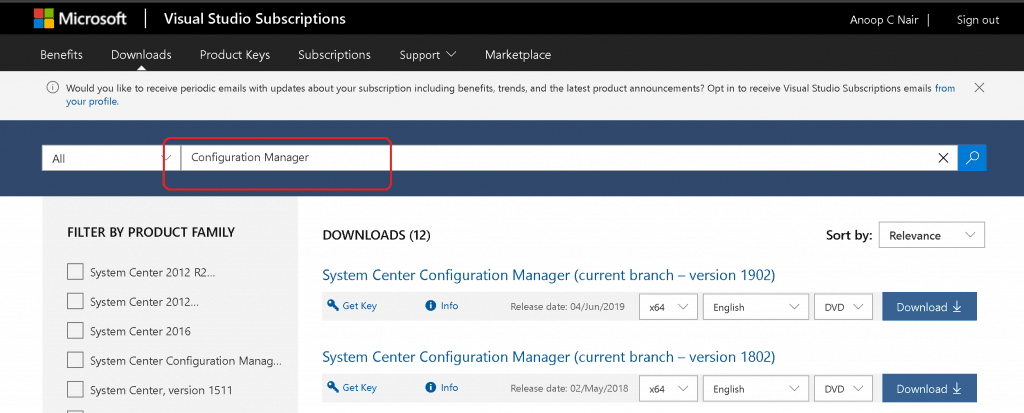
- Visual Studio Subscription (Only used for testing and training purposes)
- Volume Licensing Service Center (VLSC)
NOTE! – The latest version of the Baseline version of SCCM is 2002 (SCCM Baseline Version)
More Details about VLSC Download Installation Media– SCCM Baseline Version
The baseline media is available as part of the following releases on the Volume License Service Center (VLSC):
- System Center Config Mgr (current branch) (This is supposed to be changed somewhere in the near future – “Microsoft Endpoint Manager Configuration Manager”)
- System Center 2016 Datacenter
- System Center 2016 Standard
Let’s see the example, search the VLSC for System Center Config Mgr (current branch). Find the baseline media in the list of files, and download it for that release.
We are on WhatsApp. To get the latest step-by-step guides and news updates, Join our Channel. Click here –HTMD WhatsApp.
Author
Anoop C Nair is Microsoft MVP! He is a Device Management Admin with more than 20 years of experience (calculation done in 2021) in IT. He is a Blogger, Speaker, and Local User Group HTMD Community leader. His main focus is on Device Management technologies like SCCM 2012, Current Branch, and Intune. He writes about ConfigMgr, Windows 11, Windows 10, Azure AD, Microsoft Intune, Windows 365, AVD, etc.




Discussion