






Security Compute Units Direct Purchase vs the E5 Bundle What You Need to Know for Copilot AI Agent Workloads
Today, we are talking about Security Compute Units Direct Purchase vs the E5 Bundle What You Need to Know for Copilot AI Agent Workloads. Many companies are moving from old systems to AI-based tools, and this brings both benefits and challenges. To make the right decisions, organizations must understand how these tools work and how their billing models actually function.
Instead of depending fully on security teams, organizations can now use Security Copilot an AI system that studies threat quickly and automatically. This is similar to the changes in security, like moving from physical firewalls to cloud security. To support this new AI system, Microsoft introduced SCUs, which are a way to measure and bill how much AI power is being used.
But SCUs work differently depending on how you get them. One SCU running nonstop for a month can cost almost three thousand dollars, and companies must buy at least one SCU before they can even use Security Copilot.
This makes it expensive for small teams that don’t use AI security every hour of the day. SCUs that come with the Microsoft 365 E5 license work in a different way. Instead of paying for a running machine, companies get a SCU credits they can spend only when the AI actually does work.

Table of Contents
Security Compute Units Direct Purchase vs the E5 Bundle What You Need to Know for Copilot AI Agent Workloads
Some people compare the 400 credits, which are like tokens, to the SCUs you buy directly, which are always running. This will claim that E5 gives 20 times more compute.
Large companies also face a limit because Microsoft caps the included SCUs at 10,000 per tenant. So, if an organization has more than 25 thousand users, the benefit per user becomes smaller.
- Microsoft 365 Copilot Oversharing Blueprint 3 Phases Shared on Ignite 2024
- Microsoft 365 Copilot BizChat AI Assistant Work and Web Model
- Create PPT from Word PDF Files using Microsoft 365 Copilot in PowerPoint
Why the 20x SCU Value Claim Can Be Misleading
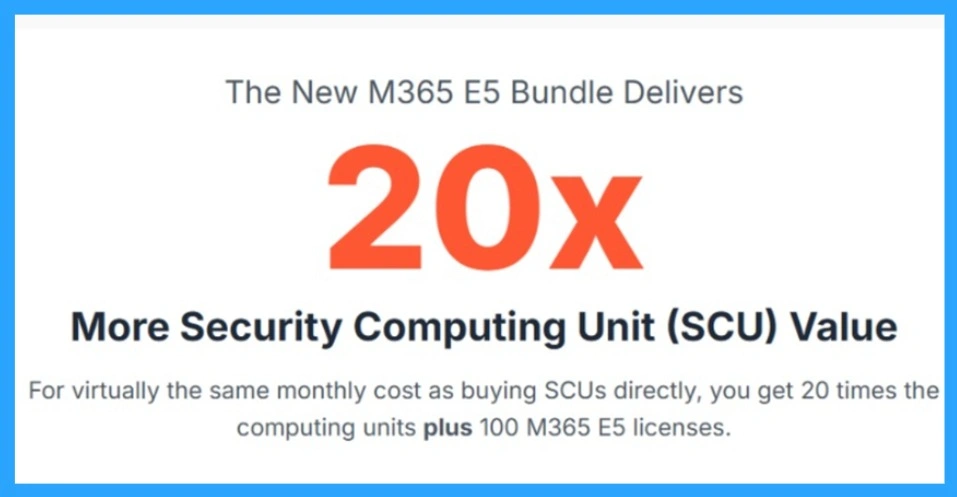
This image is promoting the idea that the new Microsoft 365 E5 bundle gives 20 times more Security Computing Unit (SCU) value, but this message can be misleading. It suggests that for the same monthly cost as buying SCUs directly, organizations get 20 times the computing power along with E5 licenses. In reality, the SCUs included with E5 are not the same as the provisioned SCUs you purchase separately.
- Purchased SCUs run continuously like dedicated machines, while E5 SCUs are credit-based and only used when the AI performs a task.
- Because these 2 types of SCUs work completely differently, comparing them directly creates a false impression.
SCU Value Comparison
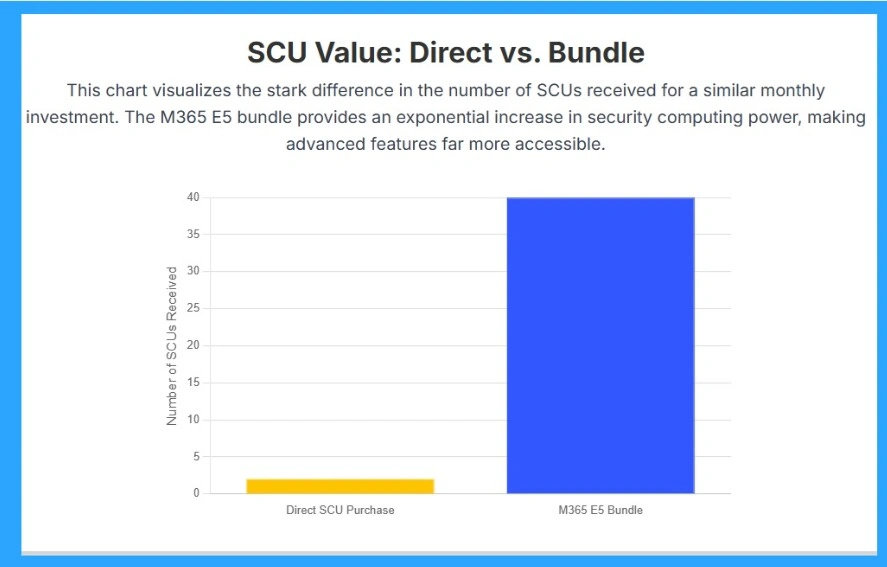
Difference in value between directly purchasing Security Compute Units and receiving them through the Microsoft 365 E5 bundle. The yellow bar shows that a direct SCU purchase provides only a small number of units for a similar monthly cost, while the blue bar shows that the M365 E5 bundle offers a much larger amount represented here as a dramatic jump to around 40 SCUs.
This visual makes it easy to understand why many organizations see the E5 bundle as a more cost-effective way to access security compute power, as it delivers significantly more SCUs without requiring separate high-cost provisioning.
Limits Caps and Hidden Costs
Companies must also understand limitations. The monthly SCU allocation is capped at 10,000 per tenant, even if the company has more than 25,000 users. If the SCUs run out, organizations must pay $6 per unit for overage. Also, partner-built agents and new AI workloads may increase monthly usage, creating future cost risks.
It’s Not Just About SCUs
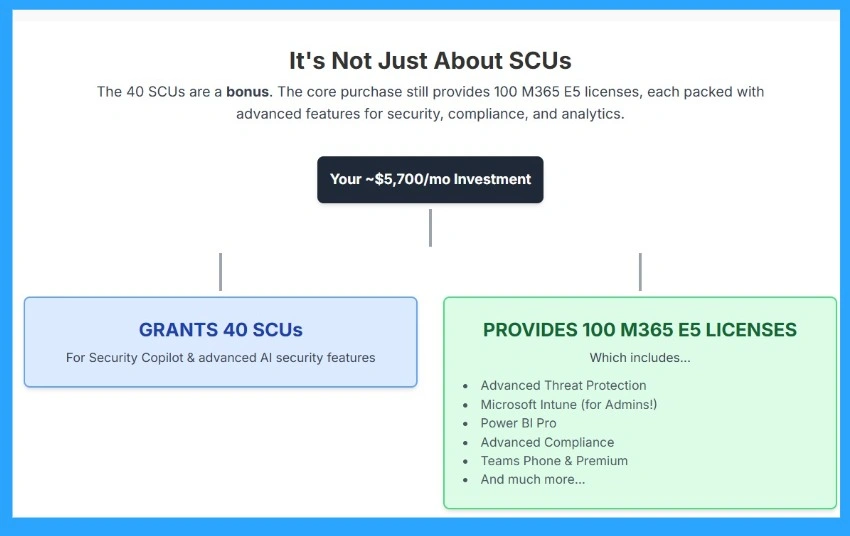
When you spend around $5,700 per month on the M365 E5 bundle, you are not only getting 40 SCUs and you are getting much more. The 40 SCUs are just a bonus that helps you use Security Copilot and advanced AI security features.
The main value comes from the 100 M365 E5 licenses included in the bundle. These licenses give you powerful tools such as Advanced Threat Protection, Microsoft Intune for device and admin management, Power BI Pro for analytics, advanced compliance tools, Teams Phone and Premium features, and many other security and productivity benefits.
Direct Purchase vs. M365 E5 Bundle
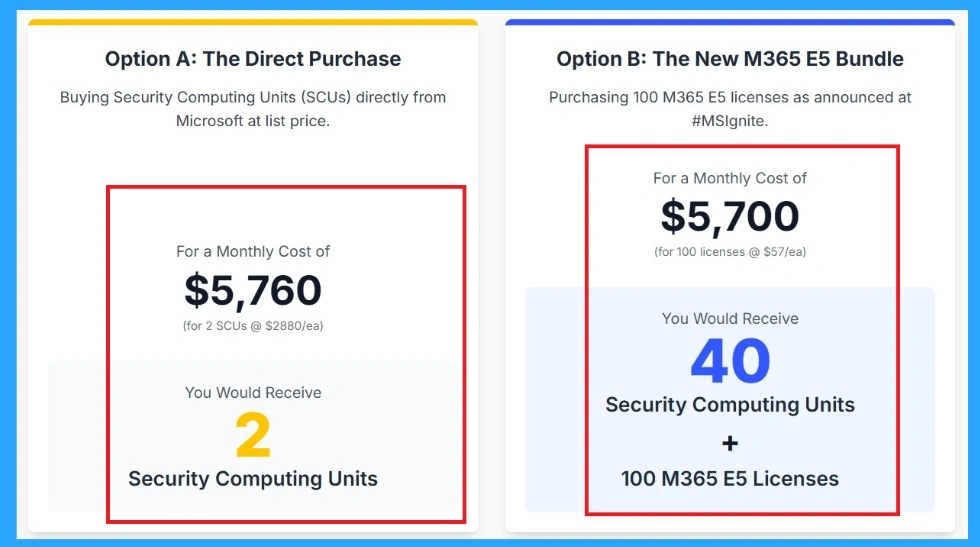
Shows how much more value you get when choosing the M365 E5 bundle instead of buying Security Compute Units (SCUs) directly. In the direct purchase option, you spend about $5,760 per month and only receive 2 SCUs, which is a very small amount of security computing power. But with the M365 E5 bundle, you pay almost the same amount $5,700 per month and receive 40 SCUs, which is twenty times more.
- On top of that, you also get 100 full M365 E5 licenses, which include advanced features like threat protection, Intune, compliance tools, Power BI Pro, and more.
| Feature | Direct SCU Purchase | M365 E5 Bundle |
|---|---|---|
| Monthly Cost | $5,760 | $5,700 |
| What You Get | Only 2 SCUs | 40 SCUs + 100 M365 E5 Licenses |
| SCU Value | Very low and only 2 units | very high -40 units included |
| Best For | Only SCU usage, very limited value | Organizations wanting AI security + full E5 features |
| Overall Value | Poor value for money | Much higher value for a lower price |
Need Further Assistance or Have Technical Questions?
Join the LinkedIn Page and Telegram group to get the latest step-by-step guides and news updates. Join our Meetup Page to participate in User group meetings. Also, Join the WhatsApp Community to get the latest news on Microsoft Technologies. We are there on Reddit as well.
Author
Anoop C Nair has been Microsoft MVP from 2015 onwards for 10 consecutive years! He is a Workplace Solution Architect with more than 22+ years of experience in Workplace technologies. He is also a Blogger, Speaker, and Local User Group Community leader. His primary focus is on Device Management technologies like SCCM and Intune. He writes about technologies like Intune, SCCM, Windows, Cloud PC, Windows, Entra, Microsoft Security, Career




Discussion