





How to Use Intune to Prevent Hackers from Stealing Credentials During Remote Sessions
Key Takeaways:
- Prevent hackers from stealing credentials during remote sessions
- Reduce exposure to credential-stealing attacks.
- Targeted at IT admins and security professionals
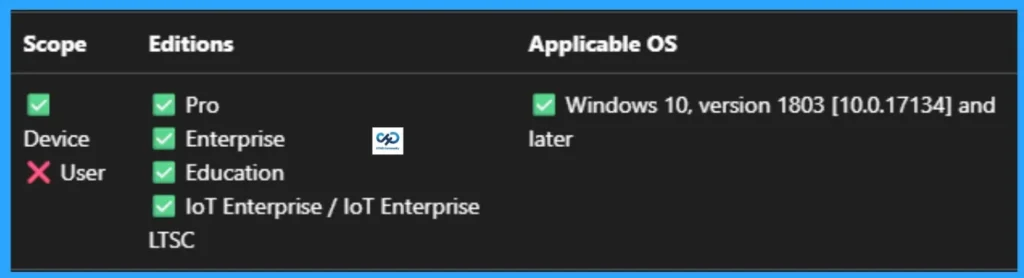
- Applicable for Windows 10, version 1803 [10.0.17134] and later Versions
Let’s discuss How to Use Intune to Prevent Hackers from Stealing Credentials During Remote Sessions. Microsoft develop delegation of non-exportable credentials in remote desktop for stopping lateral movement and credential harvesting.
Table of Contents
Table of Contents
How to Use Intune to Prevent Hackers from Stealing Credentials During Remote Sessions
The ultimate purpose of delegation of non-exportable credentials policy is to preventing the transmission of reusable credentials (like passwords or NTLM hashes) from your local device to the remote server you are connecting to.
By default, when you RDP into a server, your credentials (or their hashes) are stored in the server’s memory. If that server is compromised, an attacker can “dump” the memory and steal your password. Enabling this allows Remote Credential Guard, which keeps the credentials on your local machine and never sends them to the server.
- Require Password when Computer Wakes on Battery using Intune
- How to Remove Assigned Group from Energy Saver Battery Threshold Policy in Intune Settings Catalog
- Improve Windows PC Performance by using New Efficiency Mode
Example Scenario
For example, An IT Administrator needs to troubleshoot a web server that is currently under a suspected malware attack. With this policy The Admin uses Remote Credential Guard. The malware finds nothing in the server’s memory because the “secrets” never left the Admin‘s laptop.

How to Start Policy Creation
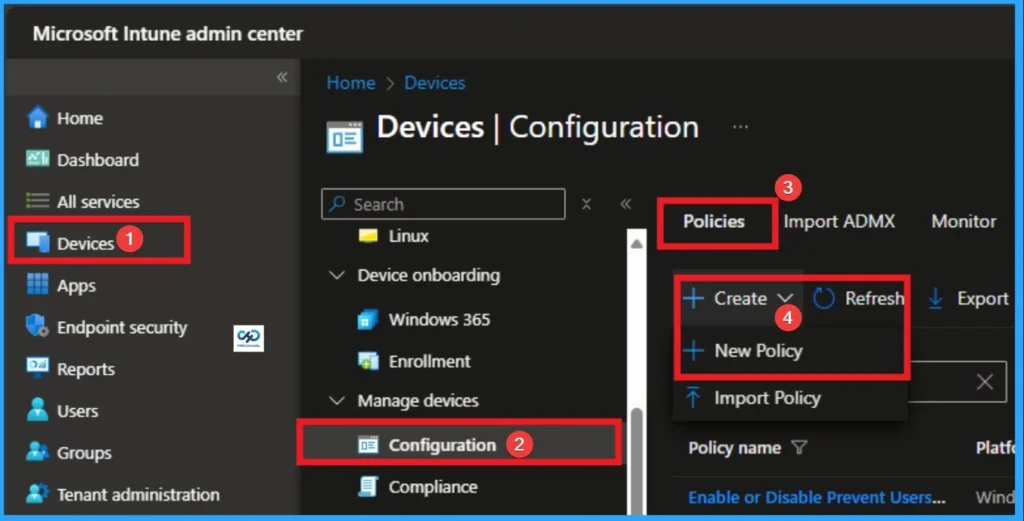
As an Admin, you can quickly configure this policy on your organisation. To start the Policy Creation, open the Microsoft Intune Admin center. Then go to Devices > Configuration >+ Create > +New Policy.
Profile Creation
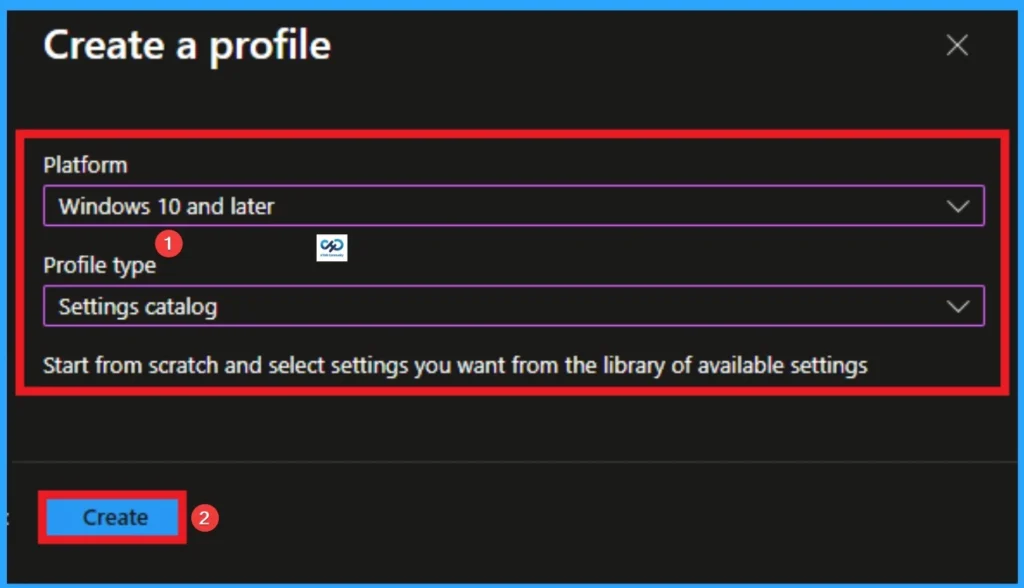
Profile creation is the necessary step that helps you to assign the policy to appropriate platform and Profile. Here I would like to configure the policy to Windows 10 and later platform and settings catalog profile. Then click on the Create button.
Filling the Basic Tab
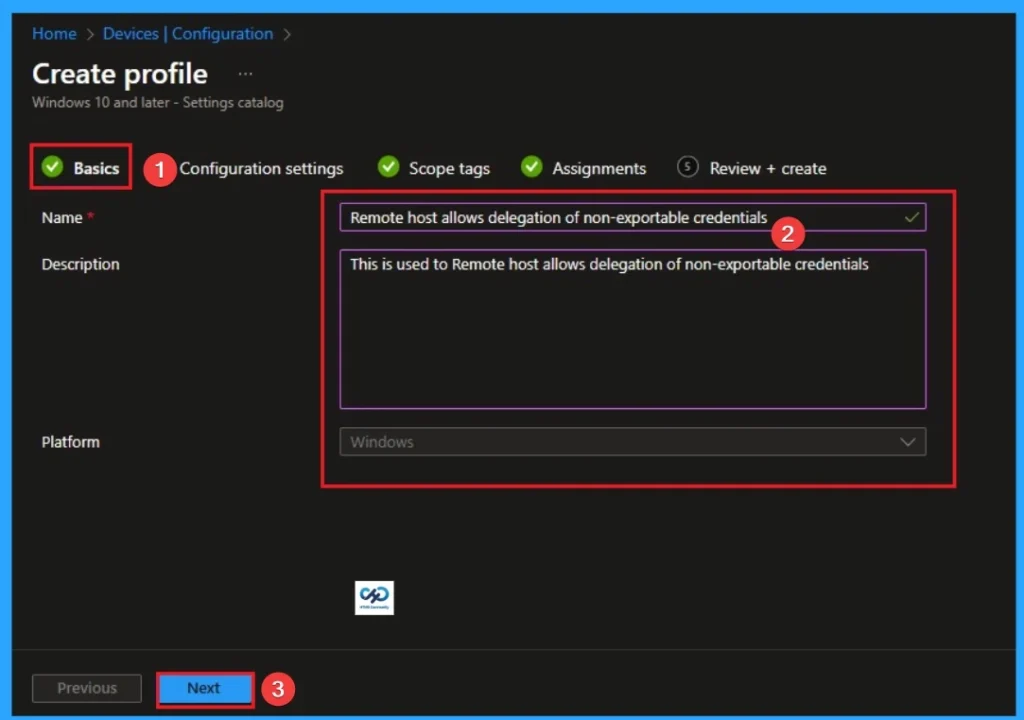
Naming the policy is the primary step that help admins to identify the policy later. This is important and necessary step that allows you to know the purpose of the policy. Here is Name is mandatory and description is optional. After adding this click on the Next button.
Configure Remote Host Allows Delegation of Non-Exportable Credentials
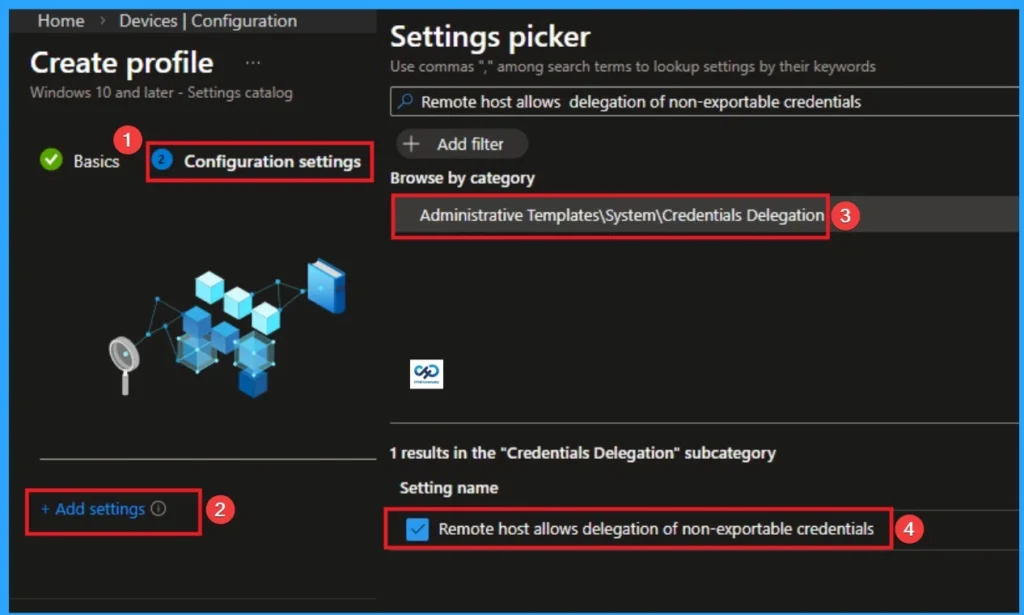
With Settings Picker, you can use the Configuration Settings Tab. On this tab, you can click on the +Add Settings hyperlink to get the Settings Picker. The settings picker shows huge number of settings. Here, I would like to select the settings by browsing by Category. I choose Administrative Templates > System > Credentials Delegation > Remote host allows delegation of non-exportable credentials.
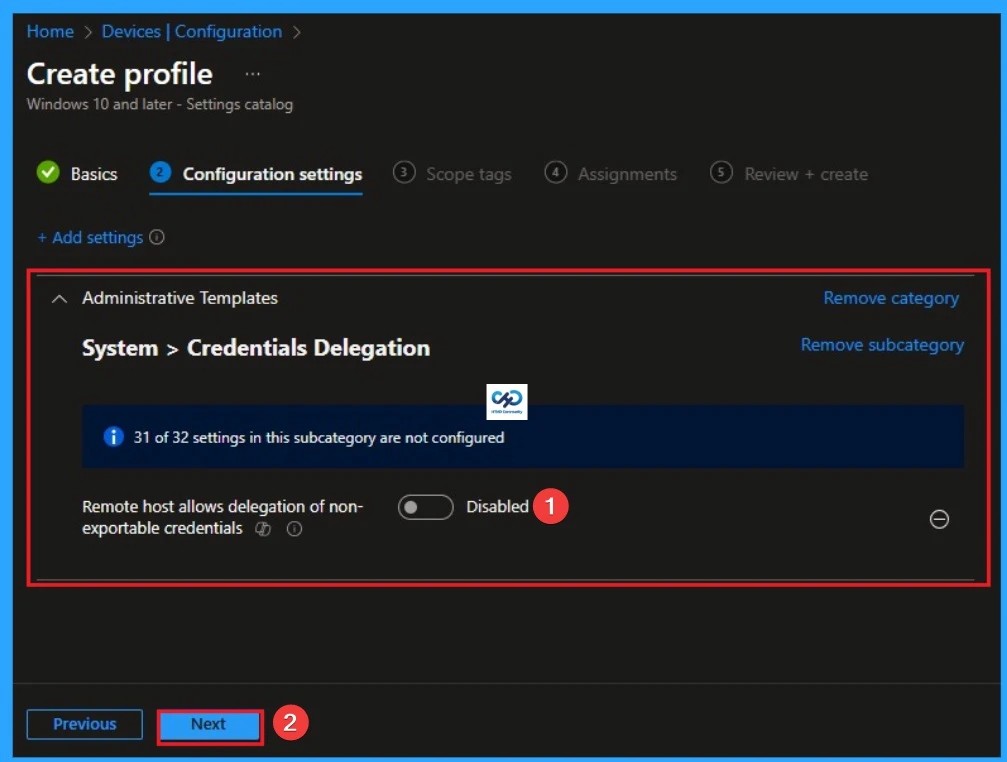
Disable Remote Host Allows Delegation of Non-Exportable Credentials
If you disable or don’t configure this policy setting, Restricted Administration and Remote Credential Guard mode aren’t supported. User will always need to pass their credentials to the host.
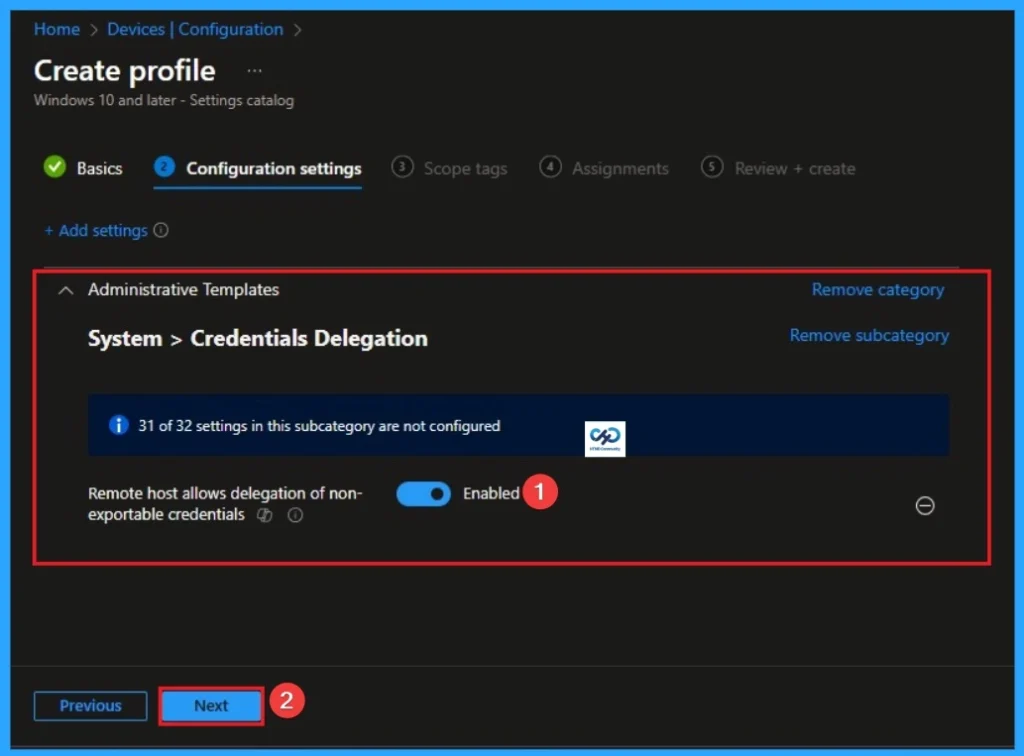
Enable Remote Host Allows Delegation of Non-Exportable Credentials
By enabling this policy, you allow the remote host to support Windows Defender Remote Credential Guard and Restricted Admin Mode, which are the gold standards for protecting administrative identities. Organizations typically choose to Enable this policy to harden their infrastructure, but may Disable it if they rely on legacy workflows.
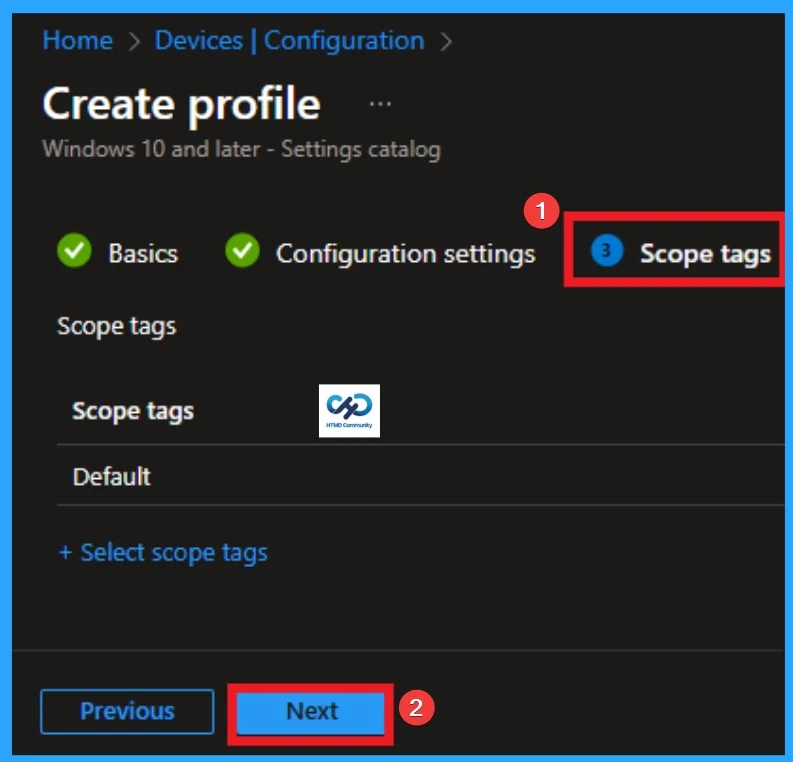
Scope Tags
With scope tags, you create a restriction to the visibility of the MPR Notifications. It helps to organise resources as well. Here, I would like to skip this section, because it is not mandatory. Click on the Next button.
Assignments Tab for Selecting Group
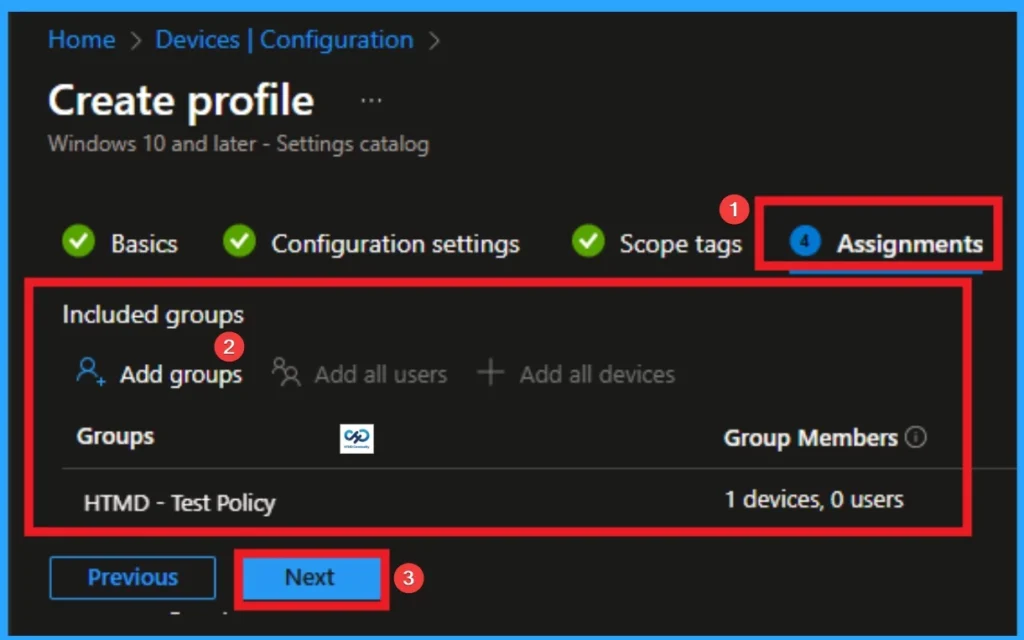
To assign the policy to specific groups, you can use the Assignment Tab. Here I click, +Add groups option under Included groups. I choose a group from the list of groups and click on the Select button. Again, I click on the Select button to continue.
Review + Create Tab
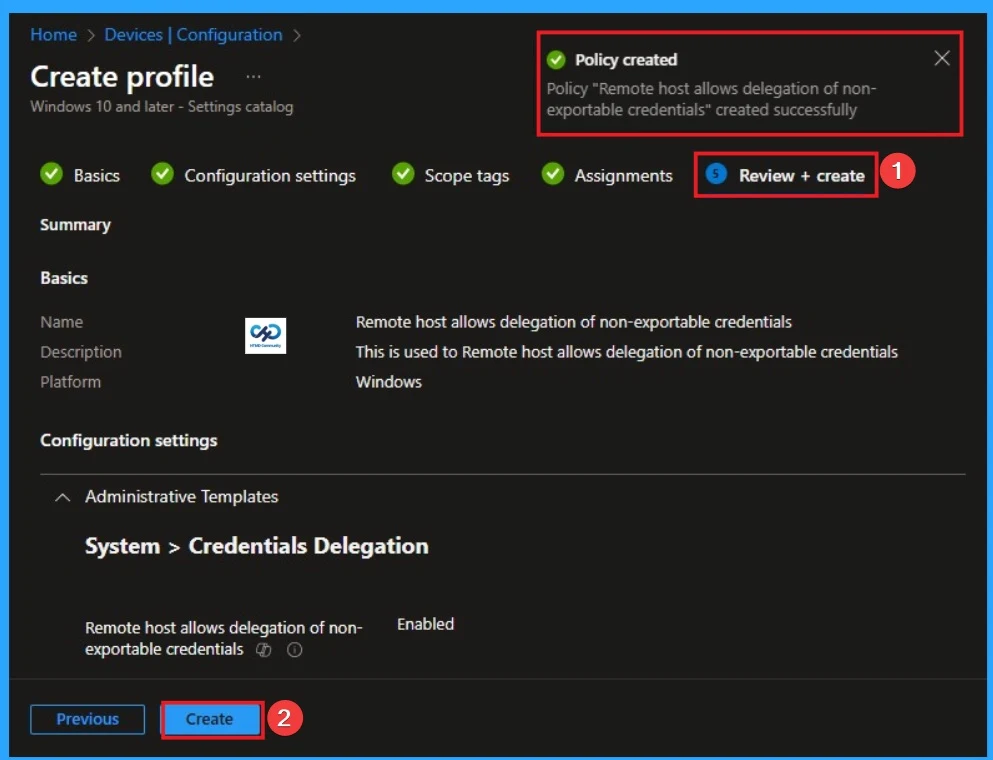
Before completing the policy creation, you can review each tab to avoid misconfiguration or policy failure. After verifying all the details, click on the Create Button. After creating the policy, you will get a success message.
Monitoring Status
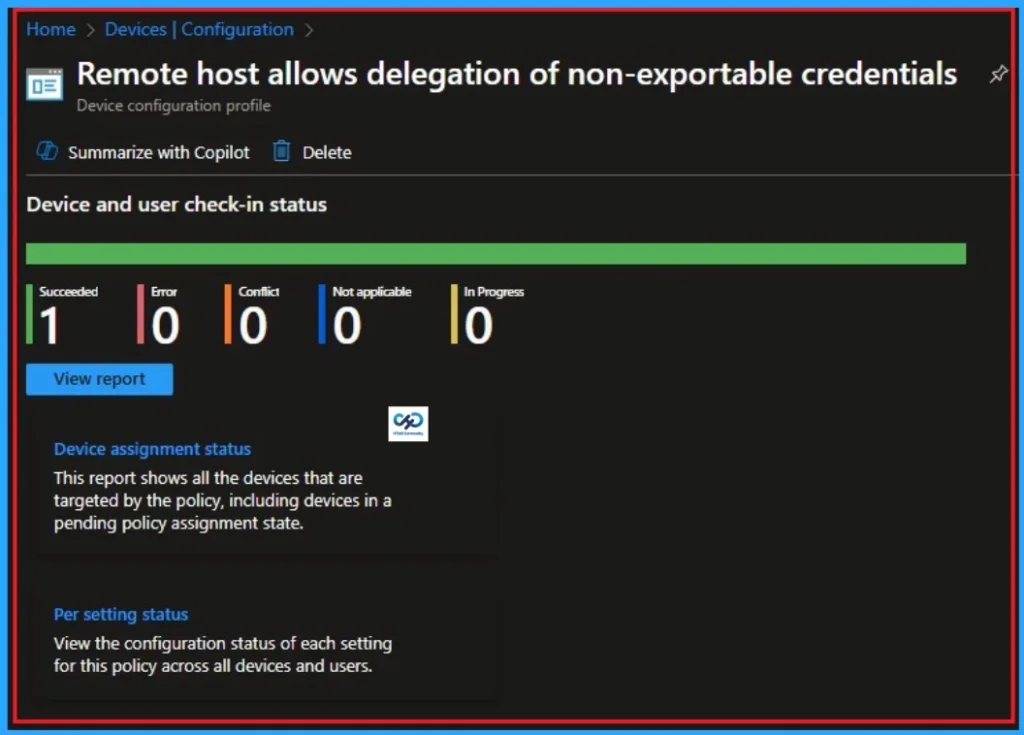
The Monitoring Status page shows whether the policy has succeeded or not. To quickly configure the policy and take advantage of the policy sync the assigned device on Company Portal. Open the Intune Portal. Go to Devices > Configuration > Search for the Policy. Here, the policy shows as successful.
Removing the Assigned Group from Prevent Hackers from Stealing Credentials Settings
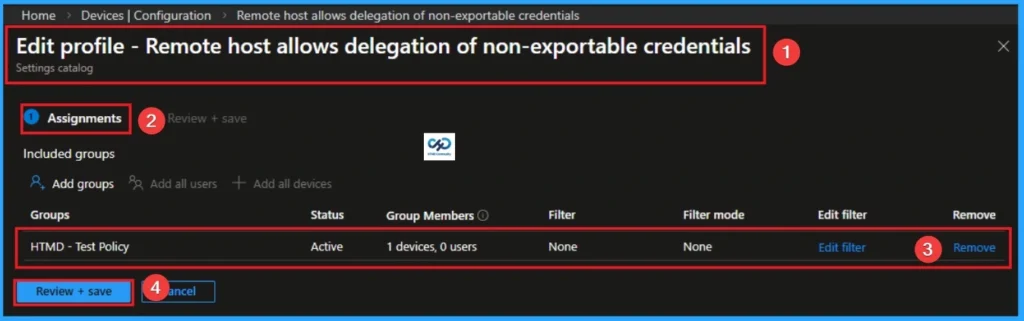
If you want to remove the Assigned group from the policy, it is possible from the Intune Portal. To do this, open the Policy on Intune Portal and edit the Assignments tab and the Remove Policy.
To get more detailed information, you can refer to our previous post – Learn How to Delete or Remove App Assignment from Intune using by Step-by-Step Guide.
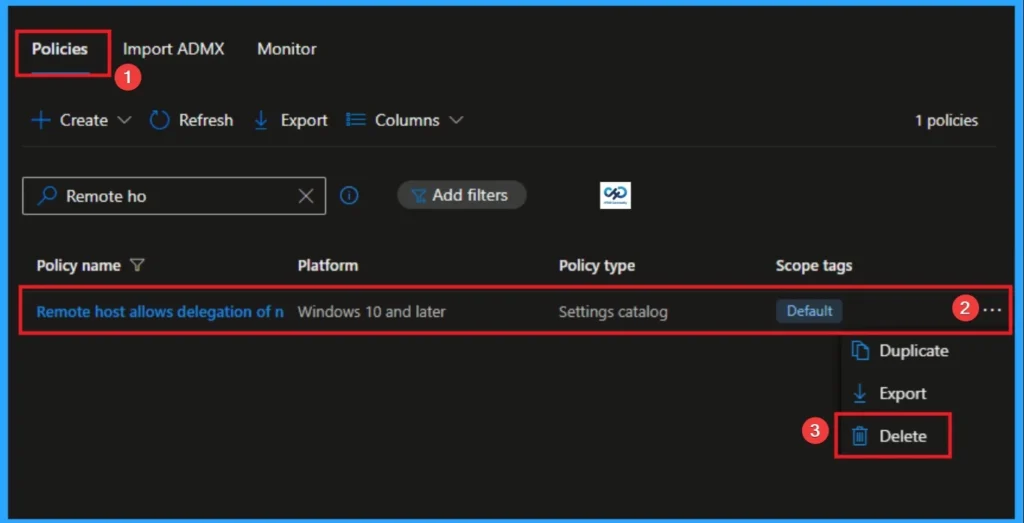
How to Delete Prevent Hackers from Stealing Credentials
You can easily delete the Policy from the Intune Portal. From the Configuration section, you can delete the policy. It will completely remove it from the client devices.
For detailed information, you can refer to our previous post – How to Delete Allow Clipboard History Policy in Intune Step by Step Guide.
Windows CSP Details
Remote host allows delegation of non-exportable credentials. When using credential delegation, devices provide an exportable version of credentials to the remote host. This exposes users to the risk of credential theft from attackers on the remote host.
| Name | Value |
|---|---|
| Name | AllowProtectedCreds |
| Friendly Name | Remote host allows delegation of non-exportable credentials |
| Location | Computer Configuration |
| Path | System > Credentials Delegation |
| Registry Key Name | Software\Policies\Microsoft\Windows\CredentialsDelegation |
| Registry Value Name | AllowProtectedCreds |
| ADMX File Name | CredSsp.admx |
Need Further Assistance or Have Technical Questions?
Join the LinkedIn Page and Telegram group to get the step-by-step guides and news updates. Join our Meetup Page to participate in User group meetings. Also, Join the WhatsApp Community and WhatsApp Channel to get the latest news on Microsoft Technologies. We are there on Reddit as well.
Author
Anoop C Nair has been Microsoft MVP for 10 consecutive years from 2015 onwards. He is a Workplace Solution Architect with more than 22+ years of experience in Workplace technologies. He is a Blogger, Speaker, and Local User Group Community leader. His primary focus is on Device Management technologies like SCCM and Intune. He writes about technologies like Intune, SCCM, Windows, Cloud PC, Windows, Entra, Microsoft Security, Career, etc.


Discussion