





Top 5 Windows 11 2026 Enhancements With Run Box Dark Mode and Copilot Upgrades
Key Takeaways
- Windows 11 will have a smarter Copilot search on the taskbar.
- File Explorer will get a dark Properties tab and simpler right-click menus.
- The Run box and other dialogs will look cleaner and more modern.
- Widgets will be easier to arrange with AI suggestions.
- Copilot AI will start helping with tasks automatically.
Hey, let’s discuss about Top 5 Windows 11 2026 Enhancements With Run Box Dark Mode and Copilot Upgrades. Microsoft has more features, enhancements, and AI planned for Windows 11 users this year. A major update arriving later this year is set to introduce several noticeable upgrades. It will bring a new Copilot-powered Search, a dark-themed Properties tab in File Explorer, a cleaner right-click menu, and a refreshed Run dialog, making the overall experience smoother and more modern.
Table of Contents
Top 6 Windows 11 2026 Enhancements With Run Box Dark Mode and Copilot Upgrades
Now that 2026 has arrived, it’s time to look ahead at what’s next for Windows 11. Microsoft is working on a variety of new features, improvements, and design changes that are expected to roll out in the months ahead, and we’ve had the chance to preview many of them early.
- 6 AI Agentic Features within Windows 365 Cloud PC
- How to Configure AI-Enabled Features for Windows 365 Cloud PCs
- Microsoft Copilot App Gains File Search and Vision Features in Latest Windows Update
Ask Copilot on the Taskbar
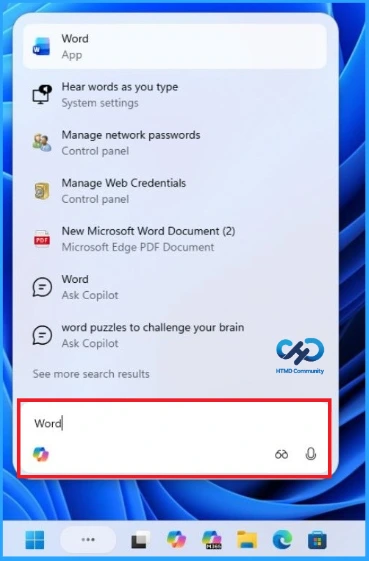
Windows 11 is making search smarter with Copilot. Soon, users will be able to set Copilot as the default search box on the Taskbar, replacing the old Windows Search. The new interface floats above the Taskbar and lets you quickly find apps, files, or even chat with Copilot, all in a cleaner, faster, and less cluttered design.
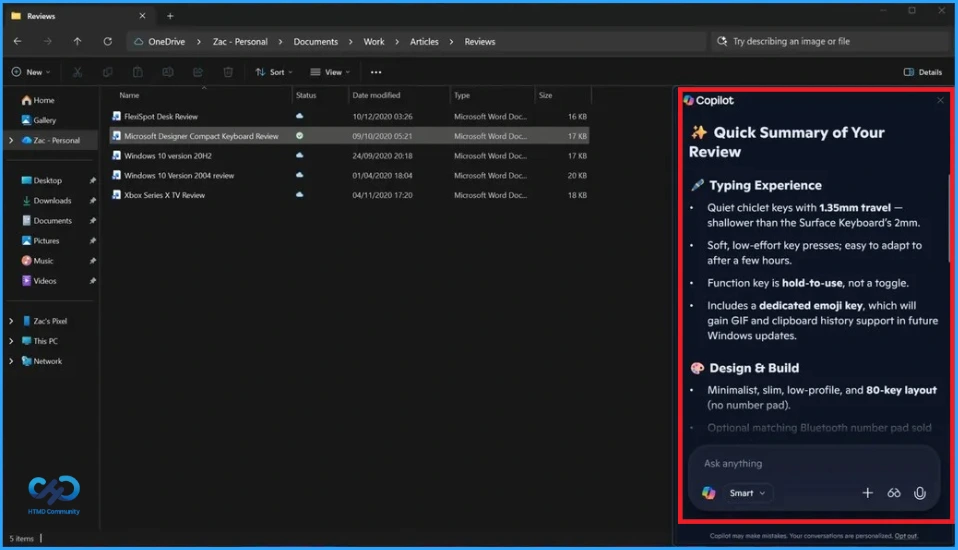
Copilot Chat in File Explorer
It seems likely that Microsoft may soon let users chat with Copilot directly in File Explorer. This would allow quick overviews or edits of files without opening them. While not officially confirmed, a hidden “Chat with Copilot” button has appeared in recent Windows 11 previews, suggesting Microsoft is testing this feature.

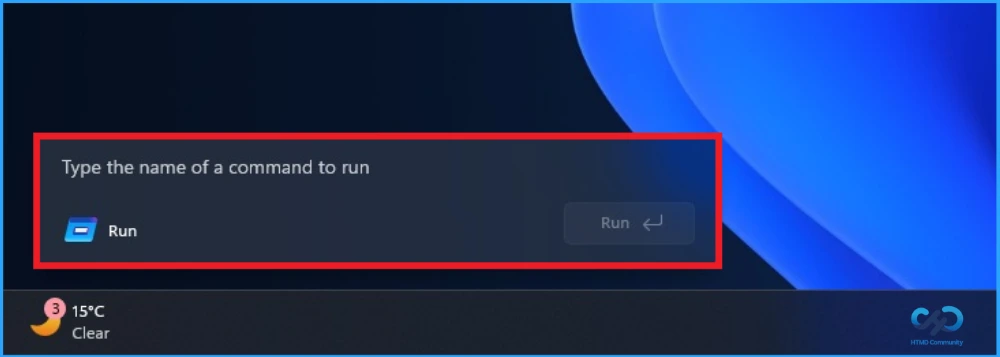
Modern Run Dialog
Even though Windows 11 refreshed the Task Manager, taskbar, and Start menu, the classic Win+R Run dialog stayed old-fashioned. That’s about to change Microsoft is reportedly working on a new, optional Run box with a clean, titlebar free design that matches Windows 11’s modern look. It will also show your recently used commands for faster access.
Agenda View on Taskbar
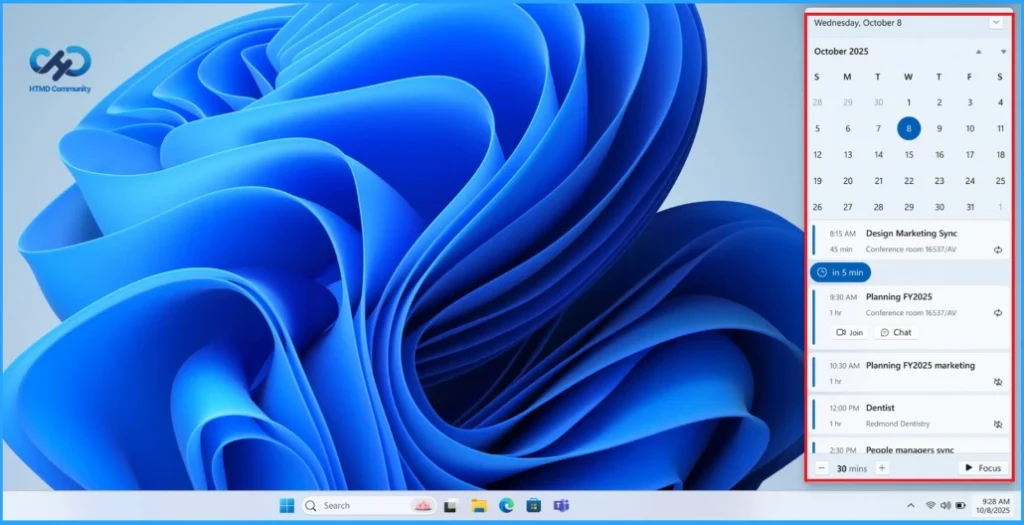
Windows 11 now brings back the ability to view your Outlook calendar in the Notifications Center (Win + N), a feature that existed in Windows 10. Once you sign in to the Outlook app, your events will sync and appear in the Taskbar calendar view. You can see today’s events, add new ones, and even join meetings directly from the calendar now enhanced with Copilot integration.
File Explorer context menu
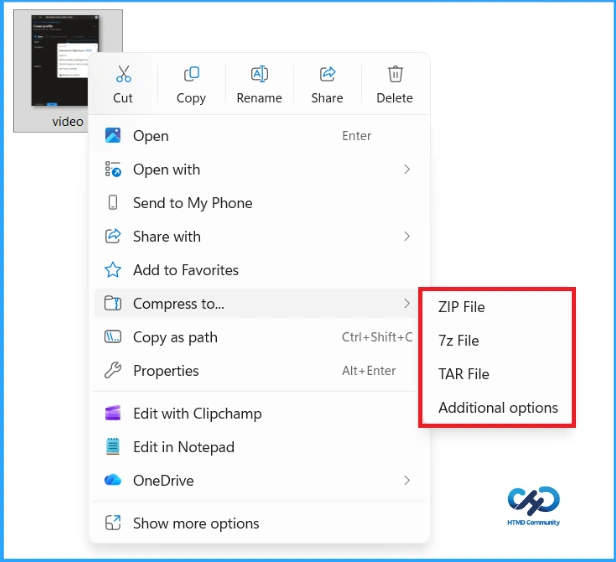
The right-click menu in Windows 11 feels messy for many users. It often loads slowly, shows repeated options, and takes up a lot of space especially on 16:9 screens with high display scaling. While having many apps installed adds to the clutter, the design also causes the problem. Microsoft plans to make it cleaner by moving some options into a sub menu.
Need Further Assistance or Have Technical Questions?
Join the LinkedIn Page and Telegram group to get the step-by-step guides and news updates. Join our Meetup Page to participate in User group meetings. Also, Join the WhatsApp Community and WhatsApp Channel to get the latest news on Microsoft Technologies. We are there on Reddit as well.
Author
Anoop C Nair has been Microsoft MVP for 10 consecutive years from 2015 onwards. He is a Workplace Solution Architect with more than 22+ years of experience in Workplace technologies. He is a Blogger, Speaker, and Local User Group Community leader. His primary focus is on Device Management technologies like SCCM and Intune. He writes about technologies like Intune, SCCM, Windows, Cloud PC, Windows, Entra, Microsoft Security, Career, etc.




Discussion