Skip to content
Intune Win32 Apps Require HTTPS on Microsoft Connected Cache for Secure Delivery and Certificate Readiness by 16 June 2026

Intune Win32 Apps Require HTTPS on Microsoft Connected Cache for Secure Delivery and Certificate Readiness by 16 June 2026

Written By Anoop C Nair
Last Updated February 23, 2026
Posted In Intune
SHARE

Key Takeaways:

  • Microsoft will require HTTPS for Connected Cache nodes
  • Change is aimed at reducing network bandwidth
  • Admins must generate a CSR on the cache node
  • Current limitations exist with certificate import on certain Windows Server

Let’s discuss Intune HTTPS Support for Connected Cache for Enterprise to Reduce Network Bandwidth Impact. Microsoft plan to enforce HTTPS content delivery for customers using Microsoft Connected Cache for Enterprise and Education from June 16th, 2026, or soon after.

Table of Contents

Intune HTTPS Support for Connected Cache for Enterprise to Reduce Network Bandwidth Impact

HTTPS for Microsoft Connected Cache nodes is require in Intune for delivering Win32 apps downloads and reduce the bandwidth impact on your network. Without this, devices will fall back to CDN, losing caching benefits.

Scope
Applies to Enterprise and Education environments using Connected Cache.
Other content (Windows updates, Office apps) can still be served via HTTP after the deadline.
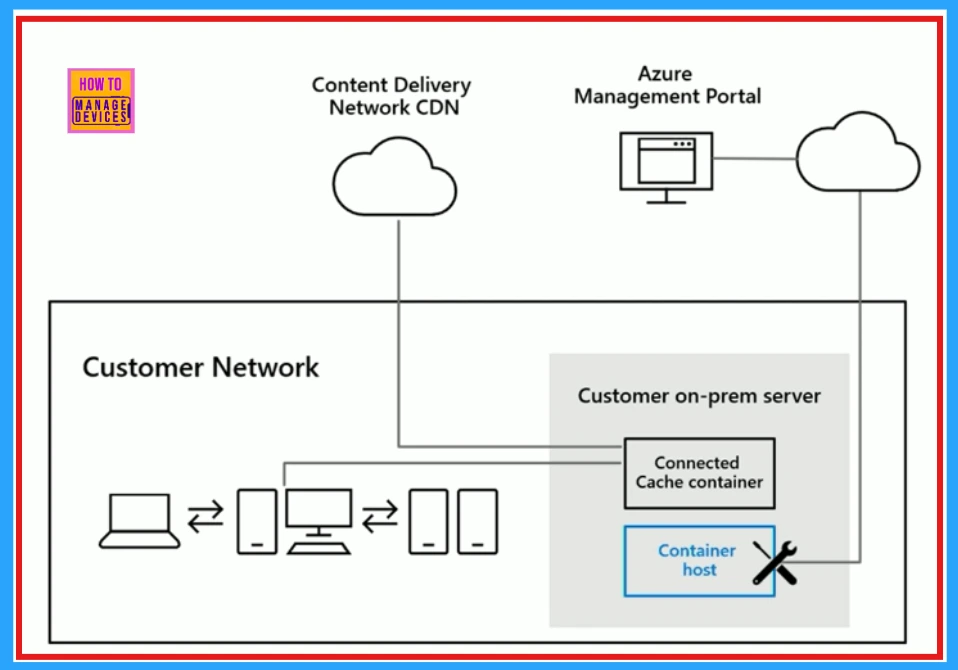
Intune HTTPS Support for Connected Cache for Enterprise to Reduce Network Bandwidth Impact – Table.1
Intune HTTPS Support for Connected Cache for Enterprise to Reduce Network Bandwidth Impact - Fig.1 - Creds to MS
Intune HTTPS Support for Connected Cache for Enterprise to Reduce Network Bandwidth Impact – Fig.1 – Creds to MS

Workflow Overview

There are some workflow includes with Intune HTTPS Support for Connected Cache. They are Generate CSR, Sign CSR, Import Certificate, Validate HTTPS.

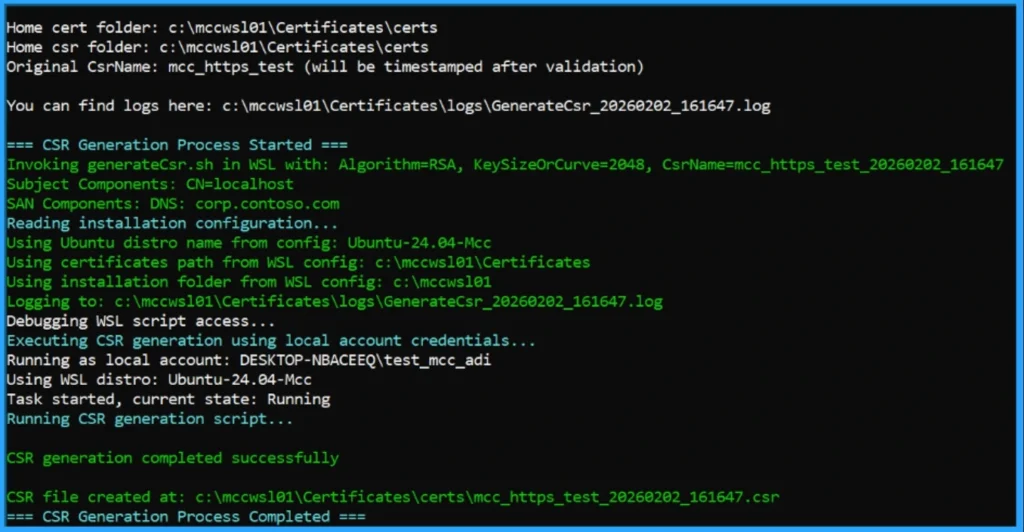
  • Generate CSR – On the Connected Cache node (must be created locally to retain the private key).
  • Sign CSR – With a trusted CA (public CA recommended; only unencrypted .crt format supported).
  • Import Certificate – Back into Connected Cache using provided scripts.
  • Validate HTTPS – Both server-side (port 443 binding, certificate correctness) and client-side (TLS handshake, CA trust).

Note- Linux Support: Same CSR → sign → import workflow, but handled with bash scripts (generateCsr.sh, importCert.sh) and Linux-specific paths/logs.

Patch My PC
Intune HTTPS Support for Connected Cache for Enterprise to Reduce Network Bandwidth Impact - Fig.2 - Creds to MS
Intune HTTPS Support for Connected Cache for Enterprise to Reduce Network Bandwidth Impact – Fig.2 – Creds to MS

HTTPS Support Configuration’s Known Issue

Almost, all customers will complete the HTTPS workflow without any problems, but there are a few known issues we want to call out. Microsoft addressed this issue and work to resolve.

  • ImportCert failures on Windows Server 2022/2025 with gMSA accounts.
  • Similar issues on Windows 11 with local runtime accounts.
  • Bug in container version 2119_e causing importCert to hang. Fixes are planned in upcoming releases.

Need Further Assistance or Have Technical Questions?

Join the LinkedIn Page and Telegram group to get the step-by-step guides and news updates. Join our Meetup Page to participate in User group meetings. Also, Join the WhatsApp Community  and WhatsApp Channel to get the latest news on Microsoft Technologies. We are there on Reddit as well.

Author

Anoop C Nair has been Microsoft MVP for 10 consecutive years from 2015 onwards. He is a Workplace Solution Architect with more than 22+ years of experience in Workplace technologies. He is a Blogger, Speaker, and Local User Group Community leader. His primary focus is on Device Management technologies like SCCM and Intune. He writes about technologies like Intune, SCCM,  Windows,  Cloud PC,  Windows, Entra, Microsoft Security, Career, etc.

Written by

Anoop C Nair is Workplace Technology solution architect with 25+ years of experience in global enterprise organizations such as JP Morgan, Capgemini, etc. Microsoft Certified Trainer. Microsoft MVP from 2015 onwards for consecutive 11+ years! He also conducts Intune and modern workplace tech training for enterprise organizations. He is Blogger, Speaker, and Founder of HTMD Community and HTMD Conference. His main focus is on Device Management technologies like Intune, Windows, Cloud PC. He writes about technologies like Intune, SCCM, Windows, Cloud PC, Windows, Entra, Microsoft Security.

Discussion

Join the discussion

Your email address will not be published. Required fields are marked *

Related guides

Intune

Simplify Windows Devices to Run Only the Required Applications using Intune

Key Takeaways Hey, let’s learn about Simplify Windows Devices to Run Only the Required Applications using Intune. This policy lets administrators replace the default windows shell with a custom or lightweight shell. it improves performance by using system resources and is useful for devices that run a dedicated application. If the policy is disabled or […]

AC Anoop C Nair 8 min read
Intune

Enhance macOS Compliance with Custom Security and Compliance Checks to Improve Device Security using Microsoft Intune

Key Takeaways In this post we are discussing about Enhance macOS Compliance with Custom Security and Compliance Checks to Improve Device Security using Microsoft Intune. Microsoft has announced the general availability of Custom Compliance Settings for macOS in Microsoft Intune. The feature helps organizations strengthen security controls while supporting many types of macOS management scenarios. […]

AC Anoop C Nair 4 min read
Intune

Manage Samsung Galaxy Firmware Versions to Improve Security and Compliance using Microsoft Intune

Key Takeaways In this post we are discussing Manage Samsung Galaxy Firmware Versions to Improve Security and Compliance using Microsoft Intune. Microsoft Intune has received a new update that expands firmware management capabilities for Samsung Galaxy devices through Firmware Versionsintegration. This enhancement gives IT administrators more control over firmware and operating system updates, helping them […]

AC Anoop C Nair 4 min read
Intune

MS Intune Adds Windows Registry Data Collection to Device Inventory for Single Values All Key Values and Subkeys

Key Takeaways Microsoft Intune 2607 introduces Windows Registry Data collection in Device Inventory, allowing IT admins to verify actual device configurations without relying on custom discovery or remediation scripts. Using the Properties Catalog, admins can collect registry information through Single Value, All Values Under a Key (Non-Recursive), or Same Value Across Subkeys. MS Intune Adds […]

AC Anoop C Nair 5 min read