





Microsoft Introduces Enhanced NTLM Auditing to Improve Windows Authentication Security
Key Takeaways
- Microsoft is working to reduce the use of the legacy authentication protocol NTLM.
- Enhanced NTLM auditing is now available in Windows 11 version 24H2 and Windows Server 2025.
- New event logs help administrators identify where and why NTLM authentication is used.
- The long-term goal is to move organizations toward stronger authentication methods such as Kerberos.
In this post we are discussing Microsoft Introduces Enhanced NTLM Auditing to Improve Windows Authentication Security. Microsoft is taking new steps to improve Windows authentication security by introducing enhanced auditing features to track the use of the legacy authentication protocol NTLM. During a security session, Maryam Gawita explained the company’s strategy to reduce NTLM usage while encouraging organizations to adopt more secure authentication methods such as Kerberos.
Table of Contents
Microsoft Introduces Enhanced NTLM Auditing to Improve Windows Authentication Security
NTLM has long been part of Windows authentication, but security experts consider it outdated and vulnerable to several attacks. Microsoft’s latest improvements aim to help administrators better understand where NTLM is still being used in their environments.
- Microsoft Plans To Disable NTLM By Default In Future Windows Versions
- New SCCM Hotfix KB15498768 NTLM Connection Fallback Update
- Windows 11 Security Feature Blocking NTLM over SMB for Advanced Threat Protection
- Microsoft Announces Deprecation of NTLM Authentication Protocols
How NTLM Authentication Works
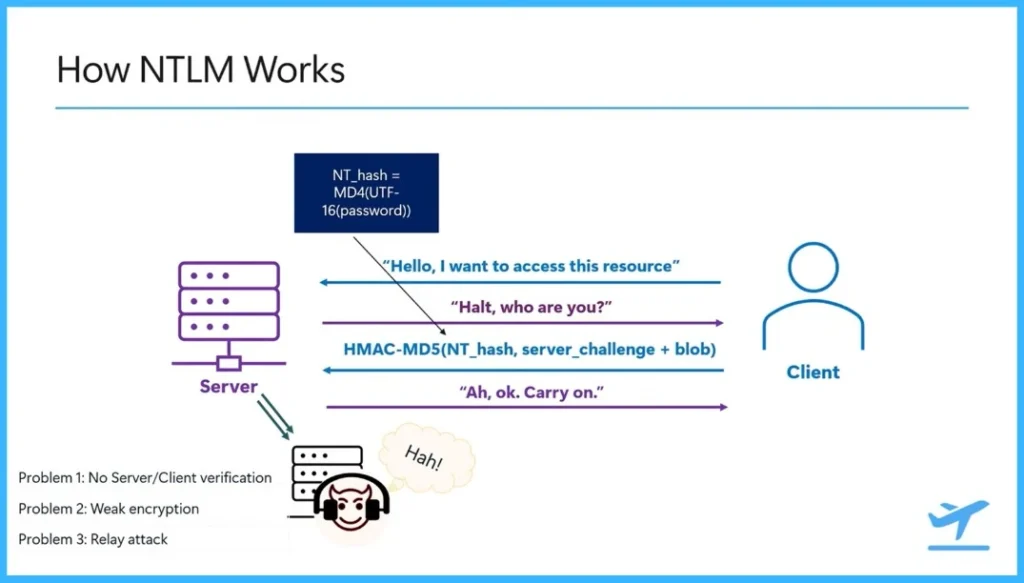
NTLM authentication works using a simple challenge response process between a client and a server. When a client tries to access a resource, it sends a request to the server. The server then sends back a challenge asking the client to prove its identity. The client creates a response using a password-based hash generated with MD4 and a calculation using HMAC-MD5. This response is sent back to the server, and if the information matches, the server allows the client to access the resource.
- However, this process has some security problems. NTLM does not properly verify the server’s identity, so an attacker could pretend to be a server and capture authentication data.
- It also uses older encryption methods, which makes it easier for attackers to perform relay or pass-the-hash attacks.
Where NTLM Is Mostly Used
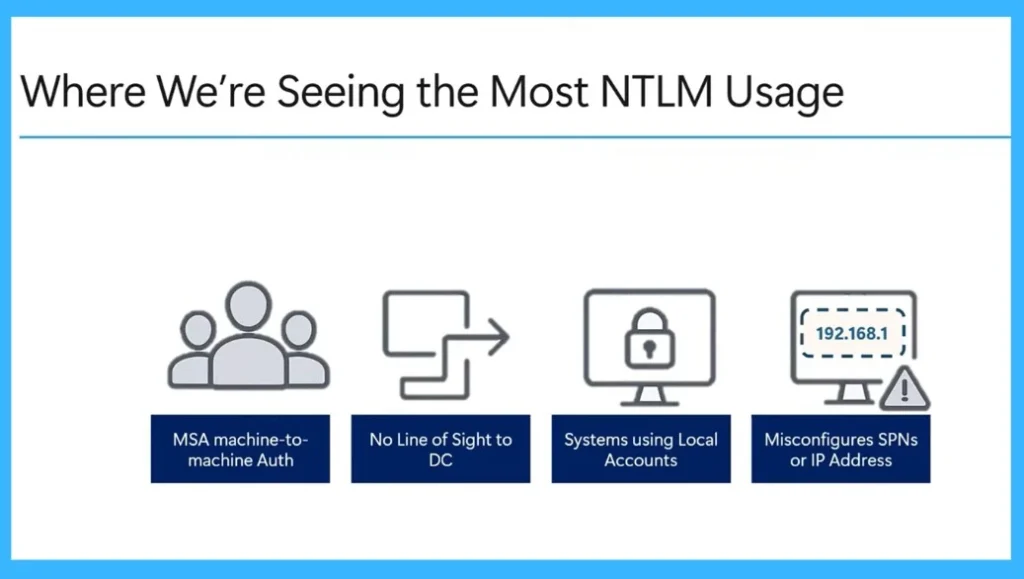
NTLM is still used in some situations where Kerberos authentication cannot be used. One common case is in workgroup environments where systems do not use domain-based accounts. It is also used when a client cannot connect to a domain controller, which means Kerberos authentication is not possible.

Another situation is when systems use local accounts instead of domain accounts. NTLM can also be used when authentication requests use an IP address instead of a SPN, or when the SPN does not match any service in the domain. In these cases, the system first tries Kerberos and then falls back to NTLM.
| Where We’re Seeing the Most NTLM Usage |
|---|
| MSA machine-to- machine Auth |
| No Line of Sight to DC |
| Systems using Local Accounts |
| Misconfigures SPNs or IP Address |
New NTLM Auditing Features in Windows
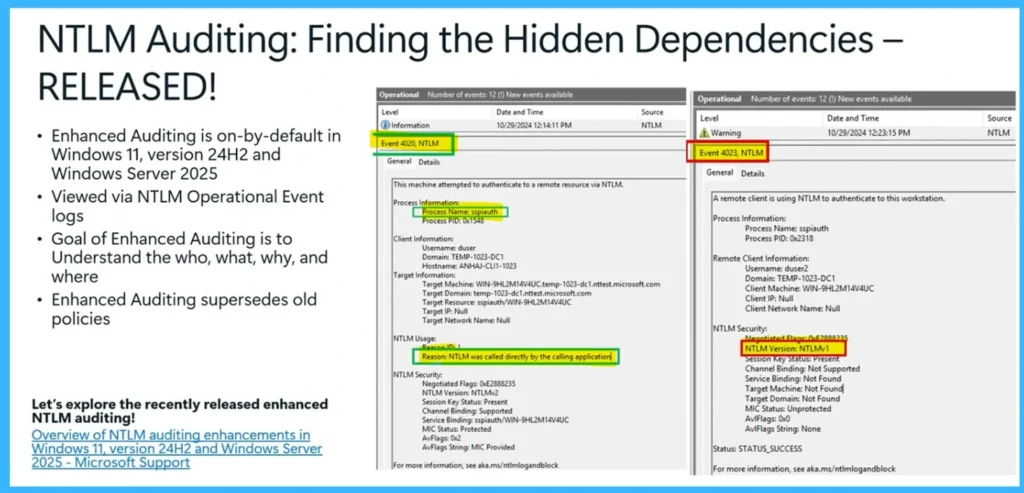
Enhanced NTLM auditing is enabled by default in Windows 11 version 24H2 and Windows Server 2025. This feature can be viewed through the NTLM Operational Event logs. The main goal of enhanced auditing is to help administrators understand who is using NTLM, what is using it, why it is being used, and where the authentication requests are coming from.
This enhanced auditing replaces older NTLM policies and provides more detailed information about NTLM usage in the environment. Administrators can check event logs such as Event 4020 and Event 4023 to see authentication activity and identify systems or applications that on NTLM.
Need Further Assistance or Have Technical Questions?
Join the LinkedIn Page and Telegram group to get the latest step-by-step guides and news updates. Join our Meetup Page to participate in User group meetings. Also, join the WhatsApp Community and the Whatsapp channel to get the latest news on Microsoft Technologies. We are there on Reddit as well
Author
Anoop C Nair has been Microsoft MVP for 10 consecutive years from 2015 onwards. He is a Workplace Solution Architect with more than 22+ years of experience in Workplace technologies. He is a Blogger, Speaker, and Local User Group Community leader. His primary focus is on Device Management technologies like SCCM and Intune. He writes about technologies like Intune, SCCM, Windows, Cloud PC, Windows, Entra, Microsoft Security, Career, etc.




Discussion