





7 Stages of Windows Zero Trust Lifecycle Management Helps Organizations Secure Update and Retire Devices Efficiently
Key Takeaways
- Windows Zero Trust Lifecycle Management protects devices throughout their entire lifecycle.
- Tools like Autopilot and Entra Join help set up devices securely from day one.
- Conditional Access protects corporate resources by allowing access only when specific security conditions are met.
- Microsoft Entra ID evaluates signals like user identity, device status, location, and risk to determine whether access should be granted.
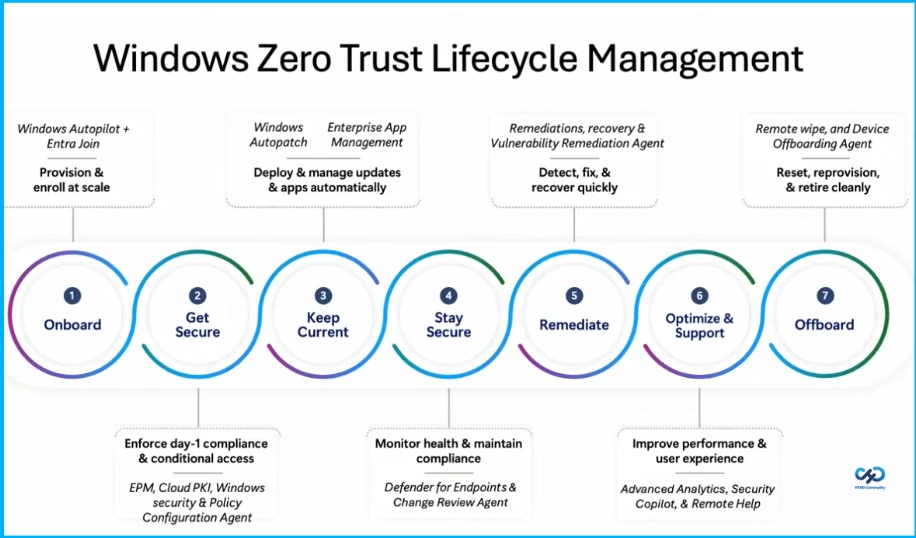
Hey, let’s discuss about 7 Stages of Windows Zero Trust Lifecycle Management Helps Organizations Secure Update and Retire Devices Efficiently. Windows Zero Trust Lifecycle Management focuses on securing devices throughout their entire lifecycle. It starts with Onboarding, where devices are provisioned and enrolled at scale using Windows Autopilot + Entra Join. Next is Get Secure, ensuring day 1 compliance and conditional access through EPM, Cloud PKI, Windows Security, and Policy Configuration Agent.
Table of Contents
Windows Zero Trust Lifecycle Management with Microsoft Intune
The lifecycle continues with Keep Current and Stay Secure, where updates and applications are deployed automatically using Windows Autopatch and Enterprise App Management, while device health and compliance are monitored with Defender for Endpoints and Change Review Agent.
If issues occur, Remediate helps detect, fix, and recover quickly using Remediations, Recovery, and Vulnerability Remediation Agent. Finally, Optimize & Support improves performance and user experience with Advanced Analytics,Security Copilot, and Remote Help, and Offboard securely resets, reprovisions, or retires devices using Remote Wipe and Device Offboarding Agent.
- 6 Core Security Pillars of Windows 11 Chip-to-Cloud Protection
- Protecting Endpoints with Zero Trust Principles and Microsoft Intune Capabilities
- Easy Method to Deploy Windows Cloud Input Protection Driver Setup using Intune
How Endpoint Privilege Management Works
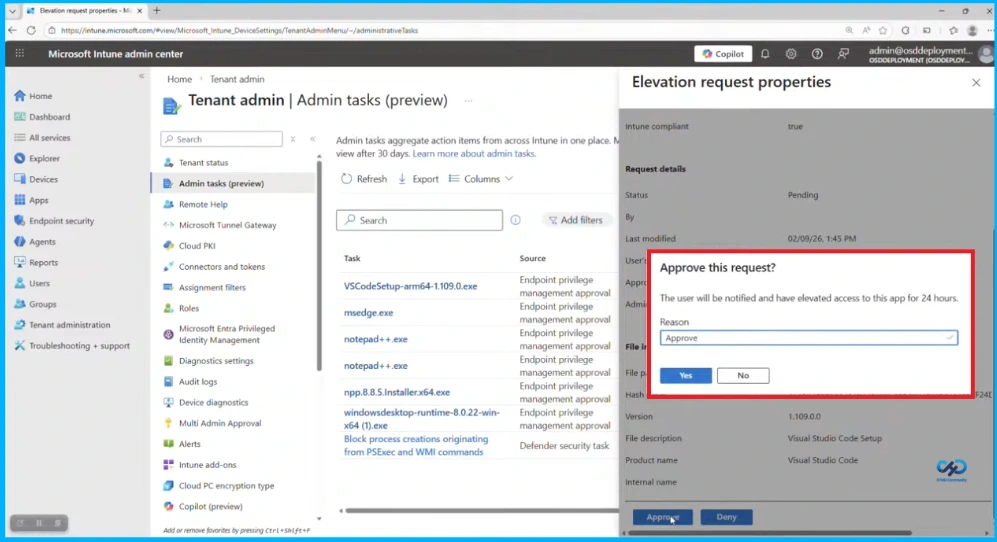
The screenshot shows the Admin Tasks section in the Microsoft Intune admin center, where administrators can review and manage elevation requests from users. When a user needs temporary administrator rights to run an application (such as an installer or tool), the request appears in the Admin Tasks list with details like the file name, source, and request status. The admin can open the request properties to review information such as the application, version, and compliance status, and then approve or deny the request.

Verify Explicitly with Conditional Access
Conditional Access ensures that users are authenticated and authorized using different signals such as user identity, location, device status, application, and risk level. By using policies in Microsoft Entra ID, organizations can control access to corporate resources based on conditions like location, approved devices, specific applications, and potential security risks. This helps protect sensitive data and ensures that only trusted users and secure devices can access company resources.
Conditional Access Policies
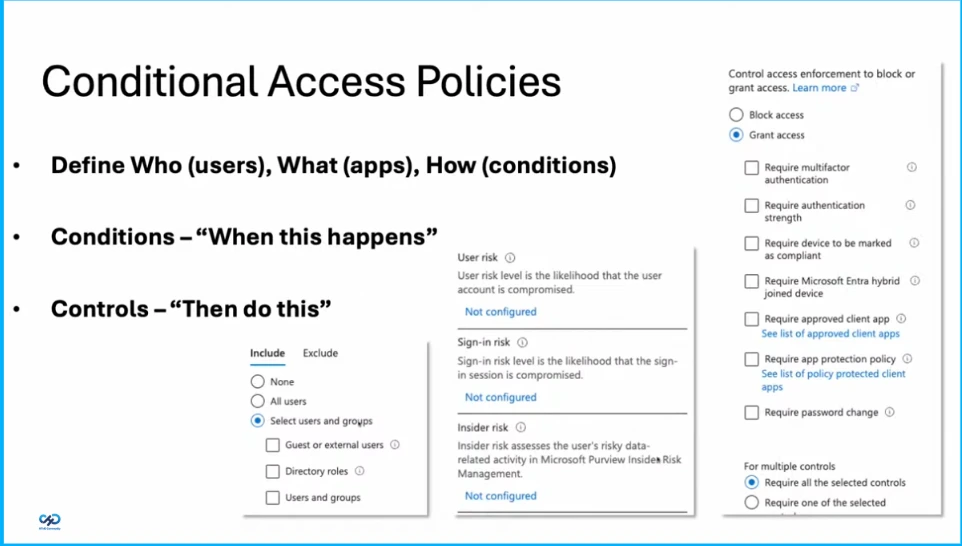
Conditional Access policies help organizations control access to applications and resources based on specific conditions. Administrators can define who can access the system, what they can access, and how access should be granted based on certain conditions such as user risk, sign-in risk, or device compliance. When these conditions are met, controls like requiring multi-factor authentication, compliant devices, or approved apps can be applied to either grant or block access, ensuring secure and controlled access to organizational resources.
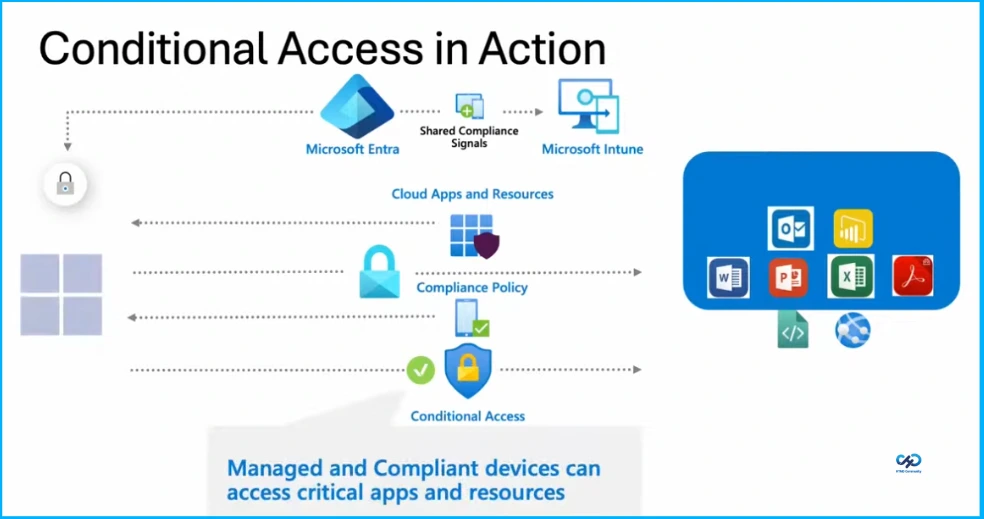
Conditional Access in Action
Conditional Access works by connecting Microsoft Entra and Microsoft Intune to control access to cloud applications and resources. Intune checks whether a device meets the required compliance policies, and this information is shared with Entra.
Need Further Assistance or Have Technical Questions?
Join the LinkedIn Page and Telegram group to get the latest step-by-step guides and news updates. Join our Meetup Page to participate in User group meetings. Also, join the WhatsApp Community and the Whatsapp channel to get the latest news on Microsoft Technologies. We are there on Reddit as well.
Author
Anoop C Nair is a Workplace Technology solution architect with 25+ years of experience. Microsoft Certified Trainer. Microsoft MVP from 2015 onwards for consecutive 11+ years! He is a blogger, Speaker, and Founder of HTMD Community and HTMD Conference. His main focus is on Device Management technologies like Intune, Windows, and Cloud PC. He writes about technologies like Intune, SCCM, Windows, Cloud PC, Entra, and Microsoft Security.




Discussion