





Exploring Security Copilot in Intune for Intelligent Device Management Troubleshooting and Advanced Analytics
Key Takeaways
- Copilot can be accessed from anywhere in Intune.
- It provides helpful prompt suggestions.
- It supports prompts for device troubleshooting and policy management.
- Prompts can open in Explorer for deeper analysis.
- Users can learn directly from Microsoft documentation.
Hey, let’s discuss about Exploring Security Copilot in Intune for Intelligent Device Management Troubleshooting and Advanced Analytics. Security Copilot in Intune provides AI-powered assistance that helps administrators manage devices, analyse data, and resolve issues more efficiently. Through Copilot Chat, admins can ask questions using natural language to find information, troubleshoot errors, and analyze policies. It also helps identify configuration issues, compare devices, and understand root causes quickly.
Table of Contents
Exploring Security Copilot in Intune for Intelligent Device Management Troubleshooting and Advanced Analytics
The explorer experience allows admins to easily explore data related to devices, apps, users, and compliance in one place and take quick management actions. Additionally, advanced analytics enhances reporting and troubleshooting by providing insights such as battery health, resource performance, and support for device data queries through KQL.
- Key Differences between Copilot Chat in Microsoft 365 and Paid Copilot License
- M365 Copilot Now Available for All Introducing the Free Copilot Chat License and Consumption Offering
- New Copilot Features in Microsoft 365 OneNote Copilot on OneNote Canvas Copilot Chat for Web and in Teams etc
Key Features
Copilot in Intune provides several useful features that help administrators work more efficiently. It offers anywhere access, allowing users to use Copilot chat across Intune while keeping context and history.
| Feature | Simple Description |
|---|---|
| Copilot Prompt Library | Provides ready-made prompt suggestions for common tasks. |
| Skills-Based Prompts | Helps with tasks like device troubleshooting, policy management, Surface devices, and Windows 365. |
| Microsoft Documentation Prompts | Allows users to run prompts and learn directly from official Microsoft documentation. |
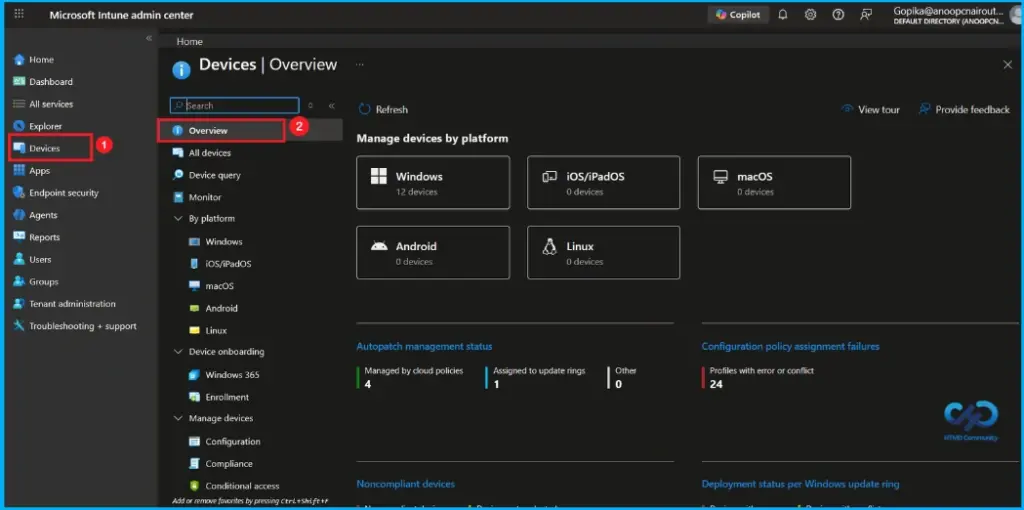
Microsoft Intune Admin Center Device Overview
The Microsoft Intune Admin Center device overview provides a quick snapshot of the organization’s device management status. It shows that 12 Windows devices are currently being managed, with no enrollments from other platforms and 4 devices are tracked under cloud-based policies. The dashboard also highlights 24 configuration policy assignment failures caused by errors or conflicts.

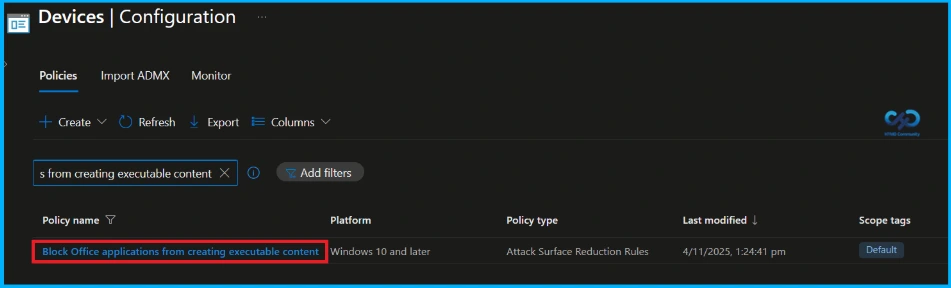
Device Configuration
In the Devices > Configuration section, where endpoint security policies are managed. A search for a single policy name (Block Office applications from creating executable content). This policy is configured for the Windows 10 and later platform and is used to manage Attack Surface Reduction (ASR) rules, which help strengthen device security by limiting potential attack vectors.
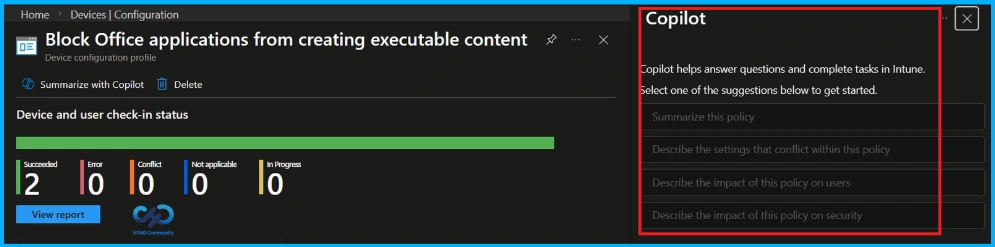
Monitoring Status and Copilot Chat
Here, the policy has success rate 2 devices, with no errors or conflicts. The Copilot panel on the right summarizes the policy settings and helps administrators understand the security configuration. Copilot helps answer questions and complete tasks in intune. Suggestions are summarize this policy, describe the setting that conflict within this policy, impact of this policy on user and impact of this policy on security.
Need Further Assistance or Have Technical Questions?
Join the LinkedIn Page and Telegram group to get the latest step-by-step guides and news updates. Join our Meetup Page to participate in User group meetings. Also, join the WhatsApp Community and the Whatsapp channel to get the latest news on Microsoft Technologies. We are there on Reddit as well.
Author
Anoop C Nair is a Workplace Technology solution architect with 25+ years of experience. Microsoft Certified Trainer. Microsoft MVP from 2015 onwards for consecutive 11+ years! He is a blogger, Speaker, and Founder of HTMD Community and HTMD Conference. His main focus is on Device Management technologies like Intune, Windows, and Cloud PC. He writes about technologies like Intune, SCCM, Windows, Cloud PC, Entra, and Microsoft Security.


Discussion