





Microsoft Intune Introduces Permission Level RBAC Visibility for Admins
Key Takeaways
- Ability to trace permissions end-to-end, from RBAC roles to role assignments and group memberships
- Enhanced Admin permissions node to quickly review user-level permissions with detailed permission and action breakdown
- Better support for auditing and compliance with clear mapping of how permissions are assigned across the environment
- Improved Admin permissions section to quickly check user access
In this post we are discussing, Microsoft Intune Introduces Permission Level RBAC Visibility for Admins. Microsoft Intune has introduced new updates to improve how administrators view and manage permissions. These enhancements focus on making Role-Based Access Control easier to understand. Administrators can now view all user permissions in one place and trace exactly how each permission is assigned using the new Roles by permission.
Table of Contents
Microsoft Intune Introduces Permission Level RBAC Visibility for Admins
This update smooth that process by providing clearer insights into user permissions and role assignments. The new features aim to improve visibility, troubleshooting, and auditing. Administrators can now quickly check permissions and also understand how those permissions are granted across roles and groups.
- Microsoft Introduces Platform Level Device Cleanup Rules in Intune with Scoped RBAC Permissions
- Create Custom Roles RBAC in Intune
- New Intune RBAC Permission for Android Device Enrollment Profiles
What’s New
The latest update in Microsoft Intune improves how admins manage permissions and access. Admins can now see all user permissions in one place and easily understand how each permission is assigned using the new Roles by permission feature. Security is also improved with Multi Admin Approval for role changes and faster access through Privileged Identity Management (PIM). In addition, updates to the admin permissions section and support for unlicensed admins make access management simpler and more controlled. The below you can see the new updates.
Admin Permissions View for User Accounts
Microsoft Intune now gives a single view where admins can see all permissions of a user in one place. This includes permissions given directly and those received through groups. Earlier, admins had to check different roles and groups separately. Now, they can quickly understand what access a user has.

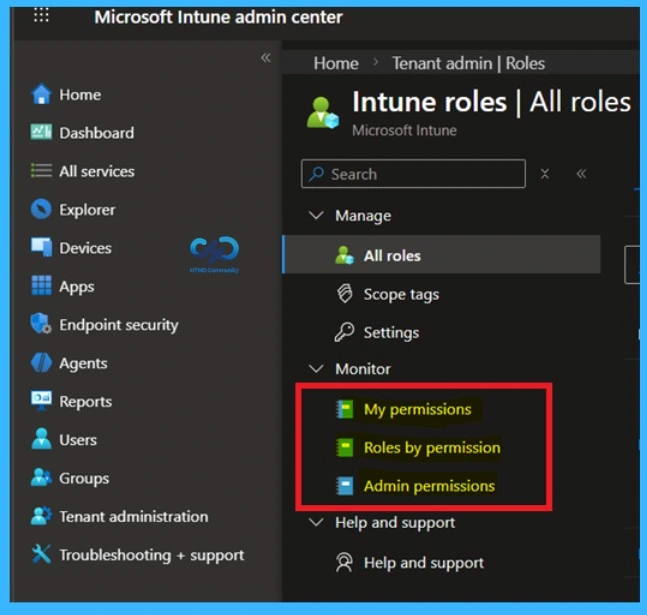
- By going to Tenant admin > Roles and expanding the Monitor section, admins can access several views that make it easier to understand what permissions users have in the tenant.
1. My Permissions
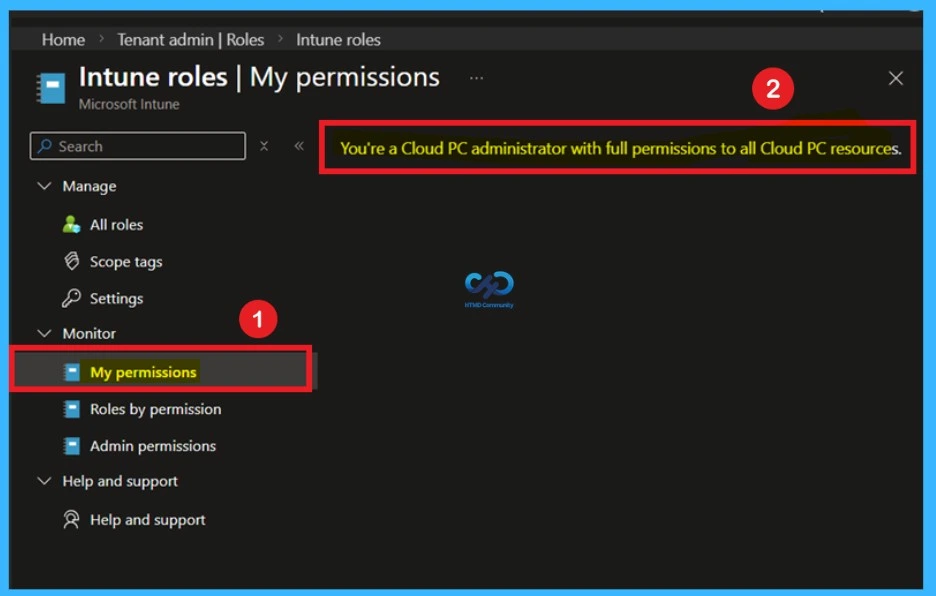
In the My permissions section, you can see all the permissions your account has in one combined list. These permissions come from different role assignments, including those assigned directly and through groups. This view helps you quickly understand what access you have. However, it does not show which role or group gave each permission.
2. Roles by Permission
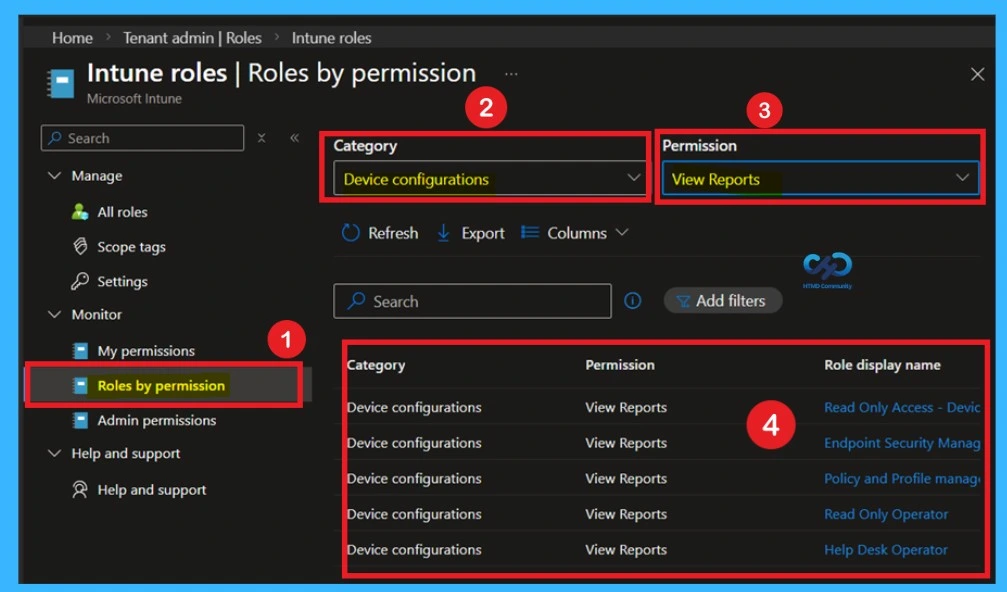
Here in the Roles by Permission view helps you understand how a specific permission is assigned. You can select a permission and then choose an action. Intune will then show all the details related to that permission. Here I select device configuration category and permission as view reports now you can see the result below.
| Roles by permission | Intune Shows |
|---|---|
| Role display name | The name of the built-in or custom RBAC role that grants the permission. |
| Role assignment display name | The name of the role assignment that assigns the role to groups of users. |
| Group name | The name of the group that receives that role assignment. |
3. Admin Permissions
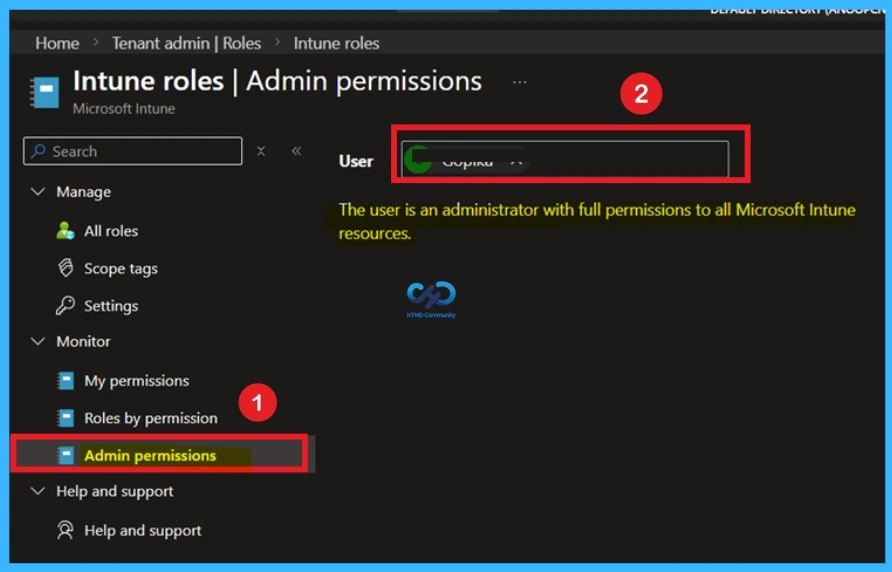
The “Admin permissions” section helps you check permissions for any user account. You just need to select a user, and Intune will show all the permissions assigned to that user. This page helps admins quickly check a user’s access level without going through different roles or settings. It makes permission checking easy and fast.
Need Further Assistance or Have Technical Questions?
Join the LinkedIn Page and Telegram group to get the latest step-by-step guides and news updates. Join our Meetup Page to participate in User group meetings. Also, join the WhatsApp Community and the Whatsapp channel to get the latest news on Microsoft Technologies. We are there on Reddit as well.
Author
Anoop C Nair is a Workplace Technology solution architect with 25+ years of experience. Microsoft Certified Trainer. Microsoft MVP from 2015 onwards for consecutive 11+ years! He is a blogger, Speaker, and Founder of HTMD Community and HTMD Conference. His main focus is on Device Management technologies like Intune, Windows, and Cloud PC. He writes about technologies like Intune, SCCM, Windows, Cloud PC, Entra, and Microsoft Security.


Discussion