





Reducing Latency with Fast Lane Notification Architecture in Intune
Key Takeaways
- Eventual consistency allowed only one notification per device every 30 minutes.
- Caused delays and an inconsistent user experience.
- Most updates happen within short time windows.
- Fast Lane uses priority queues to send notifications.
Hey, let’s discuss about the Reducing Latency with Fast Lane Notification Architecture in Intune. Eventual consistency is a model in distributed systems where changes are not immediately reflected across all nodes, but over time, all copies of the data become consistent.
Table of Contents
Reducing Latency with Fast Lane Notification Architecture in Intune
The earlier system followed an eventual consistency approach where only one fast notification was sent per device every 30 minutes. Any additional requests were neither attempted nor queued, and missed updates were postponed until the next device check-in, creating delays in applying changes.
This led to inconsistent user experiences and slower remediation, especially during peak hours. Observations showed that 30% of notifications within a 30-minute window targeted the same devices, while 90% of multiple changes occurred within 15 minutes, indicating that in most cases a single well-timed notification would have been sufficient.
- Zero Trust Workshop 3.0 Updated with AI Pillar 700 Security Controls Across 116 Groups and 33 Functional Swim Lanes
- Microsoft Explained about Intune Platform Challenges and Capacity Management
- Microsoft Explained about Intune Latency Issues No Control Your Control and Controlled by Service
Per-Device Notification Timing in Eventual Consistency
When a server-side change is detected, a timer starts for each device, and if no further updates occur within 3 minutes, a notification is sent. If additional changes happen during this window, notifications are delayed and queued for up to 10 minutes in small increments, ensuring efficient batching of updates. After a notification is delivered, new requests are held for up to an hour and then processed again at the start of the next cycle, while devices may still receive faster updates opportunistically when system capacity allows.

| Released | Work in Progress |
|---|---|
| No dropped notifications | Fast lane is coming for additional payloads |
| Time-bound delivery expectations(minimal impact to single change scenarios) | Windows/Mac IMEs: classic apps, scripts, custom compliance |
| Better experience for back-to-back change scenarios | MMP-C policy and configuration(EPM,Inventory) |
Fast Lane Architecture
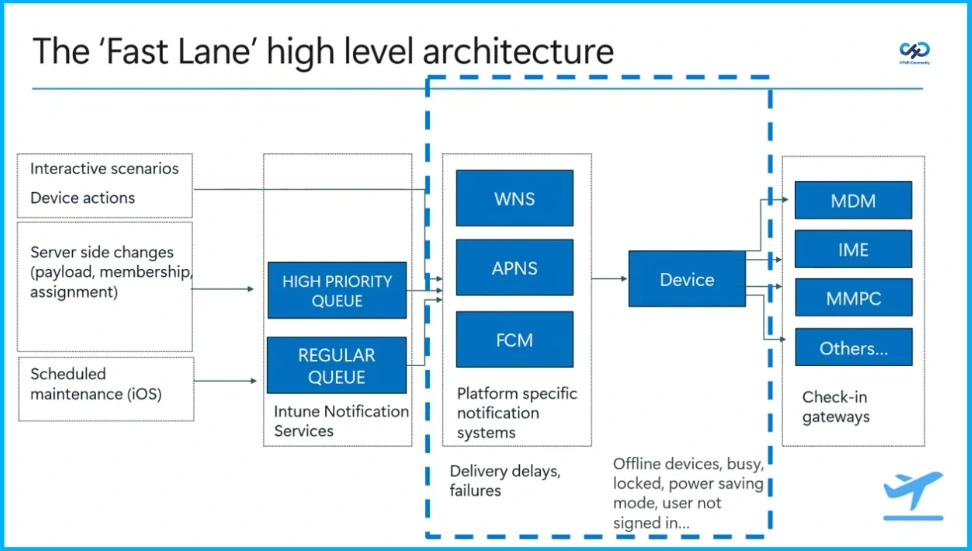
The“Fast Lane” architecture shows how updates and actions are sent from servers to devices. Device actions and server changes are first placed into high-priority or regular queues in the Intune Notification Service. These notifications are then sent through systems like WNS, APNS, and FCM to reach the device. Once the device receives them, it connects to services like MDM or IME to complete the task. However, delays can happen if the device is offline, locked, or in power-saving mode.
Notifications Resiliency
Notifications resiliency focuses on improving customer outcomes through enhanced reliability, delivery receipts, intent and prioritization, and better visibility of online or end-user presence. It also supports effective troubleshooting and diagnosability. Upcoming features will extend these capabilities to Remote Help and EPM requests, Windows Classic apps, scripts, custom compliance, device actions, and MDM policies and configuration changes, with IC3 as the primary approach and WNS as a fallback.
Need Further Assistance or Have Technical Questions?
Join the LinkedIn Page and Telegram group to get the step-by-step guides and news updates. Join our Meetup Page to participate in User group meetings. Also, Join the WhatsApp Community and WhatsApp Channel to get the latest news on Microsoft Technologies. We are there on Reddit as well.
Author
Anoop C Nair has been Microsoft MVP from 2015 onwards for 10 consecutive years! He is a Workplace Solution Architect with more than 22+ years of experience in Workplace technologies. He is also a Blogger, Speaker, and Local User Group Community leader. His primary focus is on Device Management technologies like SCCM and Intune. He writes about technologies like Intune, SCCM, Windows, Cloud PC, Windows, Entra, Microsoft Security, Career, etc.


Discussion