





Enhanced Device Info and Account Management on Windows 11 Settings
Key Takeaways
- Device Info and Account Management on Windows 11.
- The Settings Home page loads faster and fixes update download issues.
- The About page shows hardware specs again and adds graphics and storage info.
- Microsoft 365 Family users see an upgrade prompt that can be turned off.
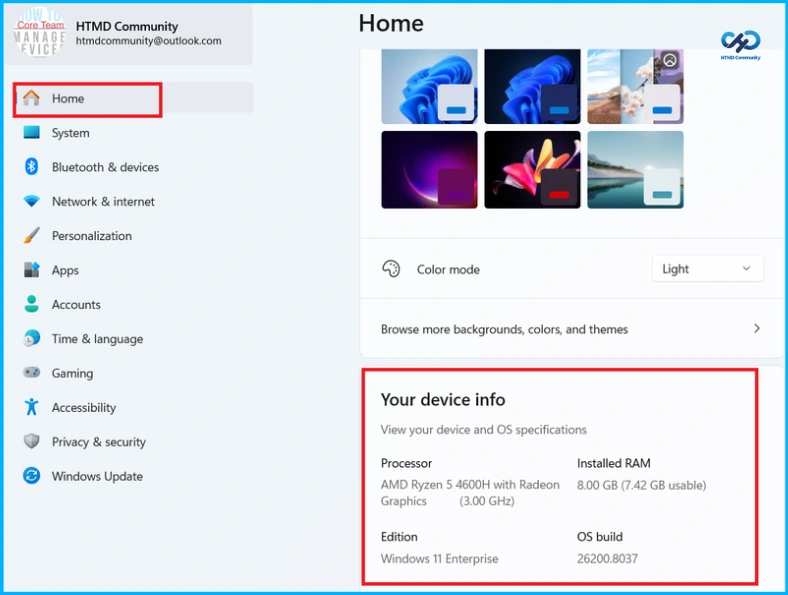
Hey, let’s discuss about Enhanced Device Info and Account Management on Windows 11 Settings. In the Settings app, the Home page isn’t changing drastically, but it does include some refinements to the Device info card to make it easier to understand. In addition, the Home page has been updated to improve loading performance, and users may also notice better reliability.
Table of Contents
Enhanced Device Info and Account Management on Windows 11 Settings
The Home page in Settings has been updated to improve loading performance and fix reliability issues related to downloading updates through Settings, System, and Advanced. The About page is also reverting a previous change, bringing back the hardware specification cards at the top, while adding graphics and storage details to the Device info section.
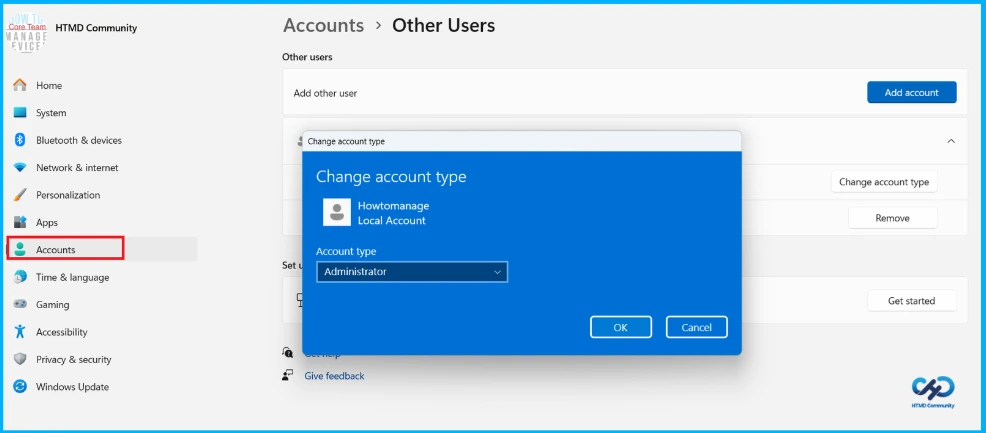
In the Accounts section, users with a Microsoft 365 Family plan connected to the device will now see an upgrade prompt, which can be turned off by disabling suggested content in Settings. Additionally, the other users page has been updated with a redesigned account type change dialog that better aligns with the Windows 11 design language.
| Section | Improvement |
|---|---|
| Settings > System > Advanced | Fixed reliability issues related to downloading updates |
- New Windows 11 OOBE Restore Feature Helps Users Recover Apps and Settings Quickly
- Easy Method to Hide Search on Windows 11 Taskbar Using Intune Policy Settings Catalog
- How to Change Add Remove Windows 11 PC from Workgroup using PowerShell Settings App
Improved Device Info Display on the Settings Home Page
The Settings Home page now features a clearer and more organized Device info section, making it easier for users to view important details about their system at a glance. This includes key specifications such as the processor type and speed, installed RAM, Windows edition, and the OS build number, all presented neatly in one place for quick reference.

Need Further Assistance or Have Technical Questions?
Join the LinkedIn Page and Telegram group to get the latest step-by-step guides and news updates. Join our Meetup Page to participate in User group meetings. Also, join the WhatsApp Community and the Whatsapp channel to get the latest news on Microsoft Technologies. We are there on Reddit as well
Author
Anoop C Nair is a Workplace Technology solution architect with 25+ years of experience. Microsoft Certified Trainer. Microsoft MVP from 2015 onwards for consecutive 11+ years! He is a blogger, Speaker, and Founder of HTMD Community and HTMD Conference. His main focus is on Device Management technologies like Intune, Windows, and Cloud PC. He writes about technologies like Intune, SCCM, Windows, Cloud PC, Entra, and Microsoft Security.




Discussion