





Microsoft Confirms Reset PC Failure Bug in Windows 11 After Recent Hotpatch Updates
Key Takeaways
- Certain Windows 11 hotpatch updates are causing reset failures
- Affected updates include KB5077212 and KB5079420
- Issue mainly impacts enterprise devices using Autopatch
- No data loss occurs despite the reset failure
- Microsoft has released a recovery update to fix the issue
In this post, we are discussing Microsoft Confirms Reset PC Failure Bug in Windows 11 After Recent Hotpatch Updates. Microsoft recently confirmed an issue in Windows 11 where certain hot patch updates are causing the “Reset this PC” feature to fail on some enterprise devices. This problem affects systems running Windows 11 Enterprise LTSC 2024, especially versions 24H2 and 25H2.
Table of Contents
Microsoft Confirms Reset PC Failure Bug in Windows 11 After Recent Hotpatch Updates
The issue is linked to recent hotpatch updates that were meant to improve security without requiring a system restart. However, after installing these updates, users may find that the reset option does not work properly when trying to either keep their files or remove everything. Despite the failure, Microsoft has clarified that there is no risk of data loss.
- Best Method to Enable Virtualization Based Security Using Microsoft Intune
- Best Way for Windows 11 24H2 Upgrade using Intune and Windows Update for Business WUfB Deployment
- Windows 11 24H2 Monthly Patching Got Faster Installation Reboot and Less CPU usage with the new Client Servicing Stack
- Configure Automatic Remediation for Windows Hotpatch Devices using Intune
What Is the Issue?
Microsoft confirmed that installing the February and March 2026 hotpatch updates has introduced a bug in the “Reset this PC” feature. This feature, also known as Push Button Reset, allows users to reinstall Windows while keeping files or removing everything. After installing these updates, the reset process may fail before completion. This creates problems for IT administrators and users who rely on this option to fix system issues.
| Which Updates Are Affected? |
|---|
| KB5077212 |
| KB5079420 |
Checking Installed Updates in Windows 11
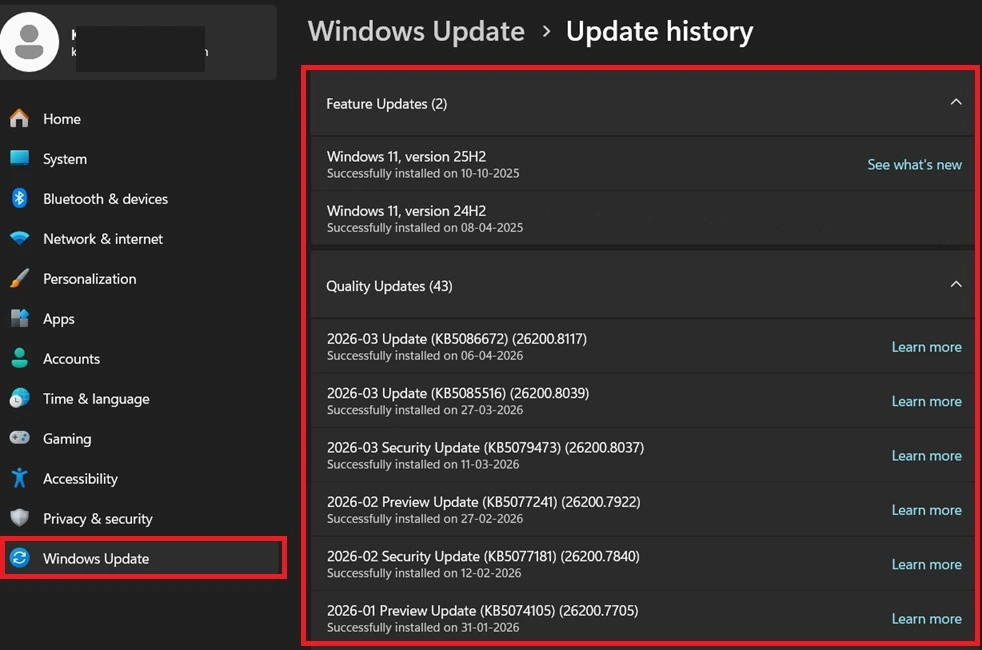
In the Windows Update history page, where users can view all installed updates on their system. By navigating to this section, users can check if updates like KB5077212 or KB5079420 are installed. If these updates appear in the list, the device may be affected by the reset problem, making this step important for identifying the issue quickly.

- Windows Settings> Windows Update> Update History
Understanding Hotpatch Updates in Intune
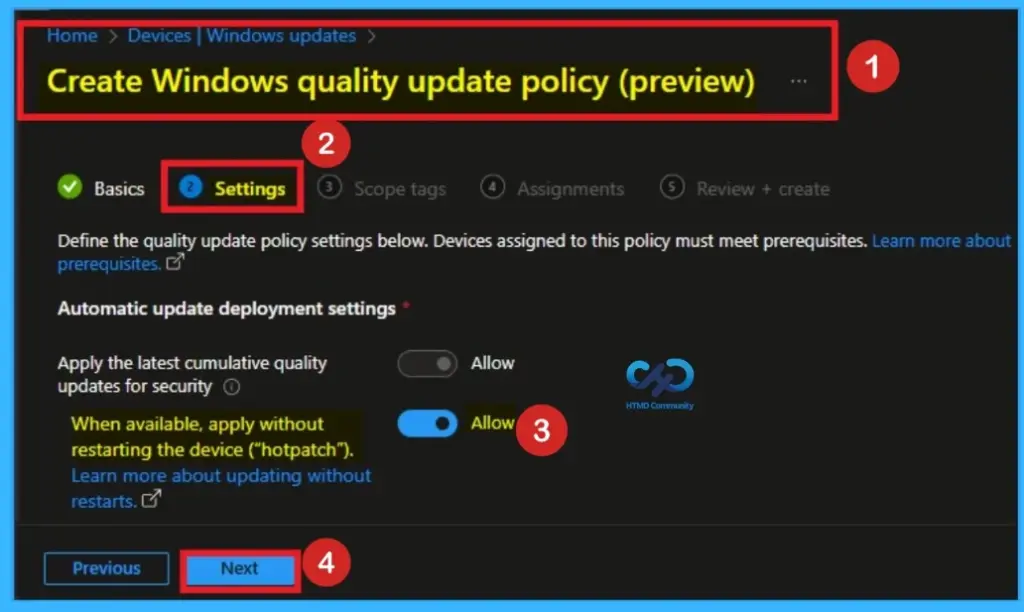
Microsoft Intune allows organizations to manage Windows updates using policies, including enabling the hotpatch feature. As shown in the image, administrators can choose to apply security updates without restarting the device. This helps businesses avoid interruptions, but in this case, the same hotpatch is linked to the reset issue affecting some Windows 11 enterprise systems.
How to Fix the Issue
To fix this problem, you need to install the recovery update provided by Microsoft. IT administrators should install KB5079471 on the affected devices. After installing this update, the Reset this PC feature will start working properly again. The good news is that this fix only needs to be installed once, and there is no risk of losing any personal data.
Need Further Assistance or Have Technical Questions?
Join the LinkedIn Page and Telegram group to get the step-by-step guides and news updates. Join our Meetup Page to participate in User group meetings. Also, Join the WhatsApp Community and WhatsApp Channel to get the latest news on Microsoft Technologies. We are there on Reddit as well.
Author
Anoop C Nair has been Microsoft MVP for 10 consecutive years from 2015 onwards. He is a Workplace Solution Architect with more than 22+ years of experience in Workplace technologies. He is a Blogger, Speaker, and Local User Group Community leader. His primary focus is on Device Management technologies like SCCM and Intune. He writes about technologies like Intune, SCCM, Windows, Cloud PC, Windows, Entra, Microsoft Security, Career, etc.


Discussion