





Microsoft Announces Teams Optimization for Windows App on iOS and Android
Key Takeaways
- Teams optimizations are now generally available for Windows App on iOS and Android
- Improves audio and video performance in virtual desktop environments
- Uses media redirection to process audio or video on the local device
- Supports both Windows 365 and Azure Virtual Desktop
Microsoft Announces Teams Optimization for Windows App on iOS and Android
In this post we are discussing, Microsoft Announces Teams Optimization for Windows App on iOS and Android. Microsoft has officially announced the general availability of Teams optimizations for Windows App on both iOS and Android devices. This update is a better for improving the virtual desktop experience for users to work easily on mobile devices to access work environments like Windows 365 and Azure Virtual Desktop.
Table of Contents
Microsoft Announces Teams Optimization for Windows App on iOS and Android
With this release, users can now enjoy a more easy and responsive experience while attending meetings through Microsoft Teams. The optimizations focus on enhancing audio and video performance, which has often been a challenge in virtualized environments accessed from mobile devices.
- Microsoft Teams Meeting Join Failure After Microsoft Edge Update Disrupts Users
- Microsoft Teams on Android to Support Third-Party Meetings with SIP Integration
- How to Create Windows 365 Frontline Dedicated Cloud PCs using Intune
- How to Set Up Windows 365 Cloud PCs with Autopilot Device Preparation
- Best Guide to Install Windows App from New Microsoft Store in Intune
- How to Set Up Windows 365 Cloud Apps Using Microsoft Intune
What’s New in This Release
This update introduces Teams optimisations using the WebRTC Redirector Service. It allows audio and video processing to happen on the user’s local mobile device instead of within the virtual machine. This reduces latency and improves overall meeting quality.
With these optimisations, users joining meetings from mobile devices can expect smoother calls, better audio clarity, and more stable video performance. The experience is designed to feel similar to using Teams directly on a local device, even when connected through a virtual desktop.

Windows Access Across Devices with Windows App
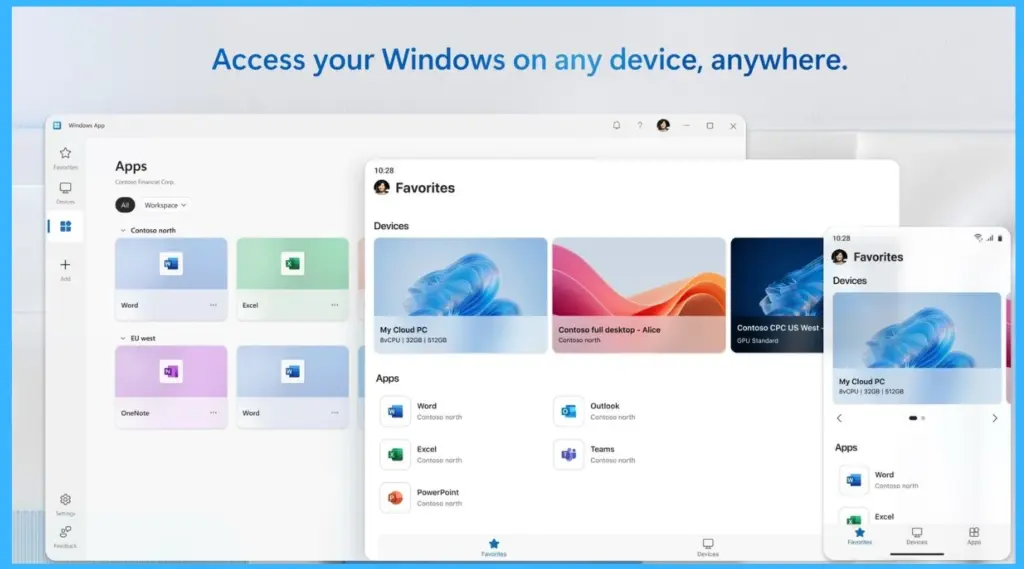
Users can access their Windows environment from multiple devices using the Windows App. Whether connecting from a desktop, tablet, or mobile phone, users can easily open their Cloud PC and apps through services like Windows 365 and Azure Virtual Desktop. The interface remains consistent across devices, allowing users to continue their work from anywhere.
- It also provides access to essential applications, including Microsoft Teams, supporting a flexible and connected work experience.
| Optimization Area | Description |
|---|---|
| Improved audio and video handling | Enhances performance during Teams calls and meetings for smoother communication. |
| Consistent media experiences | Provides stable audio/video quality across varying network conditions. |
| Familiar Teams experience on mobile | Ensures a seamless and recognizable Teams interface when joining meetings from mobile devices using Windows App. |
| Public preview evaluation | Customers tested these optimizations in real-world scenarios before general availability. |
Need Further Assistance or Have Technical Questions?
Join the LinkedIn Page and Telegram group to get the latest step-by-step guides and news updates. Join our Meetup Page to participate in User group meetings. Also, join the WhatsApp Community and the Whatsapp channel to get the latest news on Microsoft Technologies. We are there on Reddit as well
Author
Anoop C Nair is a Workplace Technology solution architect with 25+ years of experience. Microsoft Certified Trainer. Microsoft MVP from 2015 onwards for consecutive 11+ years! He is a blogger, Speaker, and Founder of HTMD Community and HTMD Conference. His main focus is on Device Management technologies like Intune, Windows, and Cloud PC. He writes about technologies like Intune, SCCM, Windows, Cloud PC, Entra, and Microsoft Security.

Discussion