





New Microsoft Security Recommendation to Block mshta.exe and Reduce Attack Risks
Key Takeaways
- New recommendation to block outbound traffic from mshta.exe.
- Requires admin action to enable.
- This recommendation helps reduce risk from living-off-the-land binary attacks
- Helps improve endpoint security and reduce attacks.
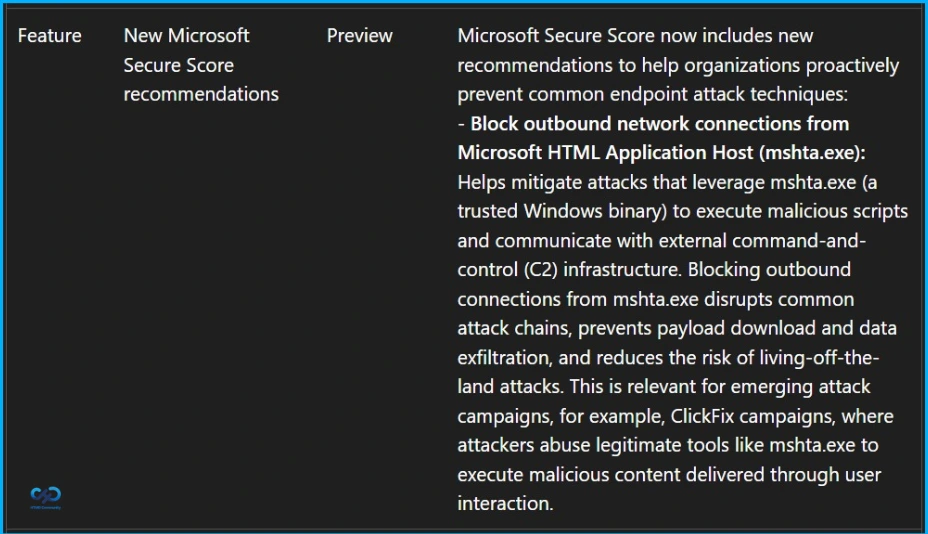
Hey, let’s discuss about New Microsoft Security Recommendation to Block mshta.exe and Reduce Attack Risks. Microsoft introduces a new Microsoft Secure Score recommendation in Microsoft Defender for Endpoint (MDE) to help organizations strengthen endpoint security and reduce exposure to common attack techniques. This recommendation focuses on blocking outbound traffic from mshta.exe, a legitimate Windows binary that is frequently abused by attackers to execute malicious scripts.
Table of Contents
New Microsoft Security Recommendation to Block mshta.exe and Reduce Attack Risks
Implementing this recommendation helps reduce risk from living-off-the-land binary (LOLBIN) attacks and improves your overall security posture.
- Microsoft Security Update Guide for Information on Security Vulnerabilities
- Maester Microsoft Security Test Automation Framework
- How to Block Office Applications from Creating Executable Content in Microsoft Defender using Intune
Rollout Timeline
The Public Preview rollout begins in late March 2026 and is expected to complete by early April 2026, while the General Availability (Worldwide) rollout also begins in late March 2026 and is expected to complete by late May 2026.
| How this Affects |
|---|
| Admins managing Microsoft Defender for Endpoint and Microsoft Secure Score. |
What will Happen
A new Microsoft Secure Score recommendation, “Block outbound traffic from mshta.exe” will be introduced and will influence the Secure Score depending on whether it is applied. It is not turned on by default and requires administrator configuration. Users will not experience any visible changes unless the organization enforces this policy.

Why this Matter
mshta.exe is often misused by attackers to download and run malicious code from remote locations. Restricting its outbound network access helps minimize the attack surface and supports modern best practices for strengthening endpoint security.
How to Prepare
Review the new recommendation in Microsoft Secure Score when it becomes available, evaluate any potential business or scripting dependencies before applying it, implement the recommended configuration to enhance your organization’s security posture, and communicate the changes to your security and endpoint management teams.
Need Further Assistance or Have Technical Questions?
Join the LinkedIn Page and Telegram group to get the latest step-by-step guides and news updates. Join our Meetup Page to participate in User group meetings. Also, join the WhatsApp Community and the Whatsapp channel to get the latest news on Microsoft Technologies. We are there on Reddit as well
Author
Anoop C Nair has been Microsoft MVP for 10 consecutive years from 2015 onwards. He is a Workplace Solution Architect with more than 22+ years of experience in Workplace technologies. He is a Blogger, Speaker, and Local User Group Community leader. His primary focus is on Device Management technologies like SCCM and Intune. He writes about technologies like Intune, SCCM, Windows, Cloud PC, Windows, Entra, Microsoft Security, Career, etc.

Discussion