






4 Key Ways Microsoft Intune Helps Reduce Vulnerability Risk and Improve Security Posture
Key Takeaways
- Windows Autopatch helps send updates automatically without manual work.
- Hotpatch allows some updates without restart, so protection is faster.
- Updates for Microsoft 365 apps can be tracked and controlled more easily.
- Companies can block outdated devices from accessing company data.
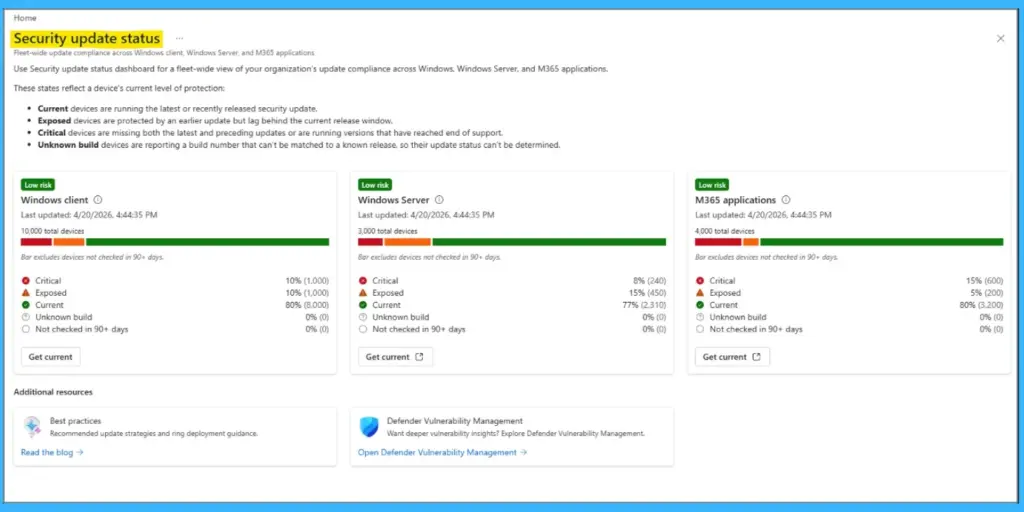
In this post, 4 Key ways Microsoft Intune Helps Reduce Vulnerability Risk and Improve Security Posture. Microsoft recently updated Microsoft Intune with a new security update status dashboard, now generally available, to help organizations track and manage updates more effectively across Windows devices, servers, and Microsoft 365 Apps. This new feature gives IT teams a better, centralized view of which devices arefully updated. It is designed to make it easier to identify risks, prioritize fixes, and ensure systems stay protected without switching between multiple tools.
Table of Contents
Table of Contents
4 Key Ways Microsoft Intune Helps Reduce Vulnerability Risk and Improve Security Posture
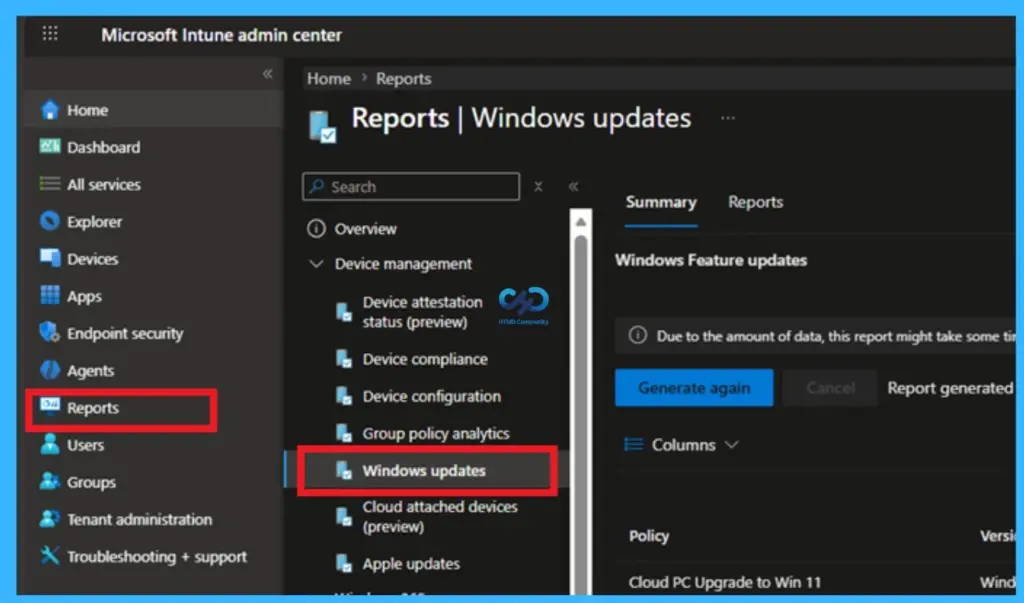
The update comes at a time when AI is speeding up vulnerability discovery, reducing the time between a security flaw being found. With this new dashboard and related capabilities, Microsoft aims to help organizations respond faster and reduce threats. To navigate Security Update Status dashboard in Intune Go to the Intune admin center > Reports > Security update status.
- Managing Real Time Protection and Security Updates During Windows OOBE using Intune
- New Capabilities in Windows Autopilot Device Provisioning Real Time Monitoring App and Script Provisioning
- Intune Enrollment Status Page Troubleshooting
What’s New – Security Update Status Dashboard
The new dashboard in Microsoft Intune provides a single view of update compliance across Windows devices, servers, and Microsoft 365 Apps. It helps IT teams quickly understand which systems are updated and which are falling behind. This visibility makes it easier to prioritize actions, track deployment progress, and present clear security status updates. Instead of switching between multiple tools, teams can now on one dashboard for accurate and current data.
| Four Ways Intune Helps Reduce Vulnerability Risk | What It Does | Why It Matters |
|---|---|---|
| Windows Autopatch | Automates update deployment with ring-based rollout and expedited updates for critical vulnerabilities | Reduces manual effort and speeds response to urgent threats |
| Hotpatch Updates | Applies fixes in-memory without requiring frequent reboots | Minimizes downtime and closes gaps faster |
| Microsoft 365 Apps Patching | Provides admin center visibility and Cloud Update controls for enforcement and rollback | Ensures Office apps stay current and secure |
| Server Updates– Configuration Manager or Azure Arc to accelerate compliance and operational workloads | Uses Configuration Manager and Azure Arc to streamline patching across hybrid or multicloud estates | Extends consistent patching to servers, with integration into Defender Vulnerability Management |
Need Further Assistance or Have Technical Questions?
Join the LinkedIn Page and Telegram group to get the latest step-by-step guides and news updates. Join our Meetup Page to participate in User group meetings. Also, join the WhatsApp Community and the Whatsapp channel to get the latest news on Microsoft Technologies. We are there on Reddit as well.

Author
Anoop C Nair has been Microsoft MVP for 10 consecutive years from 2015 onwards. He is a Workplace Solution Architect with more than 22+ years of experience in Workplace technologies. He is a Blogger, Speaker, and Local User Group Community leader. His primary focus is on Device Management technologies like SCCM and Intune. He writes about technologies like Intune, SCCM, Windows, Cloud PC, Windows, Entra, Microsoft Security, Career, etc.


Discussion