





Preview New Device View in MS Intune Simplifies Device Actions with Better Layout and Reporting Access
Key Takeaways
- Microsoft Intune now includes a redesigned device page in public preview.
- The new layout replaces multiple navigation sections with a tab-based interface.
- Device actions, reports, properties, and hardware details are grouped into four main tabs.
- The updated view currently works only when devices are opened from the All-Devices section.
In this post we are discussing Preview New Device View in MS Intune Simplifies Device Actions with Better Layout and Reporting Access. MS Intune has introduced a redesigned device management page in the Intune admin center as part of a new public preview. The updated experience focuses on how administrators interact with managed devices by bringing important information into a more unified layout.
Preview New Device View in MS Intune Simplifies Device Actions with Better Layout and Reporting Access
Microsoft has grouped commonly used controls, reports, and device actions into a cleaner structure that keeps information easier to access. The update is especially useful for IT teams handling compliance checks, device actions, and support requests across large environments. Although the preview does not introduce new device management capabilities, it changes how administrators interact with existing tools inside the Intune admin center.
- Require Password when Computer Wakes on Battery using Intune
- How to Collect Physical and Virtual Memory Information using Intune Properties Catalog
- Configure Cloud PC RDP Properties using Intune Settings Catalog
- Explore New Devices Experience in Intune Admin Portal
What’s New
The new device management experience in Microsoft Intune introduces a cleaner and more organized interface designed to simplify daily administration tasks. Microsoft has added grouped device commands, tab-based navigation, centralized reporting tools, and improved visibility into important device signals within a single view. The updated layout also includes collapsible sections and easier access to troubleshooting actions, helping administrators manage devices more efficiently with fewer navigation steps.
- New Preview new device view toggle available in the Devices > All Devices section of the Microsoft Intune admin center.
- The toggle provides quick access to the public preview experience.
| What’s New |
|---|
| Easier-to-access grouped commands, clearly and consistently ordered across device types. |
| Switch easily between tabs for your most important views. |
| Get important signals in a single pane of glass before diving deeper with tools and reports. |
| Find focus with collapsible sections and more space. |

Redesigned Device Page with Tab-Based Navigation
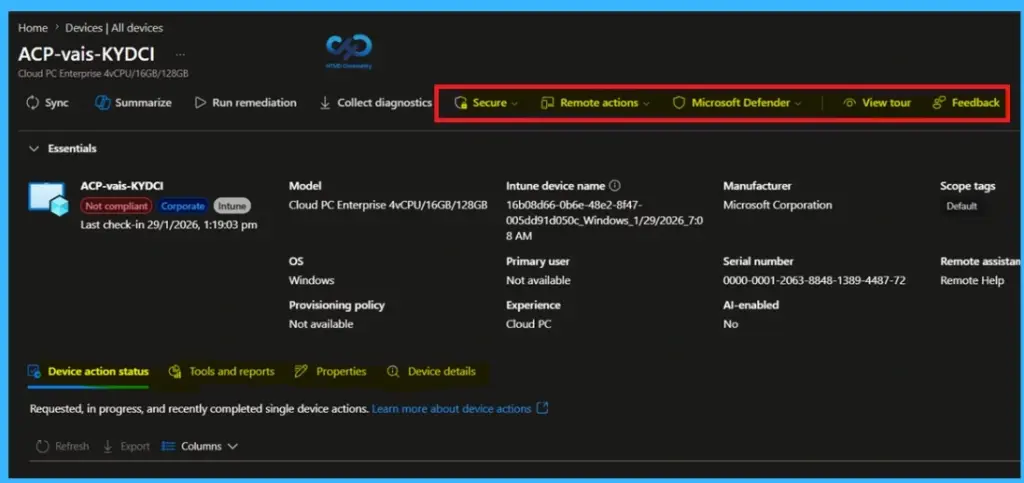
The redesigned device management page in the Microsoft Intune admin center. The updated layout introduces dedicated tabs for Device action status, Tools and reports, Properties, and Device details, helping administrators access critical information faster during troubleshooting and daily operations. The new Essentials section remains visible at the top of the page, providing quick access to important device attributes such as compliance state, operating system, manufacturer details, and assigned users.

- The interface is designed to reduce navigation complexity and improve operational efficiency for endpoint management
Need Further Assistance or Have Technical Questions?
Join the LinkedIn Page and Telegram group to get the latest step-by-step guides and news updates. Join our Meetup Page to participate in User group meetings. Also, join the WhatsApp Community and the WhatsApp channel to get the latest news on Microsoft Technologies. We are there on Reddit as well.
Author
Anoop C Nair is a Workplace Technology solution architect with 25+ years of experience. Microsoft Certified Trainer. Microsoft MVP from 2015 onwards for consecutive 11+ years! He is a blogger, Speaker, and Founder of HTMD Community and HTMD Conference. His main focus is on Device Management technologies like Intune, Windows, and Cloud PC. He writes about technologies like Intune, SCCM, Windows, Cloud PC, Entra, and Microsoft Security.


Discussion