





MS Intune Secure Boot Certificate Status Report Now Shows Detailed Status for Each Certificate
Key Takeaways
- The new Secure Boot status report in MSIntune provides a detailed flyout view for each certificate status.
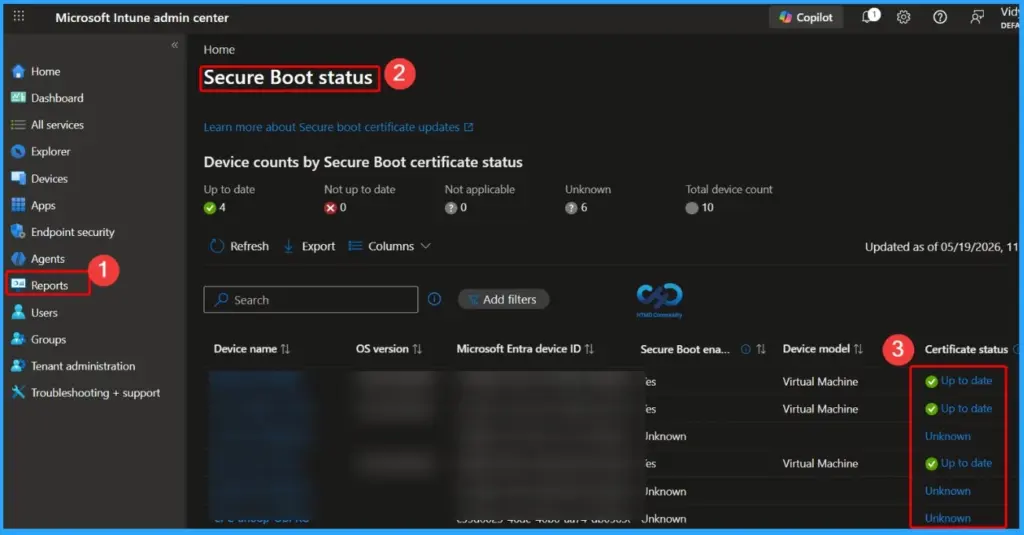
- Admins can quickly identify whether Secure Boot certificates are up to date, not up to date, Unknown, or not applicable.
- The flyout helps track both Microsoft and non-Microsoft UEFI certificates on devices.
- Devices using Microsoft-only Secure Boot trust settings may show non-Microsoft certificates as “Not applicable.”
- This improvement makes troubleshooting Secure Boot certificates and compliance monitoring much easier for IT admins.
The new Secure Boot Certificate Status report in MS Intune now provides a detailed flyout view for every certificate status, making it easier for admins to understand the exact Secure Boot configuration of each device. The report clearly shows whether certificates are up to date, not up to date, Unknown, or not applicable, helping IT teams quickly identify devices that may require attention.
Table of Content
MSIntune Secure Boot Certificate Status Report Now Shows Detailed Status for Each Certificate
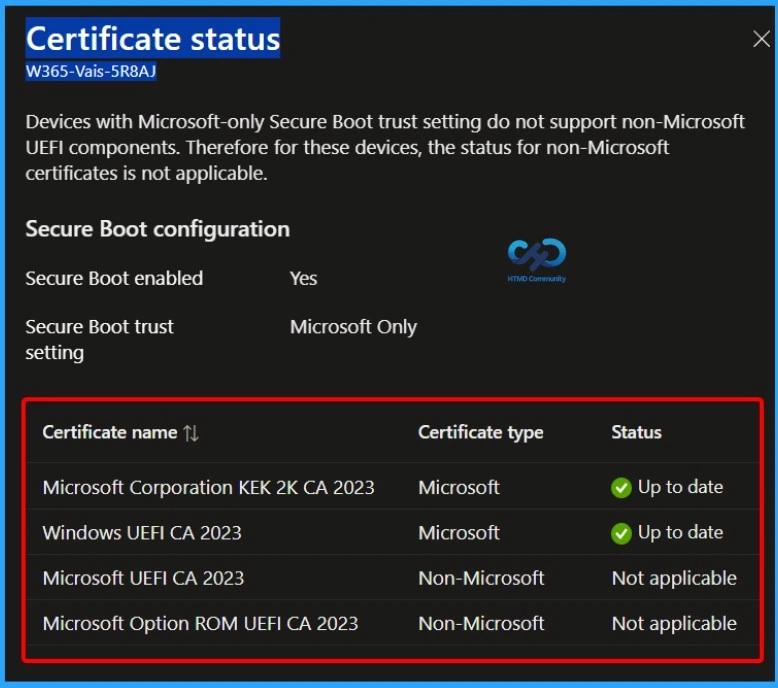
The flyout also displays Microsoft and non-Microsoft UEFI certificates separately, along with their current status. This provides administrators with better visibility into Secure Boot trust settings and simplifies troubleshooting, compliance checks, and device security monitoring across the organisation.
| Certificate status |
|---|
| Devices with Microsoft-only Secure Boot trust setting do not support non-Microsoft UEFI components. Therefore for these devices, the status for non-Microsoft certificates is not applicable. |
- Microsoft Secure Score Adds Recommendation to Check Secure Boot 2023 Updates
- Track Secure Boot Certificate Expiry in MDE Security Console for Easy Device Tracking and Readiness
- Missing Intune Autopatch Secure Boot Certificate Status Report in Intune Console
Devices with Microsoft-Only Secure Boot Trust Setting
Devices configured with the Microsoft-only Secure Boot trust setting do not support non-Microsoft UEFI components. Because of this limitation, the status for non-Microsoft Secure Boot certificates is shown as Not applicable in the MSIntune Secure Boot Certificate Status report.
This helps administrators clearly understand why certain non-Microsoft certificates are not evaluated on those devices. The report also provides better visibility into Secure Boot configuration details, making security validation and troubleshooting easier.

| Secure Boot Configuration | Status |
|---|---|
| Secure Boot Enabled | Yes |
| Secure Boot Trust Setting | Microsoft Only |
| Non-Microsoft UEFI Components Supported | No |
| Non-Microsoft Certificate Status | Not Applicable |
- Understanding Windows 10 UEFI Secure Boot – How it helps to secure Pre-Boot Phase
- Understanding Windows 10 UEFI Secure Boot – How it helps to secure Pre-Boot Phase
- Windows Measured Boot – How it helps to secure Windows OS Platform
- What is Windows 365 Boot
Need Further Assistance or Have Technical Questions?
Join the LinkedIn Page and Telegram group to get the latest step-by-step guides and news updates. Join our Meetup Page to participate in User group meetings. Also, join the WhatsApp Community and the Whatsapp channel to get the latest news on Microsoft Technologies. We are there on Reddit as well
Author
Anoop C Nair has been Microsoft MVP for 10 consecutive years from 2015 onwards. He is a Workplace Solution Architect with more than 22+ years of experience in Workplace technologies. He is a Blogger, Speaker, and Local User Group Community leader. His primary focus is on Device Management technologies like SCCM and Intune. He writes about technologies like Intune, SCCM, Windows, Cloud PC, Windows, Entra, Microsoft Security, Career, etc.


Discussion