





Microsoft Introduces File Quarantine for SharePoint and OneDrive DLP Policies to Strengthen Data Protection
Key Takeaways
- Microsoft Purview now supports a new File Quarantine action for SharePoint and OneDrive DLP policies.
- Files that violate DLP policies are moved to an admin-controlled quarantine site and replaced with a tombstone placeholder for users.
- The rollout is scheduled from mid-April 2026 through June 2026 across web platforms.
- Admins must configure the quarantine location and policies manually before using the feature.
- Quarantined files require manual review and restore by administrators, improving security, compliance tracking, and sensitive data protection.
Microsoft Purview is adding a new File Quarantine feature for SharePoint and OneDrive DLP policies. If a file breaks a DLP rule, it will be moved automatically to a secure quarantine location managed by admins. Users will only see a placeholder message instead of opening the file directly. This helps organizations protect sensitive data and improve security and compliance management.
Table of Content
Microsoft Introduces File Quarantine for SharePoint and OneDrive DLP Policies to Strengthen Data Protection
The rollout will happen from mid-April 2026 to June 2026 for web platforms. Admins need to set up the quarantine location and configure the required policy settings before using this feature. If a file is quarantined, only admins can review and restore it manually. This gives security and compliance teams better control over sensitive or policy-violating files.
| Category | Details |
|---|---|
| Message ID | MC1288527 |
| Service | Microsoft Purview |
| Roadmap ID | 557190 |
| Platforms | Web |
- Benefits of OneDrive Hide Deleted Files Reminder using Intune Policy
- Prevent users from Moving their Windows Known Folders to OneDrive
- Enable Removable Drive Locations Policy in Windows for Indexing Control using Intune
File Quarantine for SharePoint and OneDrive DLP Policies
When a file violates a DLP policy, it can be automatically moved to a secure quarantine location to stop further access or sharing. This helps organisations protect sensitive information, reduce accidental data exposure, and give administrators better control over policy-violating files while still supporting normal collaboration.
- New File Quarantine action added for SharePoint and OneDrive DLP policies
- Files violating DLP rules can be automatically isolated
- Helps prevent unauthorised access and sharing of sensitive data
- Admins can review quarantined files and take appropriate action
- Adds an extra layer of protection for compliance and security
- Public Preview rollout: Mid-April 2026 to early May 2026
- General Availability rollout: Early June 2026 to mid-June 2026
- Associated with Microsoft 365 Roadmap ID 557190
How File Quarantine Affects Your Organisation
Users will no longer be able to access the original file, and a tombstone placeholder will appear instead to inform them that the file has been quarantined. This feature helps organizations improve sensitive data protection, compliance monitoring, and investigation workflows.

| Feature | Details |
|---|---|
| Admin visibility | Administrators can monitor quarantined files through Audit logs, DLP alerts, and Activity Explorer |
| File restore | Quarantined files must be restored manually by an administrator |
| Permission restore | Original sharing permissions are not restored automatically after the file is recovered |
| Default status | The feature is disabled by default |
| Configuration requirement | Admins must configure the Quarantine action within a DLP policy before using it |
Microsoft Purview File Quarantine Feature
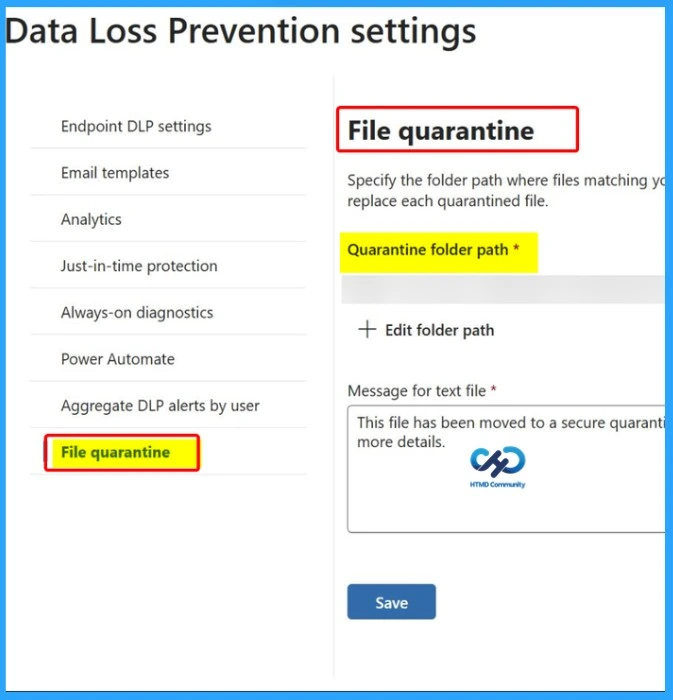
Organisations should prepare for the new Microsoft Purview File Quarantine feature before it becomes generally available. Admins need to configure a secure quarantine location, review permissions, and test DLP policies to ensure files are handled correctly when policy violations occur. It is also important to update internal processes and inform support and compliance teams about the new workflow.
- Create an admin-owned SharePoint site for quarantined files
- Configure quarantine settings in Microsoft Purview DLP policies
- Set the destination folder
- Configure the tombstone message shown to users
- Review and limit access permissions for the quarantine site
- Test DLP policies in simulation mode before full deployment
- Update internal processes for file review and restore requests
- Inform helpdesk and compliance teams about the new feature and workflow
Need Further Assistance or Have Technical Questions?
Join the LinkedIn Page and Telegram group to get the latest step-by-step guides and news updates. Join our Meetup Page to participate in User group meetings. Also, join the WhatsApp Community and the Whatsapp channel to get the latest news on Microsoft Technologies. We are there on Reddit as well
Author
Anoop C Nair has been Microsoft MVP for 10 consecutive years from 2015 onwards. He is a Workplace Solution Architect with more than 22+ years of experience in Workplace technologies. He is a Blogger, Speaker, and Local User Group Community leader. His primary focus is on Device Management technologies like SCCM and Intune. He writes about technologies like Intune, SCCM, Windows, Cloud PC, Windows, Entra, Microsoft Security, Career, etc.




Discussion