





Microsoft Defender Custom Data Collection Lets You Collect Custom Endpoint Logs Without Extra Agents
Key Takeaways:
- Microsoft Defender Custom Data Collection
- Faster onboarding for business-specific telemetry use cases
- No additional agents to deploy or maintain
- Create custom collection rules in the Defender portal
Let’s discuss about Microsoft Defender Custom Data Collection to Streamlined Telemetry without Extra Agent. Microsoft announced the general availability of Microsoft Defender Custom Data Collection. This feature is simplified collection of logging through the Defender agent itself.
Table of Contents
Table of Contents
Microsoft Defender Custom Data Collection to Streamlined Telemetry without Extra Agent
Admins can define which events endpoints should collect and forward alongside default Defender telemetry. This is especially valuable for hunters, detection engineers, and security researchers. The core purpose of this feature is reduce reliance on third-party log collectors or custom infrastructure.
| Benefits |
|---|
| No additional agents to deploy or maintain |
| No complicated custom logging infrastructure |
| Faster onboarding for business-specific telemetry |
| Granular, scalable event collection |
| Native integration with Microsoft Sentinel for querying and analysis |
- New Selective Response Actions Improve Safer Device Onboarding in Microsoft Defender for Endpoint
- Intune Defender for Endpoint Security Settings Support in Government Cloud Environments in Public Preview
- Protect Unmanaged Android Devices with Microsoft Defender for Endpoint
How Defender Custom Data Collection Works
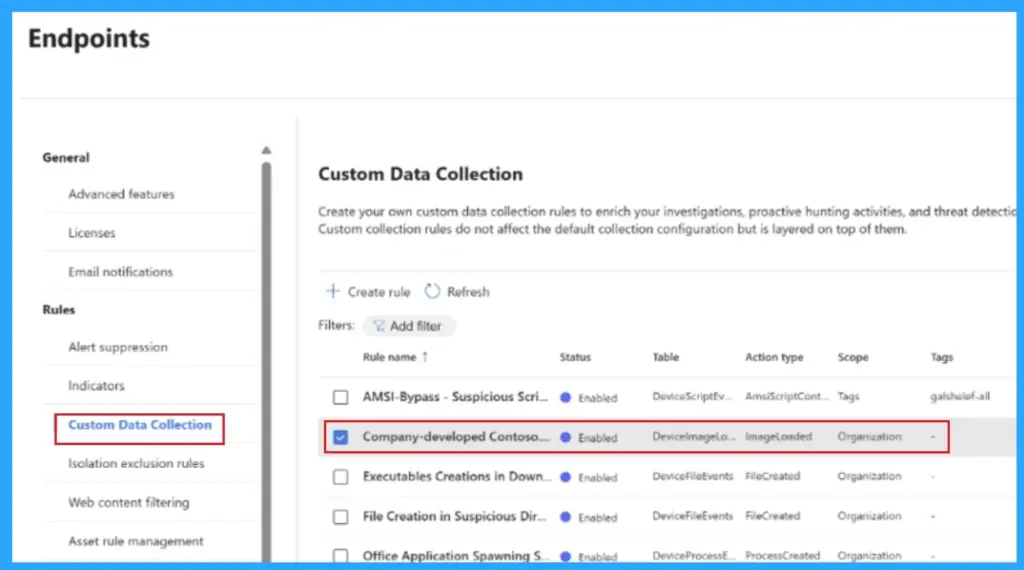
Create custom collection rules in the Defender portal. Rules are distributed to targeted endpoints. Endpoints collect matching custom events with default telemetry. Events are stored in Microsoft Sentinel / Log Analytics for hunting and analytics
When to Use Custom Data Collection
Custom data collection is used for different scenarios. It includes Threat hunting, Application monitoring, Incident response, Lateral movement detection. The below table shows the Security value of each scenario.

- Threat hunting – Detect fileless malware, malicious scripts, or unauthorized automation on privileged systems
- Application monitoring – Identify unauthorized access, data exfiltration attempts, or compliance violations for line-of-business apps
- Compliance evidence – Meet regulatory requirements (PCI-DSS, HIPAA, GDPR) with detailed forensic audit trails
- Incident response – Capture detailed evidence for investigation, identify lateral movement, and support remediation efforts
- Lateral movement detection – Detect attackers moving between systems using stolen credentials or remote access tools
Strategic Direction
Defender is evolving from a broad security product into a customizable security platform a “Swiss Army knife” for defenders. This enables richer visibility without adding endpoint complexity.
Need Further Assistance or Have Technical Questions?
Join the LinkedIn Page and Telegram group to get the latest step-by-step guides and news updates. Join our Meetup Page to participate in User group meetings. Also, join the WhatsApp Community and the WhatsApp channel to get the latest news on Microsoft Technologies. We are there on Reddit as well.
Author
Anoop C Nair has been Microsoft MVP for 10 consecutive years from 2015 onwards. He is a Workplace Solution Architect with more than 22+ years of experience in Workplace technologies. He is a Blogger, Speaker, and Local User Group Community leader. His primary focus is on Device Management technologies like SCCM and Intune. He writes about technologies like Intune, SCCM, Cloud PC, Windows, Entra, Microsoft Security, Career, etc.

Discussion