






Fix Missing SCCM Community Hub Issue| Enable | ConfigMgr
Today, we will discuss Fix Missing SCCM Community Hub Issue| Enable | ConfigMgr. Let’s find out how to fix the missing SCCM Community Hub. The ConfigMgr Community Hub is released in the SCCM 902 Production version with limited capabilities.
The Community Hub supports various items such as CMPivot queries, applications, task sequences, configuration items, configuration baselines (including child configuration items), PowerShell scripts, reports, and Power BI report templates. However, baselines with software updates or version-specific references are not supported.
The community hub is designed to prevent the need to recreate CMPivot queries, scripts, console extensions, and reports from scratch. Microsoft has created a community hub in Configuration Manager where SCCM admins can collaborate and share resources.
Leveraging GitHub, this community hub already offers industry-standard processes and tools developed for sharing. It facilitates directly integrating these tools into the SCCM Manager console. The community workspace only had documentation features available with the 1902 version of the configuration manager.

- SCCM Community Hub Removed Deprecated Missing
- Publish CMPivot Query to the SCCM Community Hub Contributions
- SCCM Community Hub – Download Scripts Reports Top 10 (anoopcnair.com)
| Index |
|---|
| Problem Statement |
| Prerelease Feature |
| Unable to Load the Configuration Manager Community Hub |
| Results -Fix Missing SCCM Community Hub |
Problem Statement
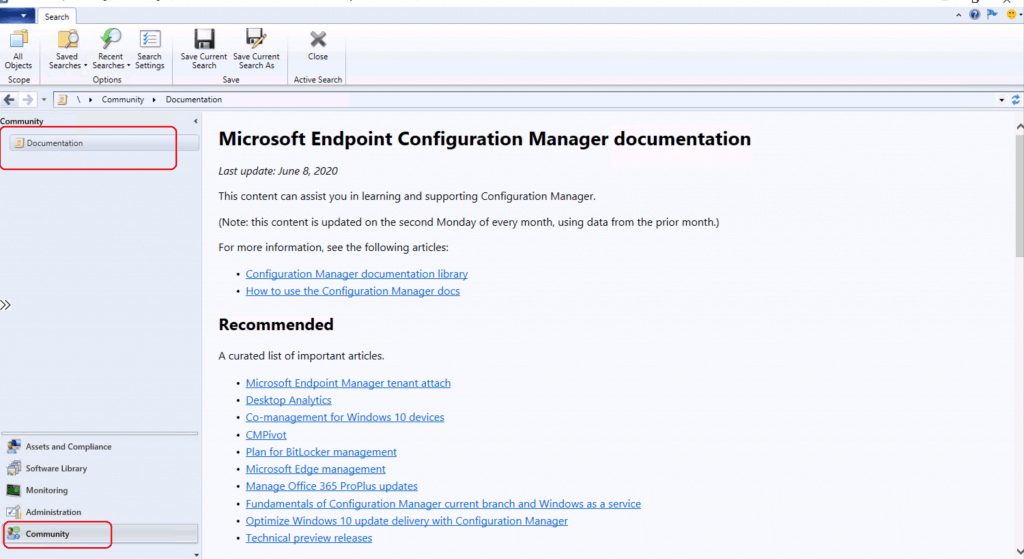
I can see only documentation nodes in the community workspace. The details are in the following screenshot. I ensured all the prerequisites documented in the list below are in place.
- The console is installed on Windows 10 2004 (the minimum version should be 1710).
- Community Hub can be used on the Windows Server Operating System with the ConfigMgr Current Branch 2010 or later. That means you can access the community hub from the primary or site servers.
- .NET Framework version 4.6 or higher
- Proxy server whitelisting to access the following URLs:
https://github.comhttps://communityhub.microsoft.com
It tries to launch the console from the Windows 10 2004 version. However, as mentioned above, I can see only the documentation node.
- Launch Console
- Navigate to \Community\Documentation
Prerelease Feature
Some of the ConfigMgr features are prerelease features. The post, SCCM List of Full Features Vs Pre-Release Features | 2002, provides more details about these features.
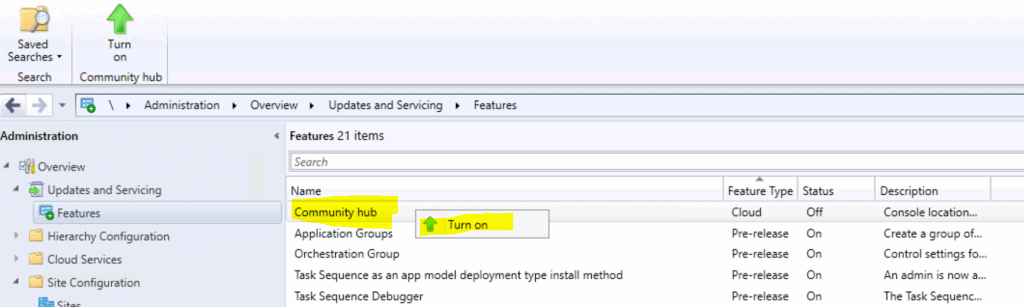
The community hub prerelease feature was not part of the initial 2002 version release. However, the prerelease feature community hub is released later, as shown in the screenshot below.
- Navigate to \Administration\Overview\Updates and Servicing\Features.
- Right-click on Community Hub.
- Click on Turn On.
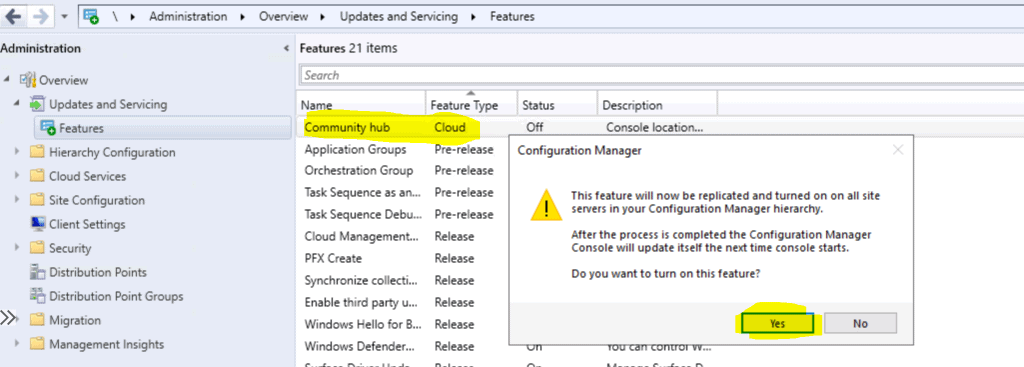
- Click on the message box, as seen in the screenshot below.
- This feature will now be replicated and turned on all site servers in your Configuration Manager hierarchy.
- After the process is completed, the configuration manager console will update itself the next time it starts (a console restart is required).
- Do you want to turn on this feature?
- Click on the YES button to enable it.
Unable to Load the Configuration Manager Community Hub
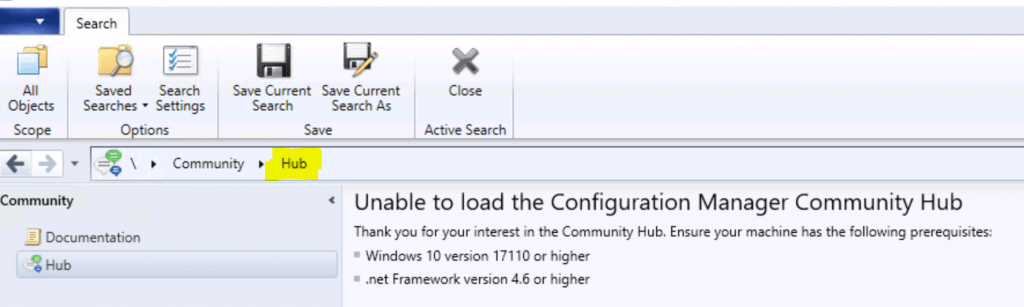
Thank you for your internet in the community hub. Ensure your machine has the following prerequisites.
- Windows 10 Version 1710 or higher.
- .net Framework version 4.6 or higher.
Results – Fix Missing SCCM Community Hub Issue
- Launch the ConfigMgr console from Windows 10 2004 devices.
- Navigate to \Community\Hub
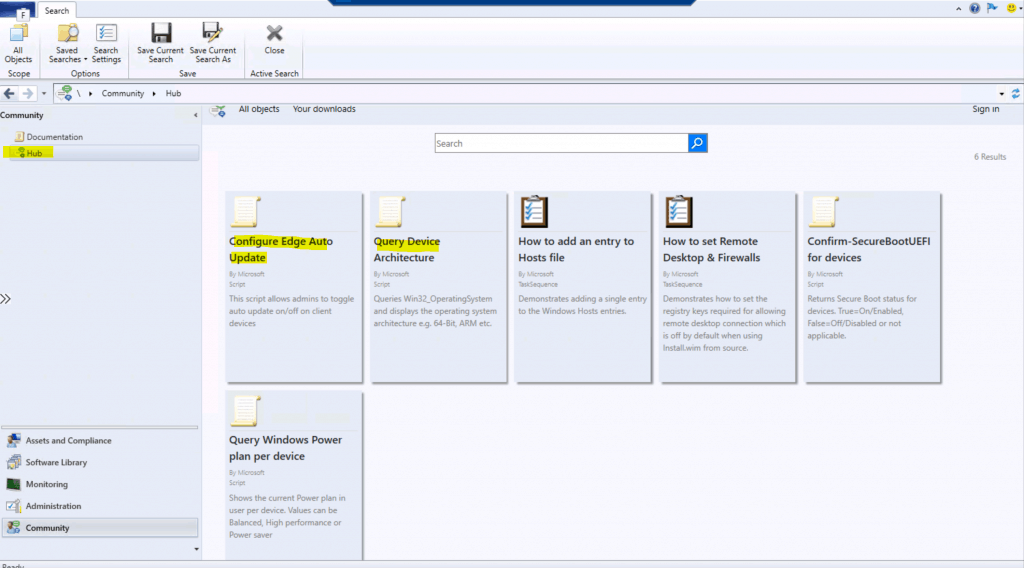
The following are the items available in the latest version of the ConfigMgr community hub.
- Configure Edge Auto Update
- By Microsoft
- Script
- This script allows admins to toggle auto-update on/off on client devices.
- Query Device Architecture
- By Microsoft
- Script
- Queries Win32_OperatingSystem and displays the operating system architecture, e.g. 64-bit, ARM, etc.
- How to add an entry to the Hosts file
- By Microsoft
- Task sequence
- Demonstrates adding a single entry to the Windows Hosts entries.
- How to set Remote Desktop & Firewalls
- By Microsoft
- Task sequence
- Demonstrates how to set the registry keys required to allow a remote desktop connection, which is off by default when using Install.wim from the source.
- Confirm-SecureBootUEFI for devices
- By Microsoft
- Script
- Returns Secure Boot status for devices. True=On/Enabled, False=Off/Disabled, or not applicable.
- Query Windows Power plan per device
- By Microsoft
- Script
- Shows the current power plan for users per device. Values can be Balanced, High-performance or Power saver
Resources
We are on WhatsApp. To get the latest step-by-step guides and news updates, Join our Channel. Click here –HTMD WhatsApp.
Author
Anoop C Nair is Microsoft MVP! He is a Device Management Admin with more than 20 years of experience (calculation done in 2021) in IT. He is a Blogger, Speaker, and Local User Group HTMD Community leader. His primary focus is Device Management technologies like SCCM 2012, Current Branch, and Intune. He writes about ConfigMgr, Windows 11, Windows 10, Azure AD, Microsoft Intune, Windows 365, AVD, etc.




I’ve done all of this, using windows 2004, .Net FW 4.8, and nothing shows up in community hub in the console.
If i try it on the server it tells me I need to run it on Windows 10.
Obviously something else is needed. Please assist
StaffIt won’t work on server at all
Ok, than why can’t i get it to work on my Windows 10 2004 machine. White screen, nothing in it. Ran console as non admin, and admin. All other functions work fine in console. Rebooted, still nothing.
StaffBecause it supports only Windows 10
It’s clearly mentioned in pre requisites …
you can’t use this feature on server operating system
Hello! I’m running it on Windows 10 2004. It doesn’t work. I have all the pre reqs.
Is there a log file?
It doesn’t work!!
How do I troubleshoot it??
Thanks
Hi Anoop, thank you for your blog site, I refer to it often, and find many of your posts helpful. For some reason, I’m not having success getting to the Community Hub, and I’m hoping you can help. I am running CM 2006. Workstation with console is running Win20H2. Community Hub feature is enabled. DotNet Framework 4.8 is installed. I see the Community hub in the left-hand menu just below the Documentation link, but when I select the Community hub, I get a blank screen. I don’t get ‘unable to load’ message or anything. What am I missing?
StaffI have seen this issue when I launched the console from the server OS.
Hopefully, you have checked the latest prerequisites from Microsoft docs https://docs.microsoft.com/en-us/mem/configmgr/core/servers/manage/community-hub#prerequisites
I think I might be on track to resolving this. I typically run the CM console ‘as different user’, and when I do that, the Community Hub is always a blank screen. But when I granted my desktop user account permissions to the CM server and just launched it natively with that account, I got access to all of the amazing tools that have been posted so far. Next step will be to grant my CM Console account rights to log on to the workstation to verify my theory. So far this appears to cut against how I’ve implemented ‘least privilege’ recommendations, but for now, I’m thankful I can get to the hub.