






SCCM 2002 KB4567007 Stuck at Post Installation | ConfigMgr
Let’s discuss SCCM 2002 KB4567007 Stuck at Post Installation | ConfigMgr. Recently, we received an HTMD Forum question about SCCM 2002 KB4567007 being stuck at post-installation.
I thought of sharing my experience with the KB4567007 ConfigMgr 2002 hotfix installation to fix the P.X.E. boot and Task Sequence issues.
As I mentioned in the ConfigMgr 2002 known issues, there is a known issue with the 2002 version of Configuration Manager (ConfigMgr).
The New Features of Configuration Manager (A.K.A. SCCM) 2002 version are explained in the following post – https://www.anoopcnair.com/configmgr-2002-list-of-new-features-enhancements-memcm-sccm/

| Index |
|---|
| Problem Statement |
| Troubleshooting |
| FIX SCCM 2002 KB4567007 Stuck at Post Installation |
Problem Statement
As explained in the blog post, FIX PXE Boot Failures Task Sequence Delays with SCCM 2002 | KB 4567007, I successfully installed the latest hotfix, KB4567007. After the hotfix was installed, all the functionalities of SCCM worked fine.
I checked the monitoring workspace for installation status from \Monitoring\Overview\Updates and Servicing Status\Configuration Manager 2002 Hotfix (KB4567007).
The post-installation process got stuck as per the monitoring status in the console.
- Installing SMS_Executive Service – not started
- Installing SMS_DATABASE_NOTIFICATION_MONITOR Component – not started
- Installing SMS_HIERARCHY_MANAGER component – not started
- Installing SMS_REPLICATION_CONFIGURATION_MONITOR Component – not started
- Monitoring replication initialization – not started
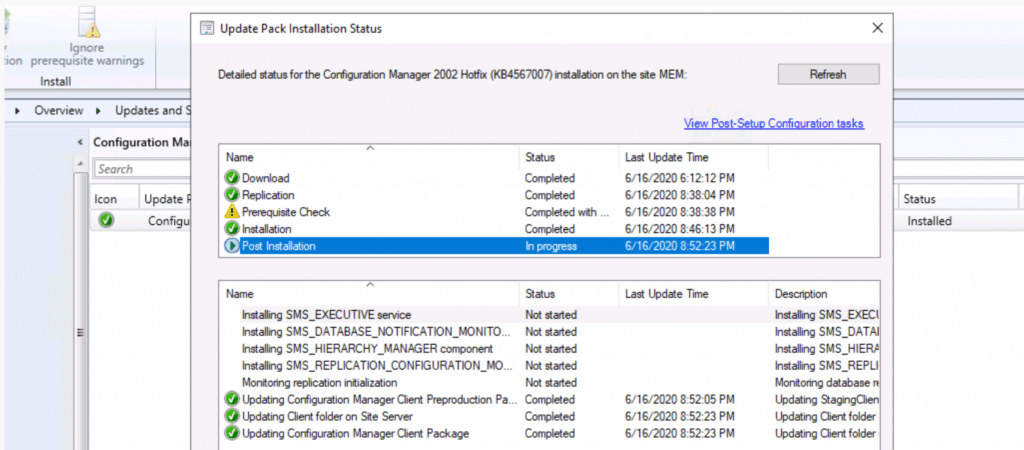
Now, it’s confusing for all the SCCM admins, and they keep waiting for this status to turn green and be completed!
Troubleshooting
- I tried to check the console close and relaunch it.
- No luck with that. The status of the KB4567007 installation still stays the same status!
- Have you checked whether the SMS_Executive and other services are running or not?
- No luck there! All the services related to ConfigMgr are up and running!

- SCCM clients can communicate with the server and receive the policies, etc.
FIX SCCM 2002 KB4567007 Stuck at Post Installation
The issue, KB4567007 Stuck at Post Installation, seems to be the UX issue. Because none of the Configuration Manager functionalities stopped working.
- I tried restarting the server to see whether that fixes the above status issue.
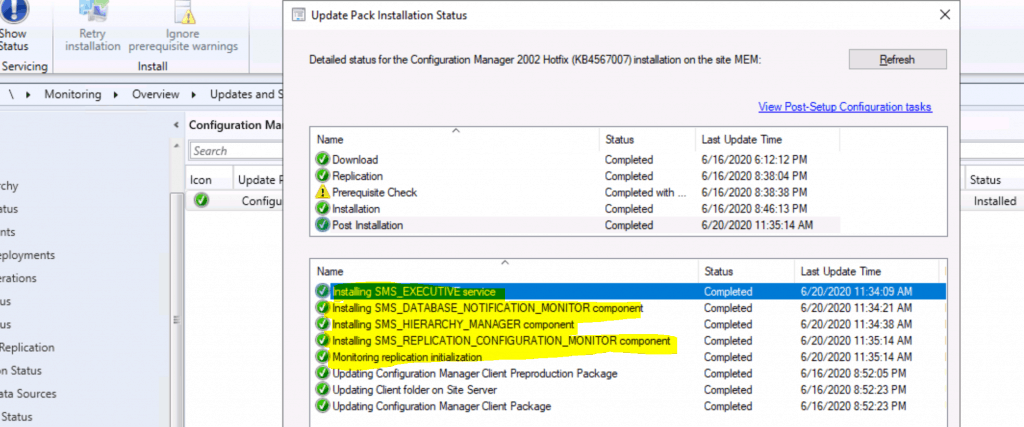
- After the restart, the UX issue is FIXED (as shown in the screenshot below).
Resource
- FIX PXE Boot Failures Task Sequence Delays with SCCM 2002 | KB 4567007
- CM 2002 KB4567007 Stuck at post installation
We are on WhatsApp. To get the latest step-by-step guides and news updates, Join our Channel. Click here –HTMD WhatsApp.
Author
Anoop C Nair is Microsoft M.V.P.! He is a Device Management Admin with more than 20 years of experience (calculation done in 2021) in I.T. He is a Blogger, Speaker, and leader of the Local User Group HTMD Community. His primary focus is Device Management technologies like SCCM 2012, Current Branch, and Intune. He writes about ConfigMgr, Windows 11, Windows 10, Azure AD, Microsoft Intune, Windows 365, A.V.D., etc.




Anyone faced “Failed to apply update changes 0x8000405” error in Install files step ?
Upgrading from 1910 to 2002 using offline servicing
StaffI never seen that … do you have any further details or any hash errors … have you disabled the antivirus?
It looks like, I am missing few setup files. Trying with new Downloads again. I will keep you updated. Thanks
Indeed issue resolved, I was missing few setup files when downloaded using offline servicing. Thank you
StaffGreat to hear the update and to know you are able solve the issue
Hello @Rupesh I’ve same problem !
Upgrade SCCM 1902 to 2002 using Offline Servicing and get Error : “Failed to apply update changes 0x8000405” at Install files step 🙁
Could you help me ?
Thx 🙂
Thanks for your KB4567007 fix, helped me a lot, I have not wasted time to wait to be all green. Just checked the cmupdate.log to see when finished the upgrade process: “There is no pending update package to be processed.” Then verified all SMS_* services, server restarted, then verified again the status and all was green. So is looks like an UX bug exist as you presented.
StaffThank you much … Appreciate your feedback on this …
I could see that the client version remained at 8968.1000 it has not changed to 8968.1031
StaffIt’s expected https://www.anoopcnair.com/sccm-2002-site-version-confusion-hotfix-kb4567007-update-configmgr/
I have got issue, the client version didn’t changed from 8968.000 to 8968.1031 after installing hotfix
Staffhttps://www.anoopcnair.com/sccm-2002-site-version-confusion-hotfix-kb4567007-update-configmgr/
HI Anoop,
The installation of 2002 is stuck and unable to see the status,
i tried to reset the but im getting error.
Running CMUpdateReset.exe tool …
[Error]
0x80131904 – Cannot open database “6347850b-bf04-488f-aa4b-2b68cdafa3e0” requested by the login. The login failed.
Login failed for user Please assist on this issue.
Hi Anoop,
Goodday to you ,
2002 installation got stuck show installing. i tired to reset the setup but faild.
Running CMUpdateReset.exe tool …
[Error]
0x80131904 – Cannot open database “6347850b-bf04-488f-aa4b-2b68cdafa3e0” requested by the login. The login failed.
Login failed for user
StaffDo you have sysadmin access on the sql database. I think you need this access