






SCCM Custom Port Option is Grayed out on CAS Properties
SCCM Custom Port Option is Grayed out on CAS Properties Configuration Endpoint Manager. Today, Manju (who commented on my post about SCCM 2012 SP1 known issues) helped me notice one more change that we can see after the ConfigMgr 2012 SP1 upgrade.
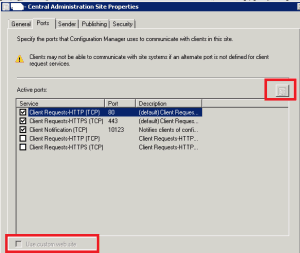
It seems you won’t be able to configure or enable “Use Custom Web Site” on CAS server site properties after the SP1 upgrade. All the options on the “ports“ tab are disabled or greyed out. After the SP1 Upgrade, we won’t be able to change anything from CAS properties –> Ports tab (It becomes read-only).
This post provides all the details of the SCCM Custom Port Option, which is Grayed out on CAS Properties Configuration Endpoint Manager.
However, this option is enabled on Primary server site properties. Why is the option “Use Custom Web Site” or Use Custom Port” Grayed out on CAS Server Site Properties?

Table of Contents
SCCM Custom Port Option is Grayed out on CAS Properties
I’m not sure if this feature is knowingly disabled from CAS. When I checked and confirmed with the RTM version, the same setting is enabled and configurable on the CAS server.
- ConfigMgr SCCM 2012 SP1 Upgrade Known Issues
- How to Upgrade ConfigMgr SCCM 2012 SP1 KB Article
- Download Install ConfigMgr SCCM 2012 SP1 RTM
- FIX Co-Management Settings Grayed Out Issue
Does the following description of the feature help us better understand it? ” Specify the ports that Configuration Manager uses to communicate with clients on this site. The SCCM Custom Port Option is Grayed out on CAS Properties.
If an alternate port is not defined for the client request service, the client may not be able to communicate with site systems.” Since the CAS server does not manage clients directly, do we need the custom port or Website Settings enabled on the CAS server site settings?
I don’t think so. Again, this is my take on it; I’m not sure it will adversely impact. The SCCM Custom Port Option is Grayed out on CAS Properties.
Resources
63 Episodes Of Free Intune Training For Device Management Admins HTMD Blog (anoopcnair.com)
How To Check ConfigMgr Task Sequence Size | SCCM – HTMD Blog #2 (howtomanagedevices.com)
We are on WhatsApp now. To get the latest step-by-step guides, news, and updates, Join our Channel. Click here – HTMD WhatsApp.
Author
Anoop C Nair is Microsoft MVP from 2015 onwards for consecutive 10 years! He is a Workplace Solution Architect with more than 22+ years of experience in Workplace technologies. He is Blogger, Speaker, and Local User Group Community leader. His main focus is on Device Management technologies like SCCM and Intune. He writes about technologies like Intune, SCCM, Windows, Cloud PC, Windows, Entra, Microsoft Security, Career etc…




Exactly what was my thought ! All the roles that are hosted on CAS do not work on custom ports anyway. Except for SUP which either works on Default ports 80 & 443 or WSUS custom ports 8530 & 8531. But again not sure about the impact of this change in SP1.