






Restart Windows 10 Device using SCCM | ConfigMgr
Let’s try Restart Windows 10 Device using SCCM. In this post, I would like to share ConfigMgr’s new update. ConfigMgr added a new “Restart” feature to the fast channel that pushes client notifications. We can use the SCCM console to identify client devices that are pending reboot. Once we have identified the devices, we can restart them with a client notification action.
Use the ConfigMgr console to identify clients that require a restart. Then, a client notification action will be used to restart them. Ensure the SCCM client version is current and has all the latest features. The only update of the server version of SCCM might not help.
You can configure client options to prevent devices from restarting automatically during a deployment. Configuration Manager has this option enabled by default, which affects all applications, software updates, and package deployments to the device.
If the user does not manually restart the device, incomplete installation of software updates and app changes may occur, resulting in failure to install additional software. If you turn off this setting, you will lose the ability to schedule the restart time after the deadline or provide the user with a final countdown notification.

- SCCM Console Beginners Guide | ConfigMgr
- Top 50+ Latest SCCM Interview Questions and Answers
- Install SCCM Console on Remote Windows 10 Windows 11 Devices | ConfigMgr
- New Method to Install SCCM Console Extensions
| Index |
|---|
| Pending Restart |
| How to Restart Devices from the SCCM console? |
| How Does Restart Action Work? |
| Logs |
| Monitoring Workspace |
| Results of Successful Restart Action |
| Video Recording |
Pending Restart – Restart Windows 10 Device
Let’s find out which Configuration Manager clients require a reboot.
- Launch Console
- Navigate to \Assets and Compliance\Overview\Devices\<Collection Name>
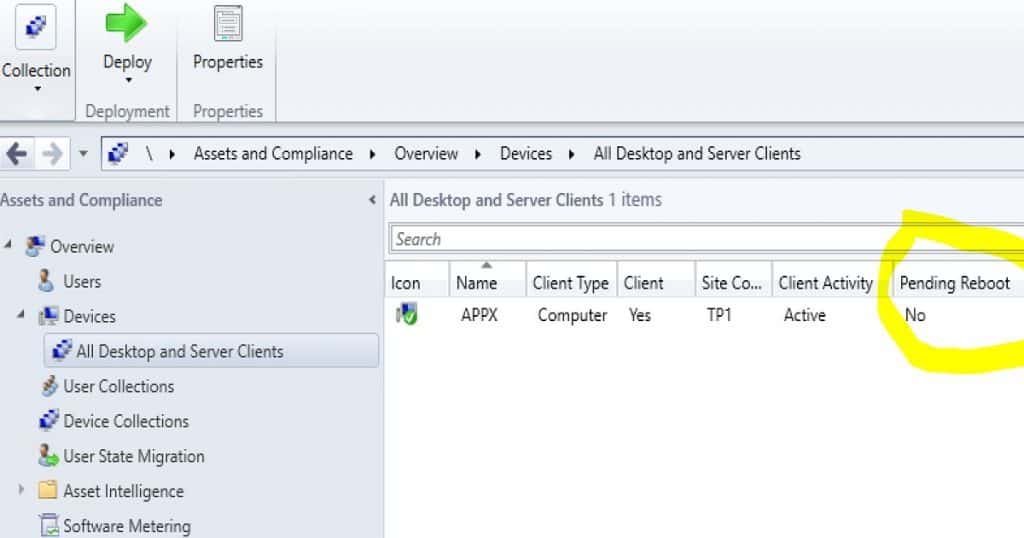
- Add a new column by right-clicking on the icon bar, as shown in the below picture.
- Select the column named Pending Reboot.
- If the Pending reboot column shows YES, then the Windows 10 device requires the reboot.
How to Restart Devices from the SCCM console?
Using the ConfigMgr console options, you can restart the computers in a device collection. You don’t have to use any PowerShell script to restart the Windows 10 devices.
- Launch ConfigMgr console
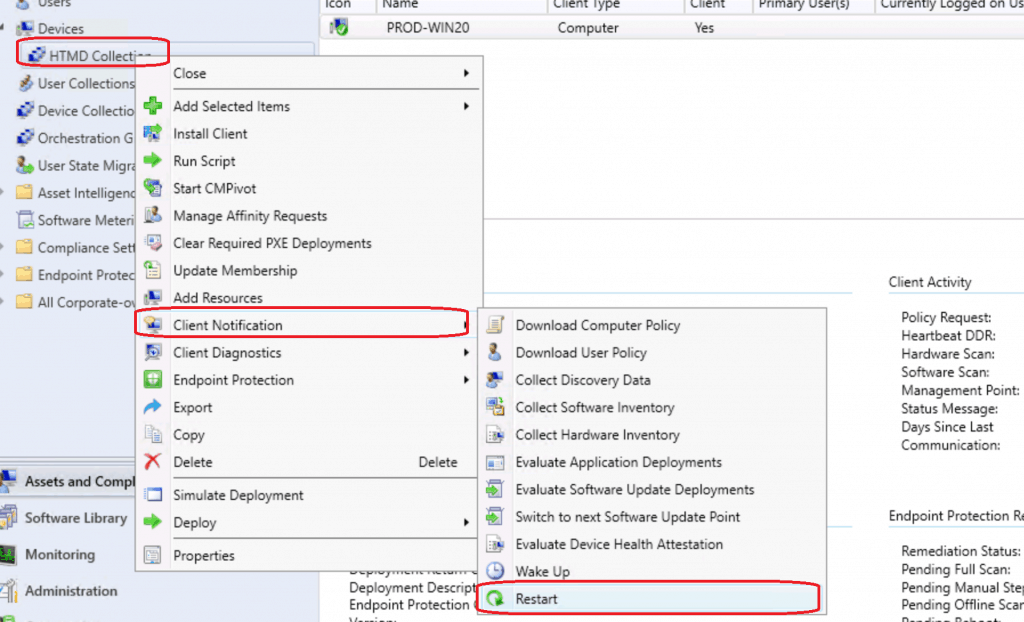
- Navigate to \Assets and Compliance\Overview\Devices\HTMD Collection
- Right-click on the collection and Select Client Notification – Restart.
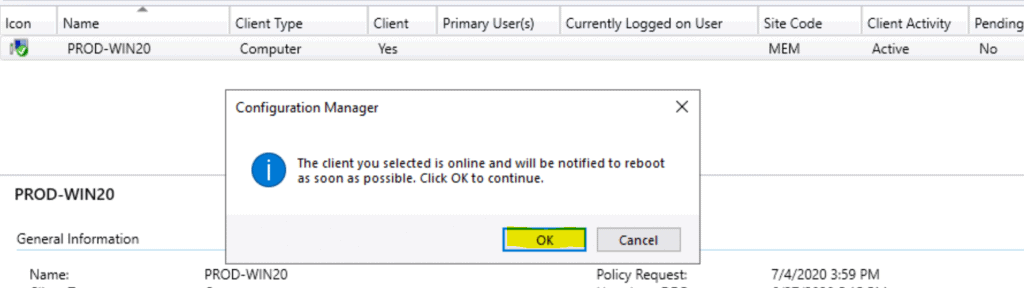
Click on the OK button from the following dialogue box.
The client you selected is online and will be notified to reboot immediately.
- Click OK to continue.
How Does Restart Action Work?
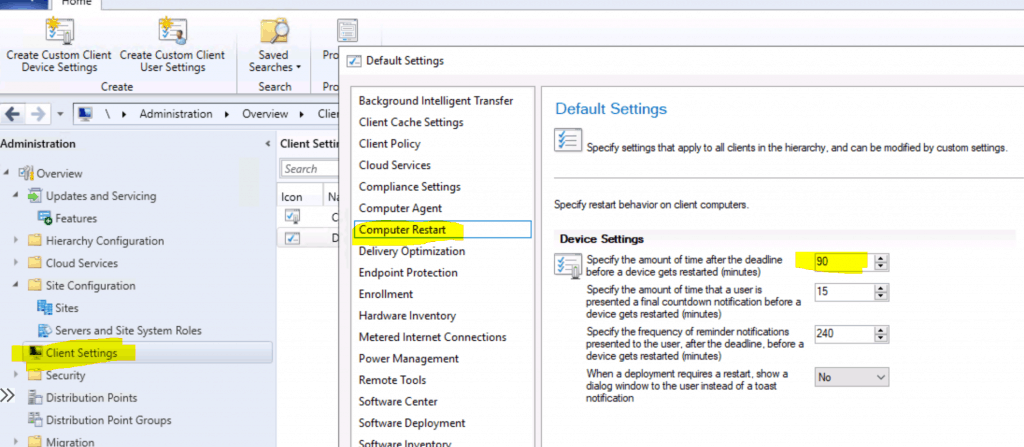
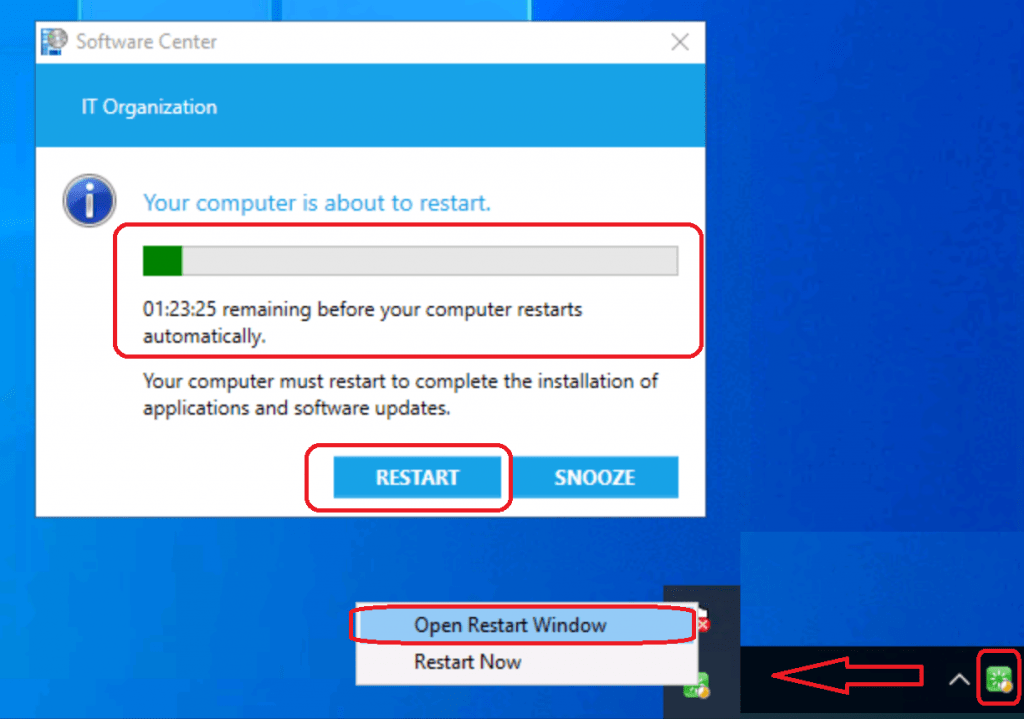
The computer restart policy is 90 minutes by default, and you can customize this policy from the client settings tab. The reboot or restart notification is very well integrated with the “Software Center” experience, which is the great advantage of this feature.
This action created a new task for the devices (pending reboot) in that collection through SCCM fast channel notification. What is the architecture flow of SCCM CB Fast channel push notification?
I have explained fast channel architecture flow in the post here.
The SCCM fast channel push client notification service will immediately notify the client about the task assigned. However, the client won’t be restarted immediately after receiving the task from the notification server component. The SCCM client will check the Client policy settings for “Computer Restart” and schedule the restart per the policy.
- Navigate to \Administration\Overview\Client Settings
- Click on Computer Restart settings
- Check to Specify the amount of time after the deadline before a device gets restarted (in minutes) – 90 Minutes.
Logs – Restart Windows 10 Device
The CCMNotificationAgent.log is the best log to check for troubleshooting fast-channel push notification tasks.
Receive task from server with pushid=6, taskid=6, taskguid=57CC724F-B995-4DA0-B286-7ADF389F2539, tasktype=17 and taskParam=
Monitoring Workspace
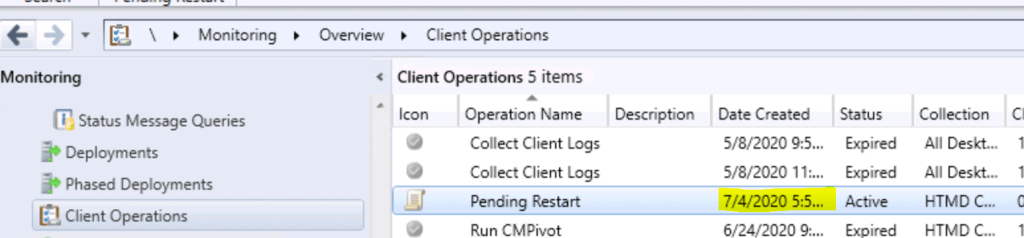
Navigate to \Monitoring\Overview\Client Operations
Results of Successful Restart Action
Now, your computer is ready to restart after the complete installation of applications and software updates.
Video Recording – Restart Windows 10 Device using SCCM | ConfigMgr
In this video
Sorry for the loud music – old video 🙂
Resources
- Video Experience of SCCM Reboot Task for Collection of Devices via Fast Channel Push Notification
- SCCM CMPivot Fast Channel Making SCCM Fast
We are on WhatsApp. To get the latest step-by-step guides and news updates, Join our Channel. Click here –HTMD WhatsApp.
Author
Anoop C Nair is Microsoft MVP! He is a Device Management Admin with more than 20 years of experience (calculation done in 2021) in IT. He is a Blogger, Speaker, and Local User Group HTMD Community leader. His primary focus is Device Management technologies like SCCM 2012, Current Branch, and Intune. He writes about ConfigMgr, Windows 11, Windows 10, Azure AD, Microsoft Intune, Windows 365, AVD, etc.




seems this collection reboot option no longer available