






Find Devices Missing Patches using ConfigMgr CMPivot Query | SCCM
Let’s Find Missing Patches using ConfigMgr CMPivot Query. I have seen many questions in HTMDForum that we want the patch report using the SQL query. In this post, you will learn how to use the SCCM CMPivot query to find missing patches.
You can customize the CMPivot query according to your needs and requirements. The main CMPivot entity used is Softwareupdate. The CMPivot entity helps determine if a software update is applicable but not installed on the device.
entity | operator1 | operator2 | ...
The following is the sample CMPivot query that will help you understand the Softwareupdate entity and the views required to get the SCCM patching report working. Hence, we have done a tough job for you. Now, you must replace the following to get the query working.
- SCCM CMPivot Query Patches Installed in Last 90 Days | ConfigMgr
- Quickly Check Registry Values using SCCM CMPivot Query
- SCCM CMPivot Standalone App Installation Guide | ConfigMgr
| Index |
|---|
| Launch ConfigMgr CMPivot |
| Find Missing Patches using SCCM CMPivot Query |
| CMPivot Results – Find Devices Missing Patches using ConfigMgr CMPivot Query |
Launch ConfigMgr CMPivot
Let’s try to find the missing patches using the CMPivot query with the filtering option on the KB article for Windows 10 devices.

- Navigate to the device collection against which you want to run the CMPivot query.
- Select All Systems device collection.
NOTE! I don’t recommend using the All System collection in a production environment with more than a few devices. Instead, use the collection with fewer devices to try out the query.
- Right-click on the All Systems collection.
- Select Start CMPivot.
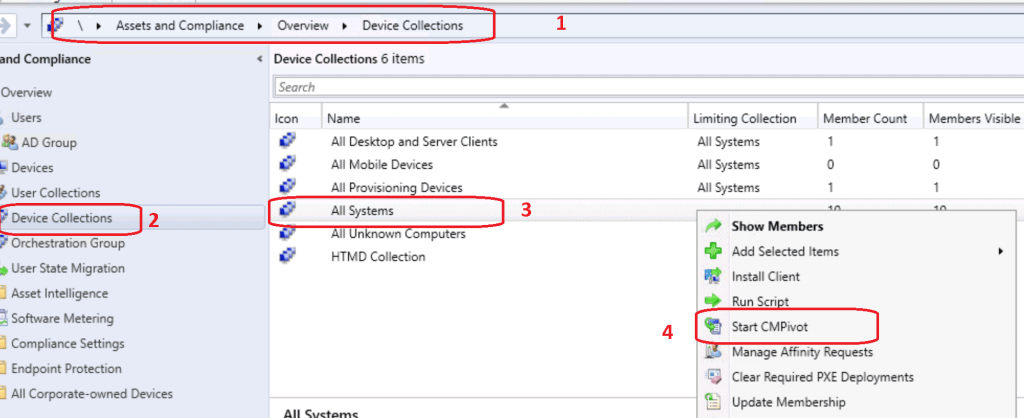
Find Missing Patches using SCCM CMPivot Query
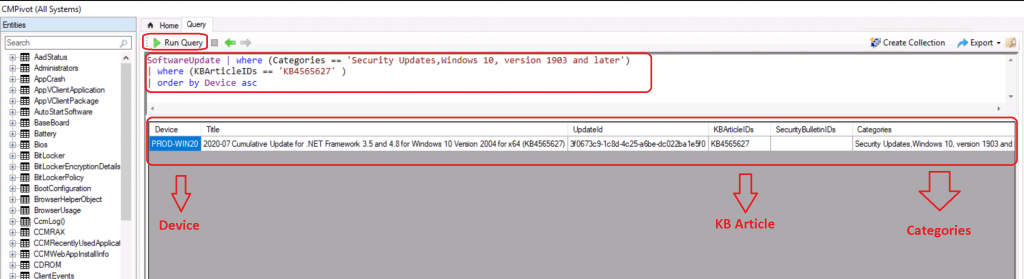
- CMPivot Query tool was launched.
- Get familiarized with new query language and CMPivot tool.
- Check out the Run Query button from the SCCM CMPivot tool.
SoftwareUpdate | where (Categories == 'Security Updates,Windows 10, version 1903 and later') | where (KBArticleIDs == 'KB4565627' ) | order by Device asc
NOTE! This CMPivot query is to find the missing devices with KB4565627. I used the categories Security Updates, Windows 10, version 1903, and later.

- Now, you have the details of the Windows 10 devices that are missing security updates (hotfixes).
- Now you have the results of the SCCM CMPivot query.
NOTE! Depending on the number of devices and complexity of the query, the CMPivot query may take time to return results. The following blog post provides more details: SCCM CMPivot Architecture Fast Channel Making | ConfigMgr.
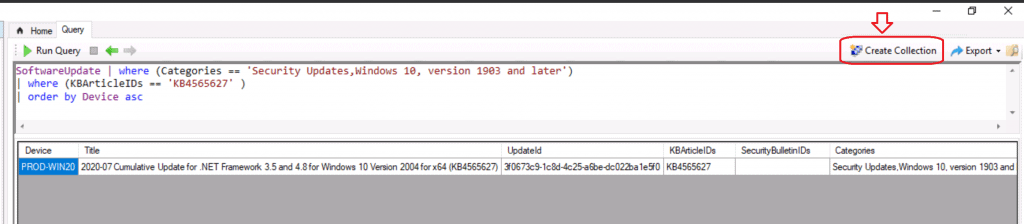
Create a collection of Windows 10 devices that are missing security updates. You can probably use this collection to pull more granular reports for troubleshooting, etc.
- Click on the Create collection (device collection) option as shown below.
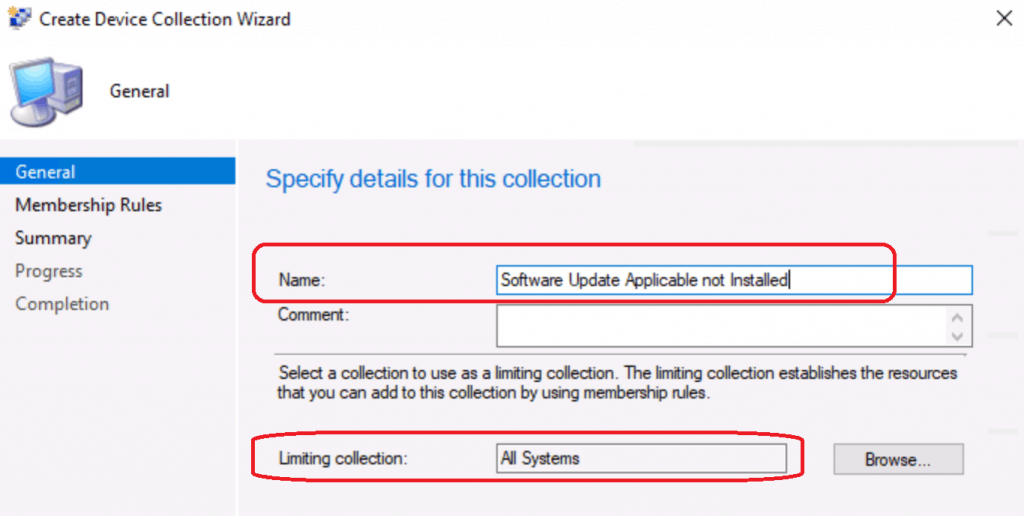
A collection creation wizard is launched. The limiting collection is selected automatically based on the device collection that you run CMPivot on.
- Click Next to continue.
NOTE! The following blog post explains more details about the SCCM Collection creation process: What is a Collection, and how do you Create SCCM Direct Membership Collections?
This device collection is a static collection. All the devices in the CMPivot query were automatically added to the static device collection called “Missing Security Updates Patches“.
- Click Next to continue.
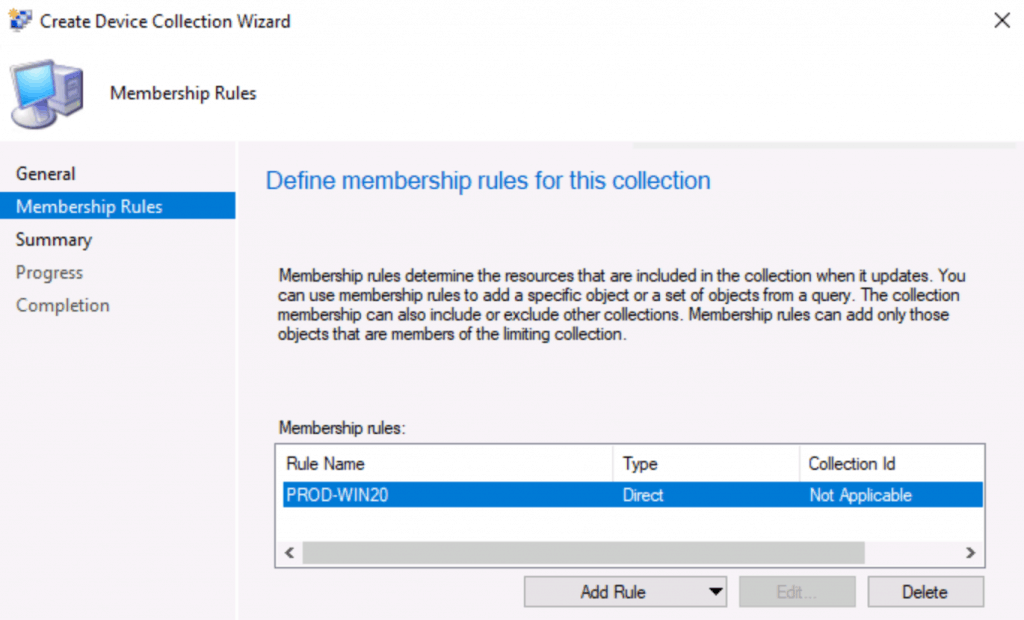
Click Next, Next, and Close to complete the collection creation process based on CMPivot query results.
Success: General
• Collection Name: Missing Security Updates Patches
• Comment:
Membership Rules
• (Direct) PROD-WIN20
CMPivot Results – Find Devices Missing Patches using ConfigMgr CMPivot Query
Let’s check the CMPivot query results to find the devices Missing Security Updates and Patches!.
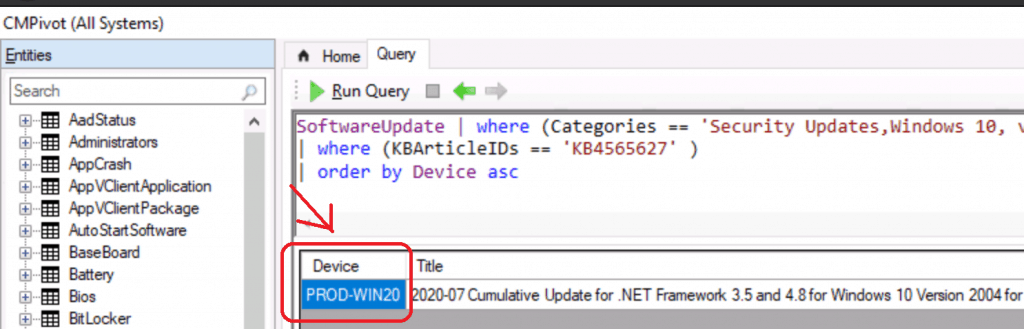
Let’s see the collection membership created directly from CMPivot query results!
- Navigate to \Assets and Compliance\Overview\Devices\Missing Security Updates Patches.
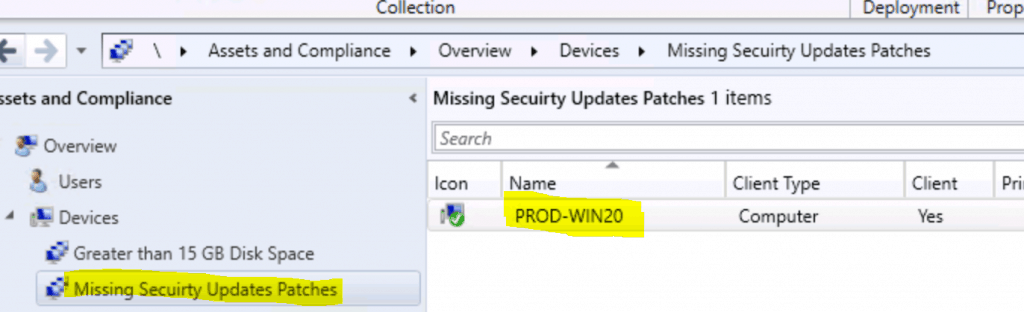
The results of both collection and CMPivot are the same! Happy Learning.
Resources
- CMPivot overview
- Monitor ConfigMgr Client Status from SCCM Console | Online | Offline
- SCCM CMPivot Architecture Fast Channel Making | ConfigMgr
We are on WhatsApp. To get the latest step-by-step guides and news updates, Join our Channel. Click here –HTMD WhatsApp.
Author
Anoop C Nair is Microsoft MVP! He is a Device Management Admin with more than 20 years of experience (calculation done in 2021) in IT. He is a Blogger, Speaker, and Local User Group HTMD Community leader. His primary focus is Device Management technologies like SCCM 2012, Current Branch, and Intune. He writes about ConfigMgr, Windows 11, Windows 10, Azure AD, Microsoft Intune, Windows 365, AVD, etc.




Great one. Thank you
Extra bonus, get count of the devices with below query.
SoftwareUpdate | summarize countif ( )
StaffOf course that you for the boost
Whats the query language if we don’t have a specific KB to look for?
Can this be used to find all applicable but not installed KB’s?