






SCCM Report Include Membership Collection Rule | ConfigMgr Query
Let’s find the ConfigMgr Include Membership collection Rule using Custom Report, SQL query, and report builder. We have many other SQL queries and custom reports we shared with the HTMD Forum community.
An Include Membership Rule adds members from another collection to the device collection where the rule is applied. Membership rules cannot be added to default collections. Your target collection must have an ID starting with the site code, not SMS. It is possible to include a default collection, in which case the ID of the included collection can start with SMS.
In my previous post, I discussed how to populate machines in a collection using system descriptions and then including them in different collections for bulk deployment. Sometimes, it is required to determine that an individual collection is part of how many other collections use rules.
- Create SCCM Collection using AD Group – Part 3 | ConfigMgr
- Create SCCM Collection based on Direct Membership Rule
- SCCM Collection Based On Active Directory OU | The Easy Way HTMD Blog (anoopcnair.com)
| Index |
|---|
| Include Membership Collection Rule |
| SQL Query |
| Result of SQL Query |
Include Membership Collection Rule
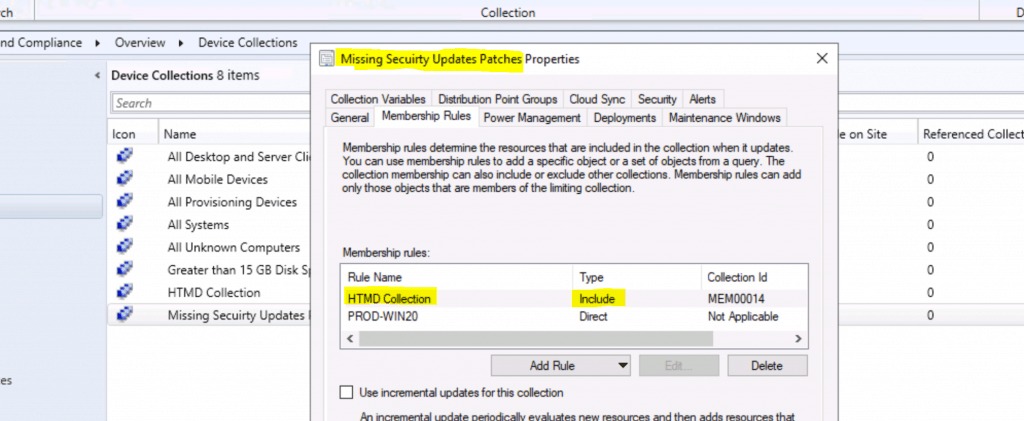
In this post, I will share a Configuration Manager SQL query that provides you with the details of the above statement. As you can see below, I have two collections.

- HTMD Collection
- Missing Security Updates Patches

The Missing Security Updates Patches collection referenced the HTMD collection using the Include rule. The following SCCM custom report lists the collections that reference one particular collection.
SQL Query
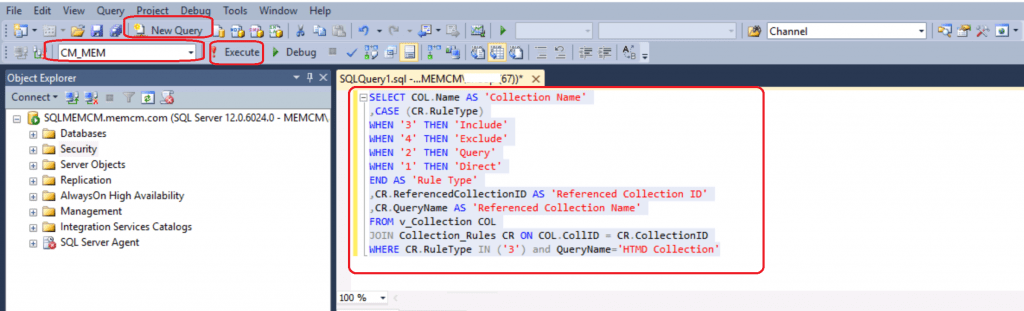
This SQL Query will help you use ‘When‘ and ‘then‘ syntax. You must have the appropriate access to launch the SQL management studio.
- Open the SQL Management Studio.
- Connect your Database Engine.
- Right-click on your database CM_XXX and click on ‘New Query.’
- Copy the following SQL query to find the application deployment report with collection details.
- Click on the Execute button.
SELECT COL.Name AS 'Collection Name'
,CASE (CR.RuleType)
WHEN '3' THEN 'Include'
WHEN '4' THEN 'Exclude'
WHEN '2' THEN 'Query'
WHEN '1' THEN 'Direct'
END AS 'Rule Type'
,CR.ReferencedCollectionID AS 'Referenced Collection ID'
,CR.QueryName AS 'Referenced Collection Name'
FROM v_Collection COL
JOIN Collection_Rules CR ON COL.CollID = CR.CollectionID
WHERE CR.RuleType IN ('3') and QueryName='HTMD Collection'
Result of SQL Query
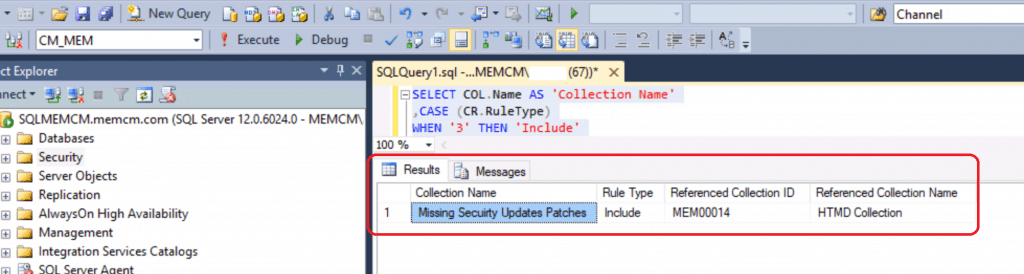
The above SQL Query provides us with the result to determine whether the collection is part of how many other application collections.
- In the QueryName, provide the collection name for which you want the result.
In this scenario, I tried to find out if the ‘HTMD Collection‘ collection is part of how many other collections.
NOTE! – You can also use ‘ReferenceCollectionID‘ instead of ‘Queryname‘ and provide the Collection ID.
| Collection Name | Rule Type | Referenced Collection ID | Referenced Collection Name |
|---|---|---|---|
| Missing Security Updates Patches | Include | MEM00014 | HTMD Collection |
References
- https://www.anoopcnair.com/sccm-create-custom-report-using-report-builder-configmgr-part-1/
- https://docs.microsoft.com/en-us/mem/configmgr/core/servers/deploy/configure/about-discovery-methods
- https://docs.microsoft.com/en-us/mem/configmgr/core/servers/deploy/configure/about-discovery-methods
- https://www.anoopcnair.com/create-application-group-using-sccm-configmgr/
- https://www.anoopcnair.com/configure-active-directory-system-discoverysccm/
We are on WhatsApp. To get the latest step-by-step guides and news updates, Join our Channel. Click here –HTMD WhatsApp.
Author
Ankit Shukla, an IT professional with over seven years of experience, has worked on SCCM/MECM since 2012. During this time, he has extensively dealt with various aspects of the tool, such as migration, infrastructure designing, OSD, custom SQL reporting, and client-side troubleshooting. Ankit’s blog posts reflect his hands-on experience addressing issues and providing practical solutions. The primary aim of his posts is to cater to the audience, comprised of support team members and SCCM admins in organizations.




Discussion