






SCCM Out of Support Versions of Office 365 Semi-Annual Channel
Today, I will explain the SCCM Out of Support Versions of Office 365 Semi-Annual Channel. Let’s build an SCCM custom report to list the devices with out of Support Versions of Office 365 semi-annual channel. ConfigMgr can help you to find the out of support versions of Office 365 Pro Plus installed devices in your environment.
The Semi-Annual Enterprise Channel gets updates on the second Tuesday of each month. In January and July, the monthly update might include feature, security, and non-security updates. In other months, it might only include security and non-security updates. Remember that new features are not added to the Semi-Annual Enterprise Channel at any other time, and you can’t download feature updates for the channel separately.
The Semi-Annual Enterprise Channel supports each version for 14 months. The version released in January is supported until March of the following year, and the version released in July is supported until September of the following year.
This extended support is convenient for organizations that need more time to test devices before trying out new Office features. It’s beneficial for organizations that follow specific rules from the government or other groups. The longer support duration lets these organizations roll out new features only once a year if needed.

Note! – Office 365 ProPlus was renamed to Microsoft 365 Apps for the enterprise. More info here.
- SCCM CMPivot Query For Out-of-Support Office 365 ProPlus
- Office 365 Apps End of Support Dates | Version vs Build Number
- Release Management Strategy Windows 10 Semi-Annual Channel and SAC-T
Supported Versions Of Office 365
The following table lists the supported version for each Office 365 update channel as of this post. For the latest support version details, we recommend checking the Microsoft docs.
As per Configuration Manager data, you must convert the Build number from the table below to match the version number.
- Build Number = 11328.20644
- Version Number (SCCM) = 16.0.11328.20644
NOTE: While checking out the support scenarios, I don’t think the last part of the build number is significant. So, in the above example, version number 1902 = build number 11328. You can use 11328 in the following scenarios.
Let’s understand some things. Once you have the latest supported version, replace the version number in the SQL query below. You can use the above version number (SCCM) to build the SQL query to list the devices with out-of-supported versions of Office 365.
| Channel | Version | Build | Release date | Version supported until |
|---|---|---|---|---|
| Semi-Annual Enterprise Channel | 1902 | 11328.20644 | August 11, 2020 | September 8, 2020 |
You can start this section once you have the version details of the latest supported Office 365 semi-annual channel. You can also track the status of out-of-support versions of Office 365 semi-annual channels. This is the simplest way to get custom reports from ConfigMgr.
The CDNBaseUrl0 for Semi-Annual Enterprise Channel is – http://officecdn.microsoft.com/pr/7ffbc6bf-bc32-4f92-8982-f9dd17fd3114
More details about Microsoft 365 Apps CDN Base URL for Office 365 Pro Plus
SQL Query – Out of Support Versions of Office 365
Use the following query in the custom report section below to find the list of devices out of support for Microsoft 365 Apps.
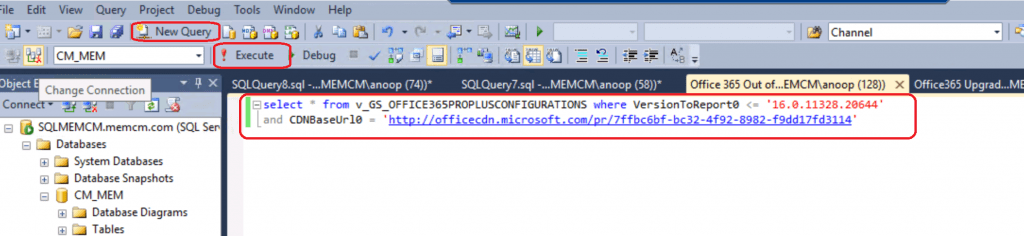
select * from v_GS_OFFICE365PROPLUSCONFIGURATIONS where VersionToReport0 < '16.0.11328.20644'
and CDNBaseUrl0 = 'http://officecdn.microsoft.com/pr/7ffbc6bf-bc32-4f92-8982-f9dd17fd3114'
Custom Report –Out of Support Versions of Office 365
- Open the SQL Management Studio.
- Click on the New Query button.
- Select the CM_MEM database from the drop-down menu.
- MEM is the ConfigMgr site code.
- Copy the following SQL query to find the report listing devices with out-of-support Office 365 semi-annual channel versions.
- Click on the Execute button.
Results – Out of Support Versions of Office 365 Semi-Annual Channel
You can check the VersionToReport0 value from the following column to understand the out-of-support Versions of the Microsoft 365 Apps (Office 365 Semi-Annual) Channel.
| ResourceID | GroupID | RevisionID | AgentID | TimeStamp | AutoUpgrade0 | CCMManaged0 | CDNBaseUrl0 | cfgUpdateChannel0 | ClientCulture0 | ClientFolder0 | GPOChannel0 | GPOOfficeMgmtCOM0 | InstallationPath0 | KeyName0 | LastScenario0 | LastScenarioResult0 | OfficeMgmtCOM0 | Platform0 | SharedComputerLicensing0 | UpdateChannel0 | UpdatePath0 | UpdatesEnabled0 | UpdateUrl0 | VersionToReport0 |
|---|---|---|---|---|---|---|---|---|---|---|---|---|---|---|---|---|---|---|---|---|---|---|---|---|
| 16777219 | 1 | 4 | 1 | 21:50.0 | NULL | UpdateNotify Object | http://officecdn.microsoft.com/pr/7ffbc6bf-bc32-4f92-8982-f9dd17fd3114 | http://officecdn.microsoft.com/pr/7ffbc6bf-bc32-4f92-8982-f9dd17fd3114 | en-us | C:\Program Files\Common Files\Microsoft Shared\ClickToRun | NULL | NULL | C:\Program Files\Microsoft Office | Office365ProPlusConfigurations | UPDATE | Failure | TRUE | x64 | 0 | NULL | NULL | TRUE | NULL | 16.0.11229.20648 |
Resources
- SCCM Create Custom Report Using Report Builder | ConfigMgr | Part 1
- Overview of update channels for Microsoft 365 Apps
- Release information for updates to Microsoft 365 Apps
- Download sizes for updates to Microsoft 365 Apps
We are on WhatsApp. To get the latest step-by-step guides and news updates, Join our Channel. Click here –HTMD WhatsApp.
Author
Anoop C Nair is Microsoft MVP! He is a Device Management Admin with more than 20 years of experience (calculation done in 2021) in IT. He is a Blogger, Speaker, and Local User Group HTMD Community leader. His primary focus is Device Management technologies like SCCM 2012, Current Branch, and Intune. He writes about ConfigMgr, Windows 11, Windows 10, Azure AD, Microsoft Intune, Windows 365, AVD, etc.




So this basically just gives me a version that is out of date and not what systems have an out of date install?