






Enable SCCM Run Scripts Feature from Intune Portal | ConfigMgr
In this post, I’ll provide a step-by-step guide on activating the SCCM Run scripts feature from Intune Portal within ConfigMgr. Microsoft has recently rolled out an update, including the Tenant Attach rollup hotfix (KB4580678) for Configuration Manager CB, version 2006.
This KB helps you enable the SCCM Run scripts feature from Intune Portal (a.k.a Microsoft Endpoint Manager admin centre) and fix some issues related to tenant attachment.
The KB 4580678 is a feature enablement hotfix and has been uncommon in the SCCM world until now. The new feature will allow admins to use the Intune portal (MEM admin centre) to initiate Run Script functionality without logging into the SCCM console.
This KB article update is available in the Updates and Servicing node of the ConfigMgr console for environments that completed the Tenant attach process and were installed using an early update ring or globally available builds of version 2006.

Announcement -SCCM Run Scripts Feature from Intune
Rob York, Program Manager for Microsoft Endpoint Manager on OSD, CMG, and the codification of Windows management, announced this.
When the ConfigMgr environment is completed with the Tenant Attach feature, Microsoft will add additional cloud value features for Help Desk personas.
Yet more #CloudValue will appear for tenant-attached customers over the next week. Run scripts in real time on #ConfigMgr devices from the admin centre. To enable this feature, a small, hotfix-esque update is required on top of CM2006. https://t.co/oGz0kFfWme #mempowered pic.twitter.com/K2aMNsDBki — Rob York (@robdotyork) September 18, 2020
Issues Fixed with KB 4580678
This hotfix also enables the option to run a script from the Intune portal and fixes some known issues with tenant attachments.
- Features like Scripts in the admin centre do not appear for users assigned to all security scopes but are not full administrators.
- Internet-based links to approve or deny user application requests via email fail in ConfigMgr, version 2006.
- This occurs for internet-based clients with a cloud management gateway (CMG).
- The administrator will receive an HTTP Error 400 when clicking the email link.
- The online status listed for devices on the internet connecting via a cloud management gateway (CMG) in the ConfigMgr console may be incorrect.
Prerequisite -Enable SCCM Run Scripts Feature from Intune
Complete the following steps to enable the SCCM Run scripts feature from the Intune Portal.
- All of the prerequisites for the Tenant are attached.
- A minimum ConfigMgr version 2006 with KB4580678 – Tenant attach rollup for ConfigMgr 2006 installed.
- All sites in the hierarchy must meet the minimum ConfigMgr version requirement. And that is SCCM 2006.
- ConfigMgr clients must be running the latest version of the client. I do NOT think there is any client-side update available for KB4580678. Hence, check whether your client version is the latest one mentioned in the GA of ConfigMgr 2006.
- The client must run PowerShell version 3.0 or later to run PowerShell scripts.
- At least one script has already been created and approved in ConfigMgr.
- Scripts with parameters aren’t supported now and won’t be visible in the Intune Portal (Microsoft Endpoint Manager admin centre).
- Only already created and approved scripts appear in the admin centre (a.k.a Intune Portal).
NOTE! The permissions for the Tenant are updated. You don’t need to give permissions to Configuration Manager Microservice https://docs.microsoft.com/en-us/mem/configmgr/tenant-attach/client-details#permissions
Permissions Required
The admin user who runs the script should have SCCM (a.k.a. ConfigMgr) Related access cess rights.
| Category | Permission | State |
|---|---|---|
| Collection | Run Script | Yes |
| Site | Read | Yes |
| SMS Scripts | Create | Yes |
| SMS Scripts | Read | Yes |
- To run the script from the Microsoft Endpoint Manager admin centre, you need Intune Portal (Admin centre) access rights.
- The Admin User role for the Configuration Manager Microservice application in the Azure AD portal.
- Add the role in Azure AD from Enterprise applications > Configuration Manager Microservice > Users and groups > Add user.
Install KB4580678 to Enable the SCCM Run Scripts Feature from Intune
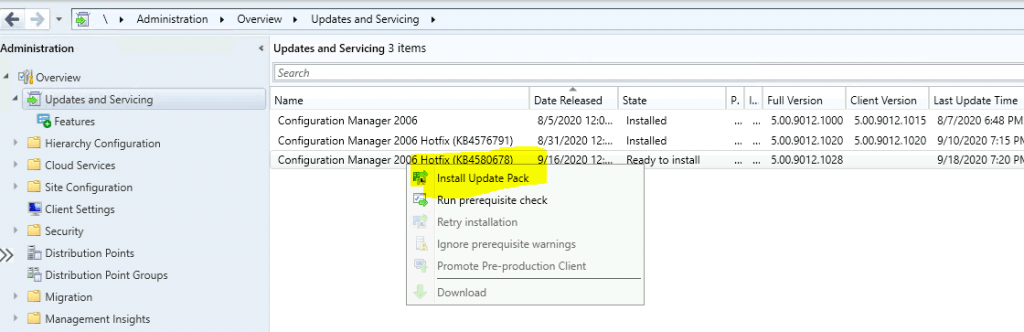
Let’s install the KB from the ConfigMgr console to enable the new feature in the Intune portal. The new feature will allow admins to use the Intune portal (MEM admin centre) to initiate the Run Script without logging into the SCCM console.
The summary of the updated package installation for Configuration Manager 2006 is given in the following post-update installations.
- Install Update Package Configuration Manager 2006 Hotfix (KB4580678)
- Prerequisite warnings will be ignored
- Test a new version of the client in production.
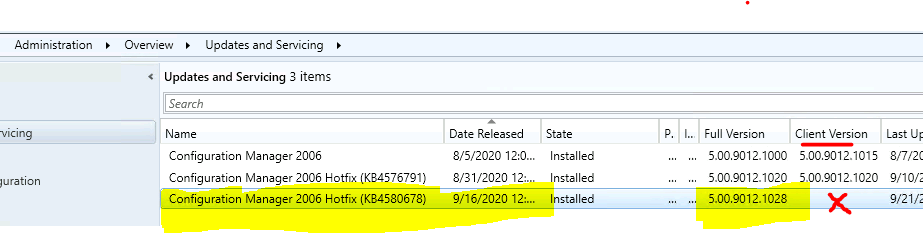
Client-Side Update –SCCM Run Scripts Feature from Intune
- There is no client-side update for the KB4580678.
- The full version of the site server got updated to – 5.00.9012.1028.
- No update is required for the SCCM console after installing KB4580678.
NOTE! – The site version has not been changed under Site Configuration – Sites. After installing KB4580678, the site version and build number remain the same: 5.00.9012.1000
Run a Script Uploaded to SCCM via the Intune Portal
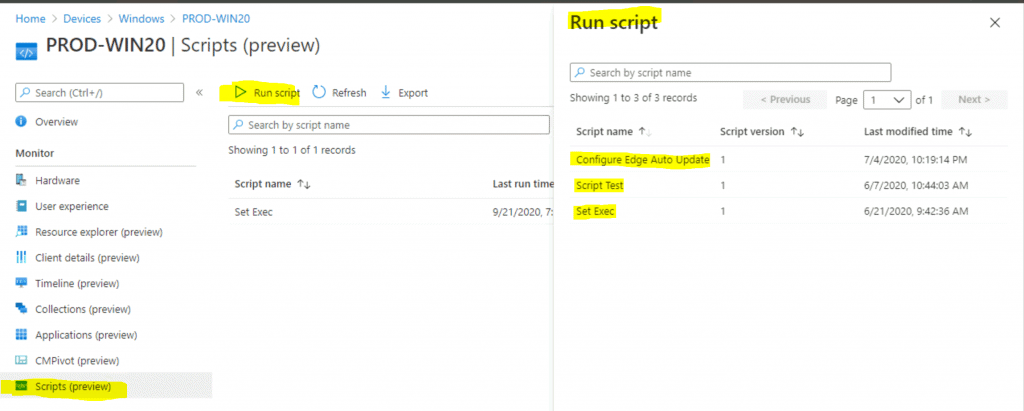
Open https://endpoint.microsoft.com with an admin user ID already discovered via SCCM Azure AD User, select Devices, select All Devices, choose a device synced from SCCM via Tenant attach and then view all approved scripts by clicking on Scripts.
- Click on the Run Scripts button to view all the approved scripts.
Resources
- Tenant attach rollup for Configuration Manager current branch, version 2006
- Tenant attach: Run Scripts (preview) from the admin centre.
We are on WhatsApp. To get the latest step-by-step guides and news updates, Join our Channel. Click here –HTMD WhatsApp.
Author
Anoop C Nair is Microsoft MVP! He is a Device Management Admin with more than 20 years of experience (calculation done in 2021) in IT. He is a Blogger, Speaker, and Local User Group HTMD Community leader. His primary focus is Device Management technologies like SCCM 2012, Current Branch, and Intune. He writes about ConfigMgr, Windows 11, Windows 10, Azure AD, Microsoft Intune, Windows 365, AVD, etc.




Discussion