






ConfigMgr Intranet Clients can Use CMG Software Update Point SCCM
ConfigMgr 2006 introduced a new option to help remote worker scenarios. I have explained how to optimize ConfigMgr infrastructure for remote workers. Let’s see how to enable access to ConfigMgr Intranet. Clients can use CMG Software Update Point.
From the 2006 version onwards, the ConfigMgr intranet clients can access the CMG software update point. The CMG SUP should be assigned to a boundary group.
The ConfigMgr Intranet Clients can use the CMG Software Update Point option as another option to help and enable the remote worker’s scenarios. Microsoft introduced a new set of ConfigMgr Management Insights called Optimize for Remote Workers.
When a device connects to the VPN, it will continue to scan against the CMG software update point over the internet. If the CMG software update point is the only one for the boundary group, then all intranet and internet devices will scan against it.

- Best Way To Manage SCCM Client On Windows Server Core Machines
- SCCM CMG Cloud Management Gateway Implementation Guide
- Setup SCCM CMG Azure Management Service Guide (anoopcnair.com)
| Index |
|---|
| Allow Configuration Manager Cloud Management Gateway traffic |
| Boundary Group -Intranet Clients can Use CMG Software Update Point SCCM |
| Logs – Intranet Clients can Use CMG Software Update Point SCCM |
Allow Configuration Manager Cloud Management Gateway traffic
When planning for a CMG in SCCM, it’s essential to note the associated costs. The CMG utilizes Azure components, incurring charges to your subscription account. Costs vary based on fixed and usage-dependent factors, including the virtual machine hosting the CMG service and data transfer amounts.
The Configuration Manager client automatically detects whether it is connected to the intranet or the Internet. When the client is able to communicate with a domain controller or an on-premises management point, it configures its connection type as ‘Currently intranet.‘ If it is unable to make this connection, the client switches to the Internet and leverages the location of the CMG service to communicate with the site.
Let’s enable the option to allow SCCM CMG traffic for intranet client devices connected through a VPN.
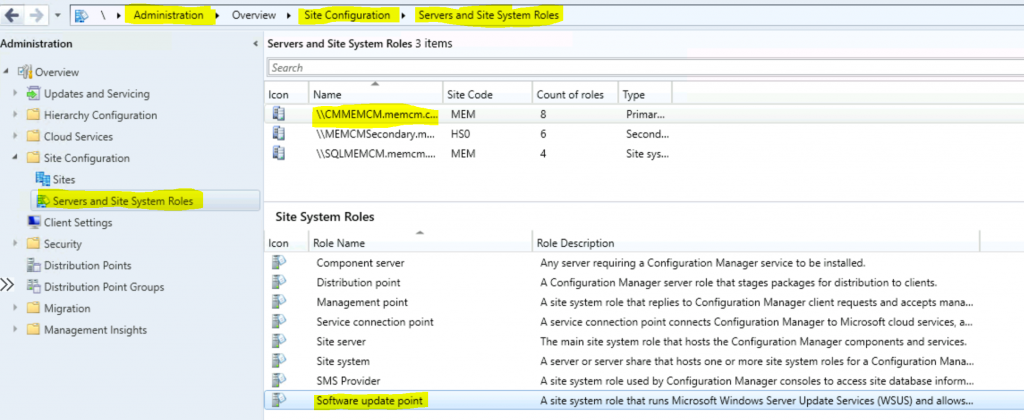
- Navigate to \Administration\Overview\Site Configuration\Servers and Site System Roles
- Click on the site system server where you have installed Software Update Point.
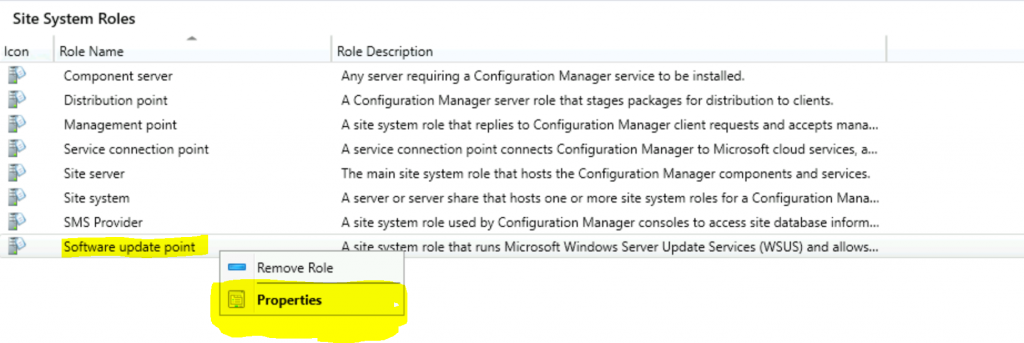
Right-click on the Software Update Point site system role
- Select Properties options
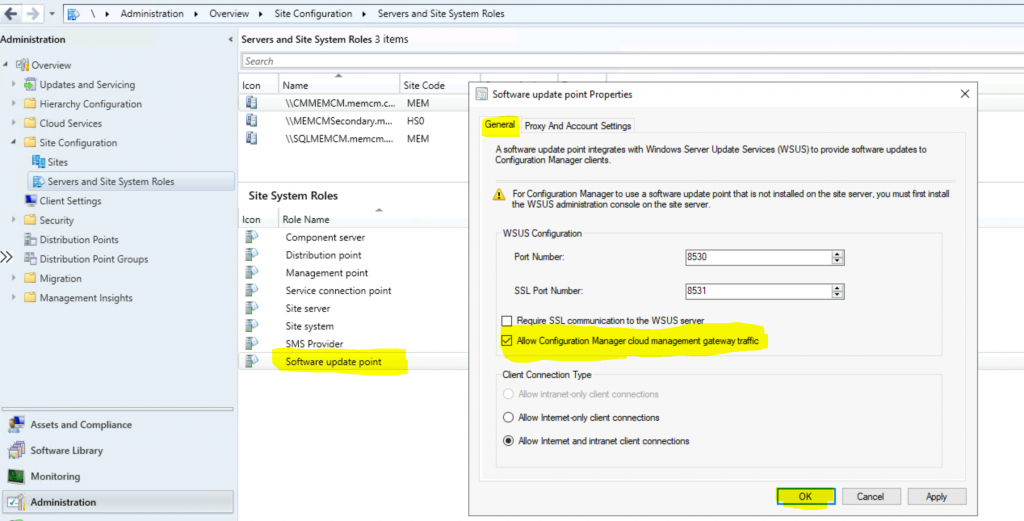
On the General Tab (ConfigMgr 2006 onwards), Select the option “Allow Configuration Manager Cloud Management Gateway traffic.”
- Click OK
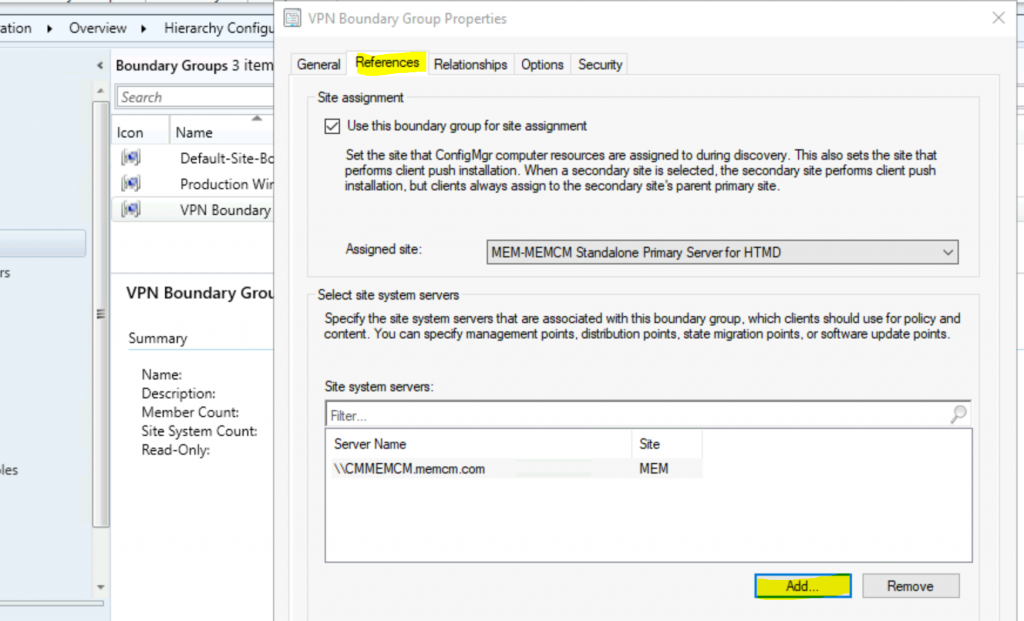
Boundary Group -Intranet Clients can Use CMG Software Update Point SCCM
Ensure you have added the CMG Software Update Point to the Boundary group so that the VPN clients will receive the details of the CMG server.
Logs – Intranet Clients can Use CMG Software Update Point SCCM
Client-side validation can be done using locationservices.log. Make sure you have CMG related entry in the log file to confirm the changes on the client-side.
Resources
- SCCM CMG SUP selection option for intranet client
- ConfigMgr Management Insights – https://docs.microsoft.com/en-us/sccm/core/servers/manage/management-insights
We are on WhatsApp. To get the latest step-by-step guides and news updates, Join our Channel. Click here –HTMD WhatsApp.
Author
Anoop C Nair is Microsoft MVP! He is a Device Management Admin with more than 20 years of experience (calculation done in 2021) in IT. He is a Blogger, Speaker, and Local User Group HTMD Community leader. His primary focus is Device Management technologies like SCCM 2012, Current Branch, and Intune. He writes about ConfigMgr, Windows 11, Windows 10, Azure AD, Microsoft Intune, Windows 365, AVD, etc.




If our company does not use SCCM for Software updates, only application deployment, can we use the CMG
StaffYes you can use CMG for application deployment. Make sure that all the required applications are distributed to the cloud DP
I have different VPN connections from different geographical locations. Also different Secondary sites. Do i have to allow network access between VPN network and server network to get information about CMG point.
StaffYou might need split tunnelling in this scenario when clients are connected via VPN … cmg connection should go out to internet directly using the split
We have noticed in our environment that just creating boundary groups for VPN Clients and assigning CMG as the content source does not work. It only works when they are configured as Internet only clients. Do you have the same experience? Has anyone configured or seen VPN clients using CMG as content source while it’s on Intranet without forcing AlwaysInternet setting?
This link is talking about the same thing: https://www.reddit.com/r/SCCM/comments/l1l2ta/client_issues_with_vpn_and_cmg/
very informative…
I have assigned the SUP server in the boundary group references and noted the locationservices picked up a to the log. I understood that it has started looking for wsus path.
but wuahandler log throws this error message.
OnSearchComplete – Failed to end search job. Error = 0x80244017.
I have used netsh winhttp show proxy. but the server is not using any proxy.
Hi, I have similar issue OnSearchComplete – Failed to end search job. Error = 0x80244017 with CMG SUP. Have you solved it?