






Enable SCCM Console Notification from Microsoft | ConfigMgr
Let’s understand how to receive Push Messages in the ConfigMgr Console (Enable SCCM Console Notification from Microsoft | ConfigMgr). The 2006 version of ConfigMgr gives an option to receive notifications from Microsoft in the ConfigMgr console.
The Configuration Manager console will alert you about specific events, allowing you to configure event notifications for your Configuration Manager sites.
Notifications are governed by role-based administration permissions. This means that if a user lacks permission to view Configuration Manager updates, they will not receive messages related to them.
The push messages are coming from Microsoft. These notification messages help you stay informed about new or updated features, changes to ConfigMgr and attached services, and issues that require action to be remediated.

- Troubleshoot SCCM Fast Channel Push Notification Issues
- Supported Windows Server OS for SCCM Servers
- Add More Security CMG Web App in SCCM 2309 Update
- Total Number of SCCM Managed Non-Cloud Connected Windows Devices
| Index |
|---|
| Prerequisites Receive Push Messages in the ConfigMgr Console |
| Enable Push Messages |
| Results – Enable SCCM Console Notification from Microsoft |
Prerequisites Receive Push Messages in the ConfigMgr Console
The following is the prerequisite to receiving the Microsoft Push Messages in the ConfigMgr console. The exact URL should be accessible for updates and servicing.
- ConfigMgr Site Server 2006 or later
- ConfigMgr console 2006 or later
- The service connection point needs access to configmgrbits.azureedge.net
Enable Push Messages
Let’s see how to enable push messages in the Configuration Manager console.
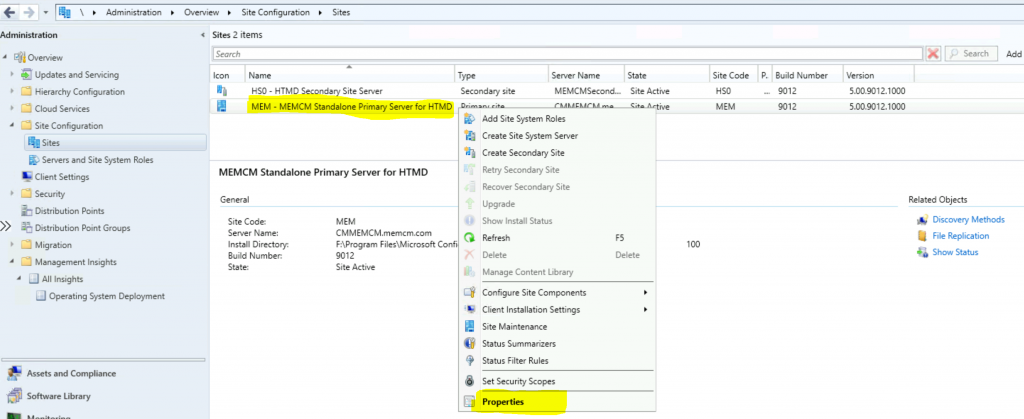
- Navigate to \Administration\Overview\Site Configuration\Sites
- Select the CAS / Standalone Primary server site
- Right-click on the site server – select Properties
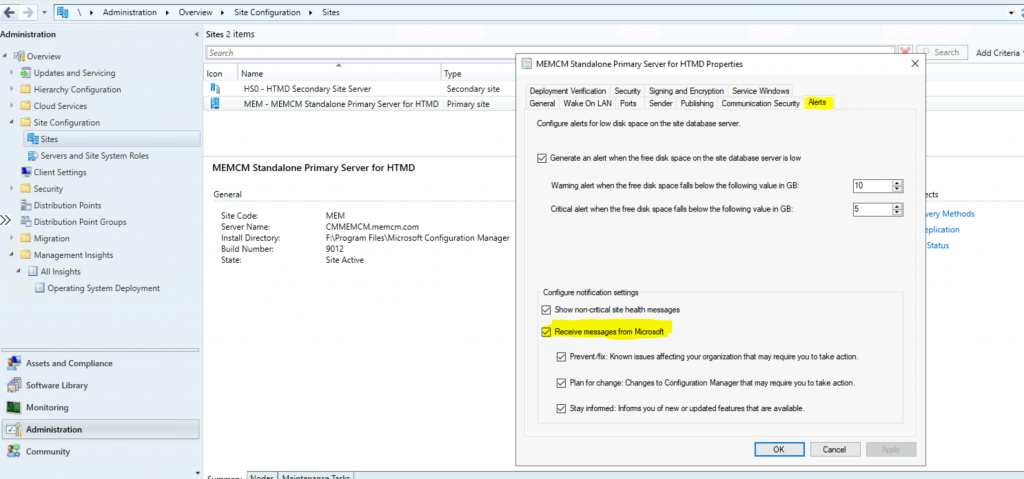
- Click on the Alerts tab to enable push messages in the admin console
- Select the following options
- Prevent/fix: Known issues affecting your organization that may require you to take action.
- Plan for change: Changes to Configuration Manager that may require you to take action
- Stay informed: Informs you of new or updated features that are available
Results – Enable SCCM Console Notification from Microsoft
I’ve not seen push messages from Microsoft in the admin console. I envision loads of push notification messages in the console with future versions. We shall see hotfix release updates in the console. I think this feature would be very useful for the community.
Resources
- Configure a site to receive messages from Microsoft
- Version 2006 of Configuration Manager Installation
- Checklist for ConfigMgr 2006
We are on WhatsApp. To get the latest step-by-step guides and news updates, Join our Channel. Click here –HTMD WhatsApp.
Author
Anoop C Nair is Microsoft MVP! He is a Device Management Admin with more than 20 years of experience (calculation done in 2021) in IT. He is a Blogger, Speaker, and Local User Group HTMD Community leader. His primary focus is Device Management technologies like SCCM 2012, Current Branch, and Intune. He writes about ConfigMgr, Windows 11, Windows 10, Azure AD, Microsoft Intune, Windows 365, AVD, etc.




I found that these 3 settings were already checked by default after the upgrade to 2006.
StaffI have the same experience as yours …missed mentioning in the post.