






SCCM How to Fix the Error the Database is in Single User Mode Configuration
Let’s discuss How to Fix the Error the Database is in Single User Mode Configuration. Through this post I will explain single-user mode configuration.
In single-user mode, only one user can access the database at a time. Whenever you set the database to single-user mode without any information, all the other connections are closed.
With the release of SCCM, we can have multiple SUPs under one primary server. One scenario that I want to test is Remote SUP with shared DB.
Before installing the SUP role, we must install WSUS 3.0 SP2 on the remote SUP server, along with the WSUS patches (2720211 and 2734608). SCCM How to Fix the Error the Database is in Single User Mode Configuration.

Table of Contents
SCCM How to Fix the Error the Database is in Single User Mode Configuration
WSUS was installed successfully with a shared DB (the DB is located on my primary server). However, when I tried to install the patch, it gave me the following error:
I’ve checked the MSI3f93c.log file and then MWusCa.log.
The second log was more specific.
- Emergency Fix for Windows Server Crashes Out-of-Band Updates Released by Microsoft
- Latest Fixes for SCCM 2303 KB24719670 Hotfix Update Rollup
- FIX Unable to Run CMPivot Issue SCCM Interoperability Mode
- FIX Error 0x87d20002 SCCM Secondary Server Upgrade
Error 1722. There is a problem with this Windows Installer package. A program run as part of the setup did not finish as expected. Contact your support personnel or package vendor. Single User Mode Configuration
Action ExInstallSqlQuery, location: C:\Windows\Installer\MSIC2B8.tmp, command: -S ACNCMPRI -Q “
Database ‘SUSDB’ is already open and can only have one user at a time.
Changes to the state or options of database ‘SUSDB’ cannot be made now. The database is in single-user mode, and a user is currently connected to it. Msg 5069, Level 16, State 1, Server ACNCMPRI, Line 1
ALTER DATABASE statement failed.
Now, how do we resolve this issue? Logged into SQL studio at my ConfigMgr 2012 SP1 primary server and checked SUSDB. Yes, that was in single-user mode. Now, how to change single-user mode to Multi-User mode? Again, the search helped to find a solution. Following are the SQL queries to resolve the issue. SCCM How to Fix the Error the Database is in Single User Mode Configuration.
1. Need to find out the user and session ID.
SQL query/statement –
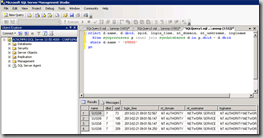
select d.name, d.dbid, spid, login_time, nt_domain, nt_username, loginame from sysprocesses p inner join sysdatabases d on p.dbid = d.dbid where d.name = ‘SUSDB’ go
2. Note down the “spid” of the user from the above query result and kill that session.
- SQL Statement – “kill 52”
- Where 52 was session ID.
3. Change the SUSDB to multi-user mode.
SQL Statement –
- ALTER DATABASE SUSDB
- SET MULTI_USER
SCCM How to Fix the Error the Database is in Single User Mode Configuration
- FIX SCCM Hotfix Failed to Install Update Files Issue 0x80004005 Error
- FIX SCCM SQL Replication Issues using Replication Link Analyzer
- How to Upgrade SCCM SQL Server to 2019 | Primary Site Database
We are on WhatsApp now. To get the latest step-by-step guides, news, and updates, Join our Channel. Click here – HTMD WhatsApp.
Author
Anoop C Nair is Microsoft MVP! He is a Device Management Admin with more than 20 years of experience (calculation done in 2021) in IT. He is a Blogger, Speaker, and Local User Group HTMD Community leader. His primary focus is Device Management technologies like SCCM 2012, Current Branch, and Intune. He writes about ConfigMgr, Windows 11, Windows 10, Azure AD, Microsoft Intune, Windows 365, AVD, etc.




If the first SQL query fails at ‘SUSDB’ on the third line you might try using ‘SUSDB’, this is probably due to regional settings. You might not be able to see it on the screen, but the quotation marks are different.
Thanks. This helped me a ton. Turned a big problem into a short fix.
Seems the only login connection is my login through SQL Management Studio. If I ‘kill” it, I’m informed I can’t kill my own session. This seems to be a catch-22. I have to connect to it, to alter it to multi-user mode, yet no one (including me) can be connected to it when it’s changed.
Well, I guess my unmediated post can be deleted, along with this one. I ended up uninstalling WSUS, uninstalling WID, and after a reboot, reinstalling them both. First thing on the list, decline kb3148812 and kb3159706. I’m tired of being the MS guineapig on this one.
You can run from master and so SP_WHO this will get you what is running with the database.. So you are not in a UserDB. Runs a Stored Procedure.
Thanks big time man, this instruction helped me a lot. I managed to change single user to multi user mode.
WSUS now working like a charm.
No, it will fail sometimes with the following message. mssql is not well designed, the only way to get out this situation is to restart mssql services.
Msg 924, Level 14, State 1, Line 51
Database adsfadf is already open and can only have one user at a time.