






SCCM ConfigMgr Hardware Related Reports | Default Reports | Configuration Manager
Let’s check the ConfigMgr Hardware Related Reports available in the latest version. Some of the reports from the hardware category are not relevant to me. One example of a report that is not frequently used is CD-ROM/Modem-related information.
If you have trouble opening SSRS reports, refer to Fix Report Server cannot Open a Connection Error ConfigMgr. Let’s also learn how to create a New Database for SSRS Reporting Service.
SCCM Hardware-Related Reports are essential tools for administrators to manage and monitor the hardware inventory of devices within their organization. These reports provide detailed insights into various aspects of hardware configurations, helping IT teams maintain compliance, troubleshoot issues, and plan for upgrades effectively.
SCCM offers a comprehensive set of default hardware-related reports that cover a wide range of information. All the information is explained in detail below.

Table of Contents
Hardware
Let’s examine the hardware-related default SCCM reports that are available and ready to use in this post. How many of you use these reports? Let’s discuss this in the comments. The following are the sections available for the hardware category of reports.
- List of SCCM Default Reports | Configuration Manager
- ConfigMgr Application Package Distribution Related Default Reports | SCCM
- How to Launch ConfigMgr Reports | SCCM | Default Reports
- ConfigMgr Reports Site Infrastructure Related | SCCM | Default
- ConfigMgr Reports Power Management | Default | SCCM
- ConfigMgr Reports Task Sequence | Default | SCCM
| Out of Box SCCM 1910 Hardware Reports |
|---|
| Hardware – CD-ROM |
| Hardware – Disk |
| Hardware – General |
| Hardware – Memory |
| Hardware – Modem |
| Hardware – Network Adapter |
| Hardware – Processor |
| Hardware – SCSI |
| Hardware – Security |
| Hardware – Sound Card |
| Hardware – Video Card |
CD ROM Reports
I don’t think we use the Hardware—CD-ROM report for the device they manage now. Is it time to remove this section of the reports?
| CD-ROM Related Default Reports |
|---|
| CD-ROM information for a specific computer |
| Computers for a specific CD-ROM manufacturer |
| Count CD-ROM drives per manufacturer |
| History – CD-ROM history for a specific computer |
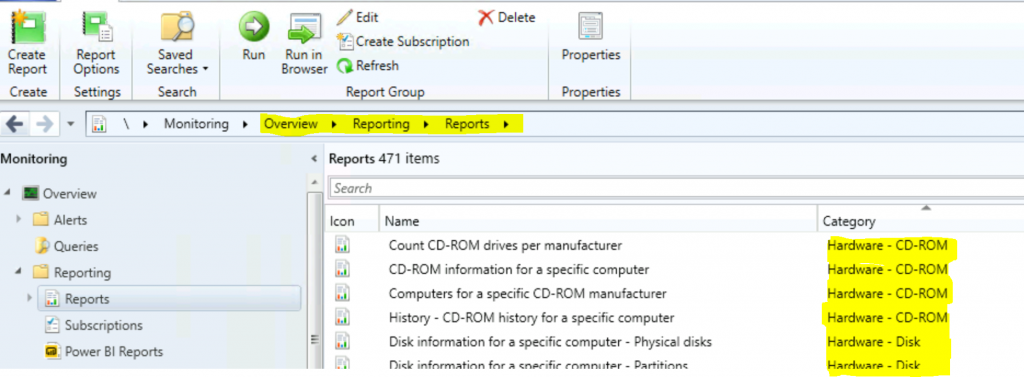
List of SCCM CB Hardware Reports
Let’s learn how to launch Hardware CD-ROM reports from the console. The following blog provides more information. In this section, you can see the default reports of ConfigMgr CB (version 2010).
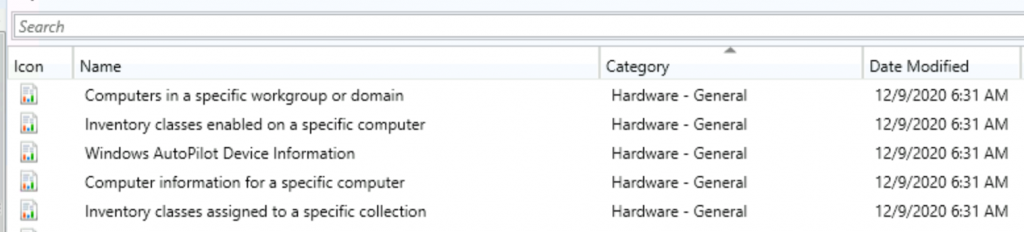
General
This category encompasses basic information about a computer system’s physical components. It typically includes the processor type, RAM size, storage capacity, graphics card, and other hardware specifications.
| Hardware – General |
|---|
| Computer information for a specific computer |
| Computers in a specific workgroup or domain |
| Inventory classes assigned to a specific collection |
| Inventory classes enabled on a specific computer |
| Windows AutoPilot Device Information |
Hard Disk
This category pertains to the physical storage devices (disks) attached to a computer, including details such as disk type (HDD, SSD), capacity, and partitions.
| Hardware – Disk |
|---|
| Computers with a specific hard disk size |
| Computers with low free disk space (less than specified % free) |
| Computers with low free disk space (less than specified MB free) |
| Count physical disk configurations |
| Disk information for a specific computer – Logical disks |
| Disk information for a specific computer – Partitions |
| Disk information for a specific computer – Physical disks |
| History – Logical disk space history for a specific computer |
Memory
This is the hardware memory section. The below table also shows more details about hardware memory.
| Hardware – Memory |
|---|
| Computers where physical memory has changed |
| Computers with a specific amount of memory |
| Computers with low memory (less than or equal to specified MB) |
| Count memory configurations |
| Memory information for a specific computer |
Processor
Understanding and managing processor performance across computers in an IT environment is crucial for optimizing system efficiency, ensuring compatibility with software requirements, and identifying potential hardware upgrade needs to effectively meet operational demands.
| Hardware – Processor |
|---|
| Computers for a specific processor speed |
| Computers with fast processors (greater than or equal to a specified clock speed) |
| Computers with slow processors (less than or equal to a specified clock speed) |
| Count processor speeds |
| Processor information for a specific computer |
Security
The security section provides more details about the firmware state of devices. The table below provides more information.
| Security |
|---|
| Details of firmware states on devices |
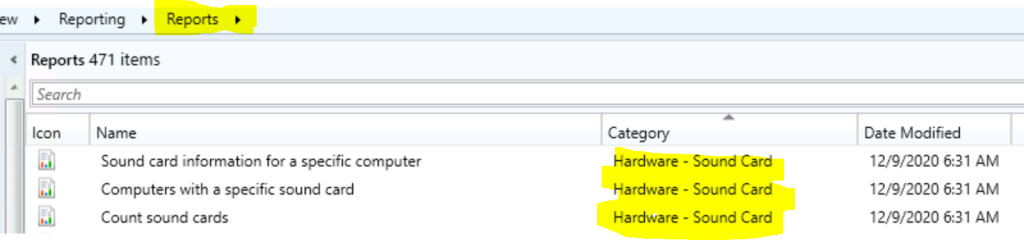
Sound Card
Managing sound cards in computer systems involves tracking and ensuring compatibility with audio hardware across an organization’s network. Here are key aspects:
| Hardware – Sound Card |
|---|
| Computers with a specific sound card |
| Count sound cards |
| Sound card information for a specific computer |
Video Card
This is the video card section. Here, you can see options such as computers with a specific video card, counting video cards by type, and video card information on a particular computer.
| Hardware – Video Card |
|---|
| Computers with a specific video card |
| Count video cards by type |
| Video card information for a specific computer |
SCSI
The SCSI section includes options such as Computers with a specific SCSI card type, the Count of SCSI card types, and SCSI card information in a particular computer.
| Hardware – SCSI |
|---|
| Computers with a specific SCSI card type |
| Count SCSI card types |
| SCSI card information for a specific computer |
Network Adapters
The network adapter section includes options for Computers with a specific network adapter, a Count of network adapters by type, and Network adapter information for a specific computer.
| Hardware – Network Adapter |
|---|
| Computers with a specific network adapter |
| Count network adapters by type |
| Network adapter information for a specific computer |
Modem?
Do we still use a Modem? The table below provides more details about the hardware modem.
| Hardware – Modem |
|---|
| Computers for a specific modem manufacturer |
| Count modems by manufacturer |
| Modem information for a specific computer |
Resources
- Fix Report Server cannot Open a Connection Error ConfigMgr | SCCM
- SQL Server Database Migration
- SQL Server – Installation
We are on WhatsApp now. To get the latest step-by-step guides, news, and updates, Join our Channel. Click here – HTMD WhatsApp.
Author
Anoop C Nair is Microsoft MVP! He is a Device Management Admin with more than 20 years of experience (calculation done in 2021) in IT. He is a Blogger, Speaker, and Local User Group HTMD Community leader. His primary focus is Device Management technologies like SCCM 2012, Current Branch, and Intune. He writes about ConfigMgr, Windows 11, Windows 10, Azure AD, Microsoft Intune, Windows 365, AVD, etc.




Discussion