






SCCM Reports on Driver Management | ConfigMgr | Configuration Manager
Let’s check the ConfigMgr/SCCM Reports on Driver Management. Thirteen (13) out-of-box reports are available as part of Configuration Manager SSRS reports. For more details, refer to the ConfigMgr driver import and driver package creation process guide.
Other useful hardware-related reports are available in addition to driver management reports. You can also learn how to Launch ConfigMgr Reports from the previous post here.
If you have trouble opening SSRS reports, refer to Fix Report Server cannot Open a Connection Error ConfigMgr. Let’s also learn how to create a New Database for SSRS Reporting Service.
This post will provide comprehensive details about SCCM reports focused on driver management. These reports are essential for administrators to track and manage drivers across their organization’s devices efficiently.

Table of Contents
SCCM Reports on Driver Management – Requirements
Ensure you have all the following to access the ConfigMgr driver management default reports.
- Reporting Services Point is installed.
- SSRS reports are working fine.
- Ensure you have appropriate permissions to launch reports from the Console and SSRS URL.
- SCCM Driver Management Guide Best Practices ConfigMgr
- List of SCCM Default Reports | Configuration Manager
- Create SCCM Custom Report Using Report Builder | ConfigMgr | Part 1
Launch ConfigMgr Client Reports
Let’s learn how to launch driver management default reports from the console.
- Launch Console
- Navigate to \Monitoring\Overview\Reporting\Reports.
- Sort the reports by Category.
- Right-click on the Report “Driver Management“.
- Select the RUN option.
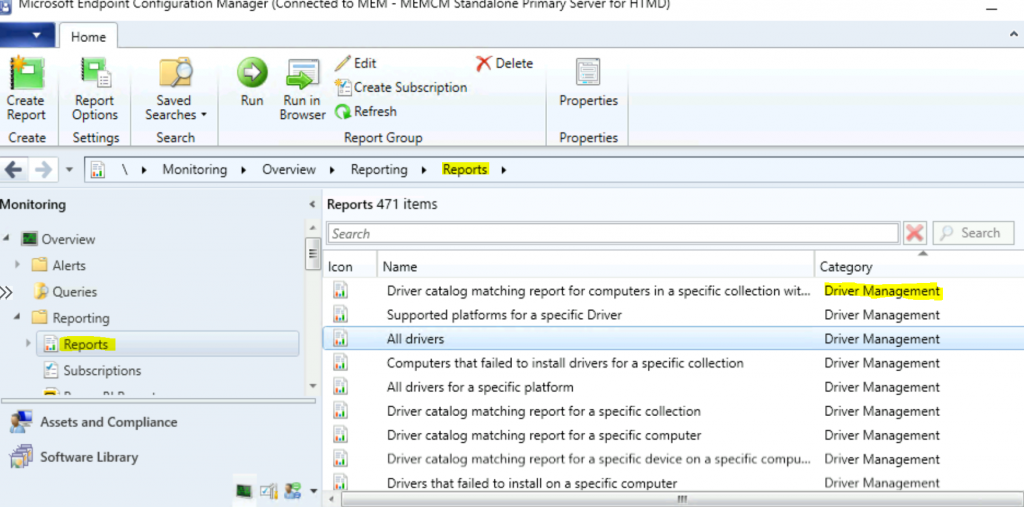
Driver Management Reports
Let’s check the 13 (thirteen) ConfigMgr Driver Management reports.
| Sl.No. | Driver Management |
|---|---|
| 1 | All drivers |
| 2 | All drivers for a specific platform |
| 3 | All drivers in a specific boot image |
| 4 | All drivers in a specific category |
| 5 | All drivers in a specific package |
| 6 | Categories for a specific driver |
| 7 | Computers that failed to install drivers for a specific collection |
| 8 | Driver catalog matching report for a specific collection |
| 9 | Driver catalog matching report for a specific computer |
| 10 | Driver catalog matching report for a specific device on a specific Computer |
| 11 | Driver catalog matching report for computers in a specific collection with a specific device |
| 12 | Drivers that failed to install on a specific computer |
| 13 | Supported platforms for a specific Driver |
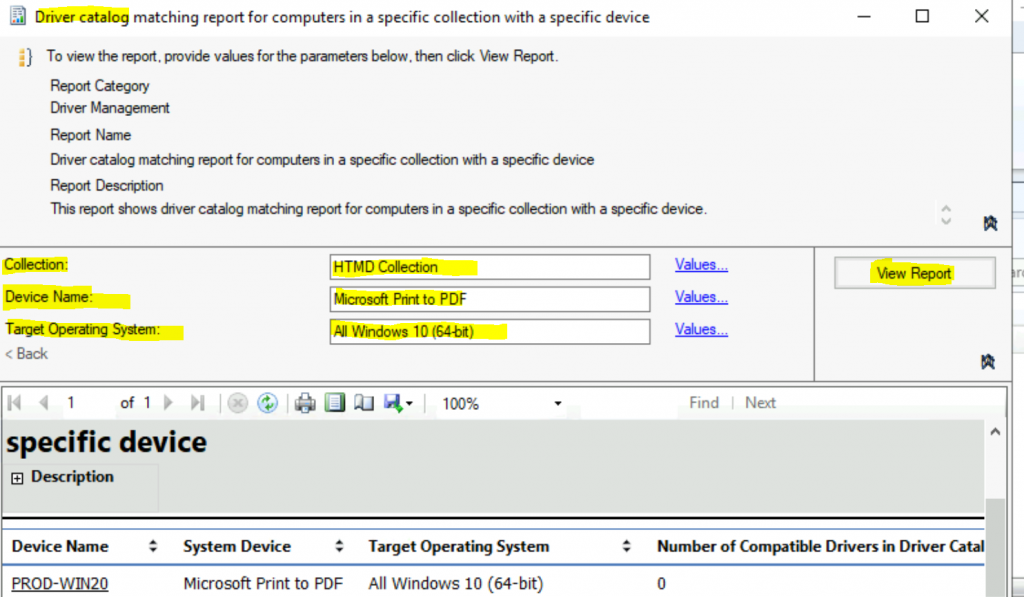
Driver catalog matching report for computers in a specific collection with a particular device shows a driver catalog matching report for computers in a specific collection with a particular device.
Resources
We are on WhatsApp now. To get the latest step-by-step guides, news, and updates, Join our Channel. Click here – HTMD WhatsApp.
Author
Anoop C Nair is Microsoft MVP! He is a Device Management Admin with more than 20 years of experience (calculation done in 2021) in IT. He is a Blogger, Speaker, and Local User Group HTMD Community leader. His primary focus is Device Management technologies like SCCM 2012, Current Branch, and Intune. He writes about ConfigMgr, Windows 11, Windows 10, Azure AD, Microsoft Intune, Windows 365, AVD, etc.




Hi,
Does anyone have an easy way to query driver “usage”?
To see for example in which bootimages it’s being used.
It seems that in PowerShell the Get-CMDriver unfortunately doesn’t have a ‘usage’ property.
This would come in handy to cleanup unused drivers when you have more than 1000 like us. (never been cleaned…)