






ConfigMgr Client Component Status | Installed | Enabled | Disabled | SCCM | Configuration Manager
Let’s have a quick look at ConfigMgr Client Component Status in detail. You can use the Components tab of the Configuration Manager client application – Configuration Manager Properties to view the installed, disabled, and enabled components on a Windows 10 computer.
The component tab displays the status and version of the components that ConfigMgr (a.k.a SCCM) uses to manage Windows 10 devices.
I know some of you get confused with the different component status scenarios. Should we start looking into some possible issues when all the components have a status as installed? Can we control component status with client settings?
Let’s also understand what will be shown in the component status when you disable a feature from the client settings.

Table of Contents
ConfigMgr Client Component Status
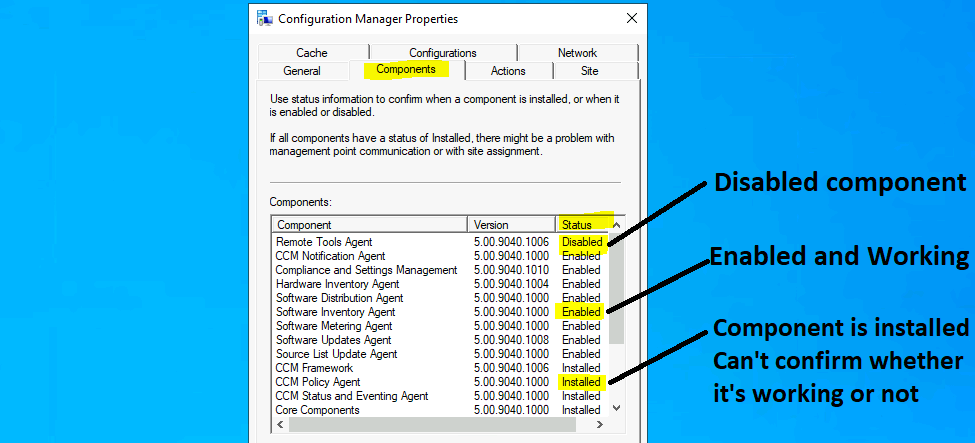
I hope you already know how to launch the Configuration Manager client application. The components tab has three (3) kinds of status information. You can use status information to determine whether a component is installed, enabled, or disabled.
| ConfigMgr Client Component Status |
|---|
| Installed – The component is installed. I can’t confirm whether it’s working or not. |
| Enabled – Is the component installed, enabled, and working? |
| Disabled – The component is installed but disabled. |
- Overview of Client Online Status in SCCM Console Configuration Manager ConfigMgr
- FIX SCCM Client Issues Using Automation Client Health
- SCCM Management Insights Configuration Manager ConfigMgr Details
Client Settings Vs Component Status
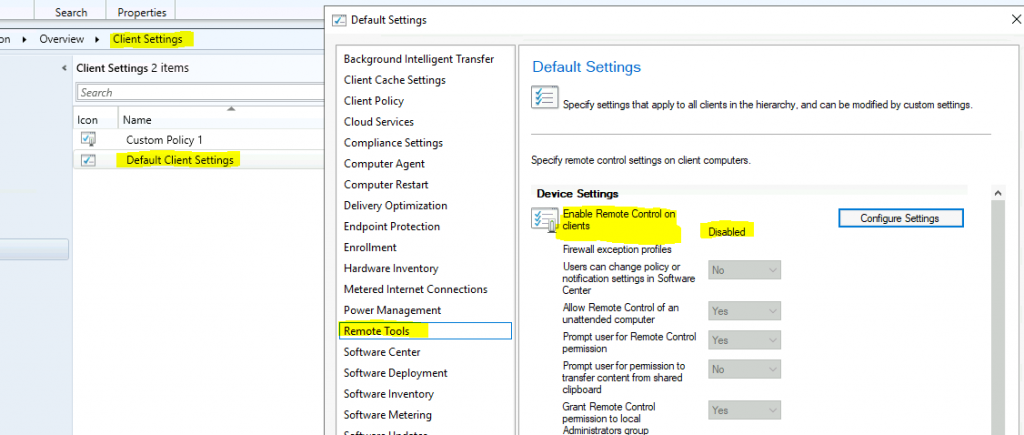
Let’s understand whether there is any relation between the client settings configured from the administration workspace of the admin console. I’m going to take the example of the Remote Tool Agent component. As you can see in the above screenshot, the component status is disabled.
Now, let’s check what is the client settings configuration:
- Navigate \Administration\Overview\Client Settings.
- Select the client settings policy with the highest priority or check the resultant policy from collection.
- Right-click on policy and Select Properties.
- Click on the Remote Tools section from the policy.
- The Remote Tools feature is disabled in the client settings policy as well.
How to Disable a Client Component
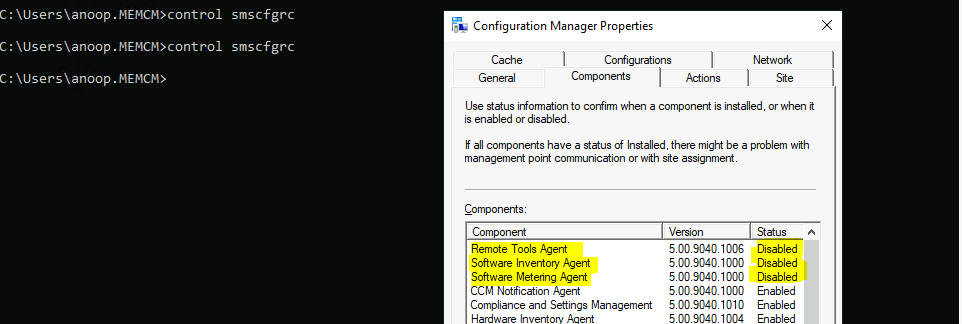
To disable the client component on a Windows 10 device, disable the Configuration Manager client settings feature. I have also disabled two additional features (software metering and software inventory) from client settings. After the next policy sync, the SCCM client component status was changed to Disabled.
- Software Inventory Agent
- Software Metering Agent
List of Components
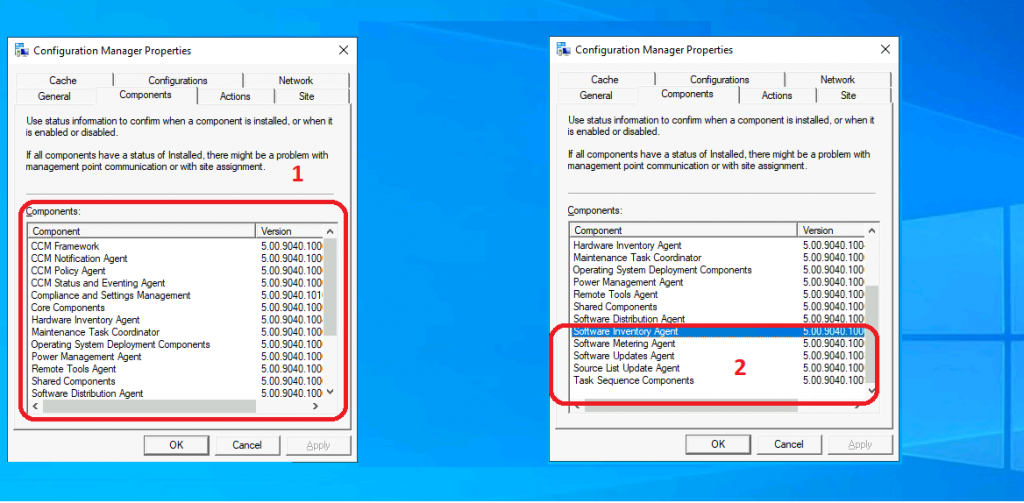
The following is the list of client components available: The total number of components available as of ConfigMgr 2010 is 18 (eighteen).
- CCM Framework
- CCM Notification Agent
- CCM Policy Agent
- CCM Status and Eventing Agent
- Compliance and Settings Management
- Core Components
- Hardware Inventory Agent
- Maintenance Task Coordinator
- Operating System Deployment Components
- Power Management Agent
- Remote Tools Agent
- Shared Components
- Software Distribution Agent
- Software Inventory Agent
- Software Metering Agent
- Software Updates Agent
- Source List Updates Agent
- Task Sequence Components
Troubleshooting Tips
When you have a client with all components that have a status of installed, there might be a problem with management point (MP) communication or site assignment (the client is not part of any boundary groups?).
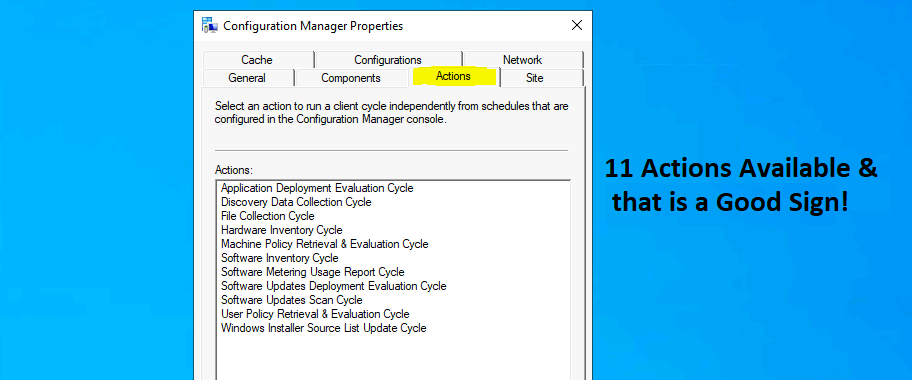
When you see only two actions in the Actions tab of Configuration Manager properties, the client might have a problem receiving policies from MP. This could be for several reasons. You might need to analyze these issues by deep-diving into SCCM client logs.
Resources
We are on WhatsApp now. To get the latest step-by-step guides, news, and updates, Join our Channel. Click here – HTMD WhatsApp.
Author
Anoop C Nair has been Microsoft MVP for 10 consecutive years from 2015 onwards. He is a Workplace Solution Architect with more than 22+ years of experience in Workplace technologies. He is a Blogger, Speaker, and Local User Group Community leader. His primary focus is on Device Management technologies like SCCM and Intune. He writes about technologies like Intune, SCCM, Windows, Cloud PC, Windows, Entra, Microsoft Security, Career, etc.




Discussion