






ConfigMgr SCCM Client Action Application Deployment Evaluation Cycle | Configuration Manager
Let’s understand the ConfigMgr Client Action called Application Deployment Evaluation Cycle in more detail. Users/admins can initiate the app deployment evaluation cycle to speed up application evaluation as part of troubleshooting scenarios from Windows 10 clients and the admin console. In this post, I will cover the details of this action on the client side.
ConfigMgr Client Component Status Details are also necessary for troubleshooting. Each client component has three different status details: installed, disabled, and enabled.
Let’s not get confused between ConfigMgr Client App and SCCM Software Center. Both are different, and client actions are available with the ConfigMgr Client App (a.k.a. Configuration Manager Application), which is available in the control panel.
In this post you will get all the details of the ConfigMgr SCCM Client Action Application Deployment Evaluation Cycle.

Table of Contents
Configuration Manager Client Actions
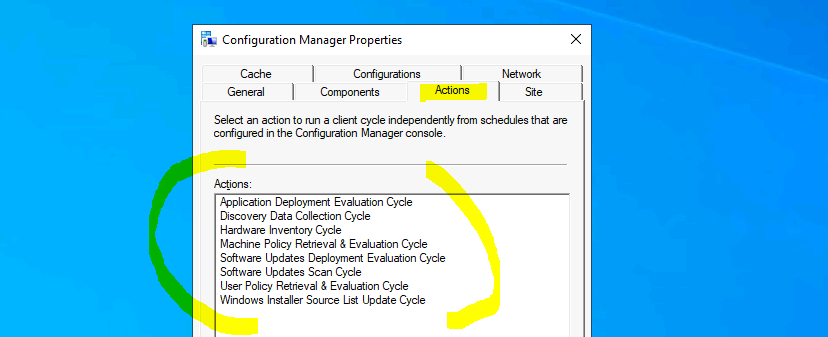
There are 8 (eight) client actions available in Configuration Manager client application properties as of the ConfigMgr 2010 version. You can also initiate any of the following actions from a Configuration Manager client computer by selecting any of the actions from the list below.
- Application Deployment Evaluation Cycle
- Discovery Data Collection Cycle
- Hardware Inventory Cycle
- Machine Policy Retrieval & Evaluation Cycle
- Software Updates Deployment Evaluation Cycle
- Software Updates Scan Cycle
- User Policy Retrieval & Evaluation Cycle
- Windows Installer Source List Update Cycle
- How to Trigger SCCM Client Agent Actions Using PowerShell Script
- ConfigMgr Software Updates Deployment Evaluation Cycle | Client Action | SCCM | Configuration Manager
Application Deployment Evaluation Cycle
Let’s understand more details about the Application Deployment Evaluation Cycle action. When do you want to initiate this action? And what are the actions that will get initiated when you trigger this?
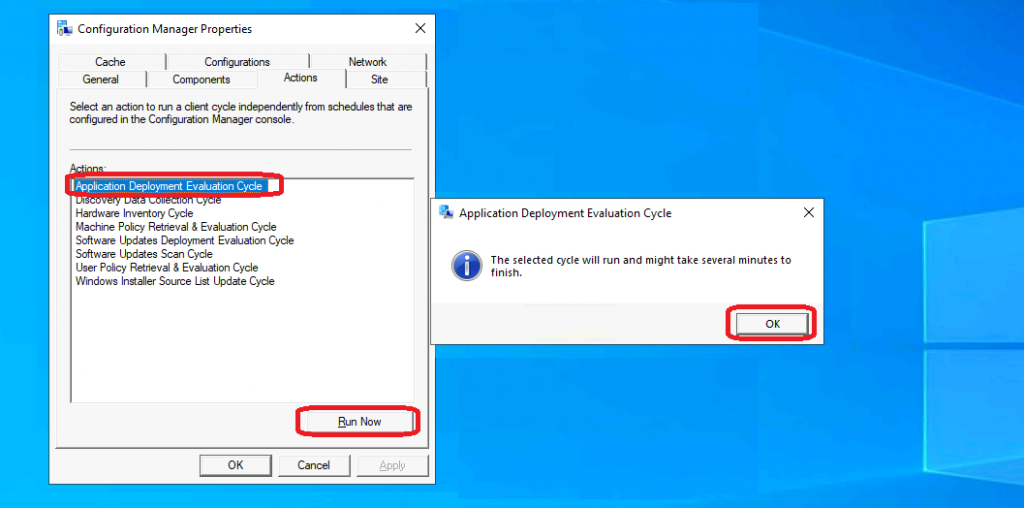
- You can install the client app from any computer with an SCCM client.
- Open Command Prompt
- Run the following command – Control smscfgrc
- Click on the Actions tab
- Select Application Deployment Evaluation Cycle
- Click on OK from the Application Deployment Evaluation Cycle popup window
Background Processes
This SCCM client action Application Deployment Evaluation Cycle “immediately” triggers the application deployment evaluation process. The high-level details of the background processes are explained below:
- CI agent component gets triggered
- Start analyzing the required apps on the Windows 10 device.
- DCM agent component gets triggered
- Application policies will be evaluated for SYSTEM.
- Will any missing required apps be installed again?
- Expression Solver component gets triggered.
- CWMIDiscoverySource::DiscoverResource – URI: (RegSetting_95ccb335-6ac8-440f-aba0-05d45b5c07c8) returned an object with a non-null value
- UDA Provider via DCMWMI Provider gets triggered
- Query supplied is: select * from CCM_File_Setting where ((FileSystemRedirectionMode = 1 AND Name = “firefox.exe”) AND Path = “C:\Program Files\Mozilla Firefox\”)
- DCM Reporting component gets triggered
- App Discovery component gets triggered
- Entering ExecQueryAsync for query “select * from CCM_AppDeliveryType where (AppDeliveryTypeId = “ScopeId_1074285A-82C7-474F-B242-1EE20F8C3CE5/DeploymentType_ee452e08-d889-4842-ac6f-de3a4c01de67″ AND Revision = 1)”
Performing detection of app deployment type Edge X86 Default Deployment Type(ScopeId_1074285A-82C7-474F-B242-1EE20F8C3CE5/DeploymentType_ee452e08-d889-4842-ac6f-de3a4c01de67, revision 1) for system.Logs Recorded Actions
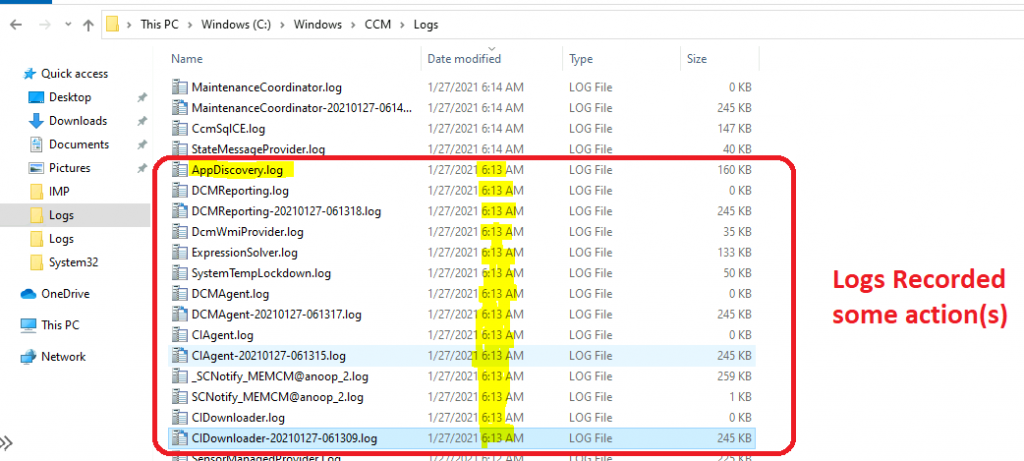
Let’s check the client logs to understand where all the actions got triggered. The following logs updated and recorded new entries as part of the Application Deployment Evaluation Cycle. More details about SCCM clients logs are available here.
- Location -> C:\Windows\CCM\Logs
| Log Files |
|---|
| AppDiscovery.log |
| CIAgent-20210127-061315.log |
| CIAgent.log |
| CIDownloader-20210127-061309.log |
| CIDownloader.log |
| DCMAgent-20210127-061317.log |
| DCMAgent.log |
| DCMReporting-20210127-061318.log |
| DCMReporting.log |
| DcmWmiProvider.log |
| ExpressionSolver.log |
| SCNotify_MEMCM@anoop_2.log |
| _SCNotify_MEMCM@anoop_2.log |
Resources
We are on WhatsApp now. To get the latest step-by-step guides, news, and updates, Join our Channel. Click here – HTMD WhatsApp.
Author
Anoop C Nair has been Microsoft MVP for 10 consecutive years from 2015 onwards. He is a Workplace Solution Architect with more than 22+ years of experience in Workplace technologies. He is a Blogger, Speaker, and leader of the Local User Group Community. His primary focus is on Device Management technologies like SCCM and Intune. He writes about technologies like Intune, SCCM, Windows, Cloud PC, Windows, Entra, Microsoft Security, Career, etc…




You might want to mention that the when kicking off the Application Deployment Evaluation Cycle from the Control Panel Applet, it will evaluate the applications for both the Computer and the currently logged in User. Yes, some organization deploy applications to the User so I think its important to mention that since when using the Right Click Tools or remotely executing the client actions via Interactive prompt, it will only evaluate the applications deployed to the computer.
StaffThank you Steve for the insights.
Hoping someone can help, its following on from Steves comment. I have some uninstall applications that run in a User Context.. this is to remove apps installed by users. If i add the device to my collection SCCM will unistall the application. The issue is if the user then reinstalls the app, the software Evaluation which runs every 4 hours is not triggering the removal of the app again. It only works if the app install behaviour is set to run as System, but running the uninstall as system isnt removing the app for me from the users appdata directory.
Anyway i can get sccm to remove the app in a user context everytime it does its software Evaluation??
StaffHave you tried user-based deployments? I have not tried this scenario but with the deployment option such as(similar to following) “Run when the only user is logged in” worth checking? or DCM is the other around.
Yes, I did test User Deployment but that didn’t seem to do anything on my test device. Interestingly enough the software seems to uninstall again but instead of the expected 4 hour cycle it takes roughly about 2 days. I’ve seen this now on 2 devices and it seems to be consistent. Just need to try and understand what triggers this. Currently investigating the default client settings that are deployed to Users. Will update if I have managed to sus it out.