






SCCM Content Library Cleanup Tool | Distribution Point | Configuration Manager
Let’s understand how to use the SCCM Content Library Cleanup Tool (ContentLibraryCleanup.exe). The SCCM DP content library cleanup helps the admin remove orphaned content. This tool avoids hacking around WMI to remove orphaned content.
ContentLibraryCleanup.exe is NOT a GUI-based tool; instead, it’s a command-line tool. I don’t like command-line tools because they’re easy to make mistakes. So, it would be best if you understood the parameters of the ConfigMgr Content Library Cleanup Tool.
In this post, you’ll find everything about the SCCM Content Library Cleanup Tool. We’ll cover how it helps manage the Distribution Point and the basics of Configuration Manager, breaking down the details into simple, easy-to-understand terms.
Let me put the warning (This tool should be run carefully) as part of the prerequisite because it contains details of permissions required to run the Content Library Cleanup Tool.

Table of Contents
SCCM Content Library Cleanup Tool | Distribution Point | Configuration Manager – Requirements
The following are some critical requirements/prerequisites to run this tool.
- Administrative access to the distribution point.
- “Full Administrator” RBAC role.
- “All” scope.
- If running the tool remotely, please ensure your network is secure.
- The tool runs in What-If mode and will not alter the content library.
- The tool doesn’t support removing content from the site server with a single library.
- The tool doesn’t support a content-enabled cloud management gateway or a cloud-based distribution point.
- How To Use ConfigMgr Content Library Explorer Tool
- How to Monitor SCCM DP using Job Queue Manager Tool
- List of Free SCCM Catalogs for Third-Party Software Updates

Where is ContentLibraryCleanup.exe
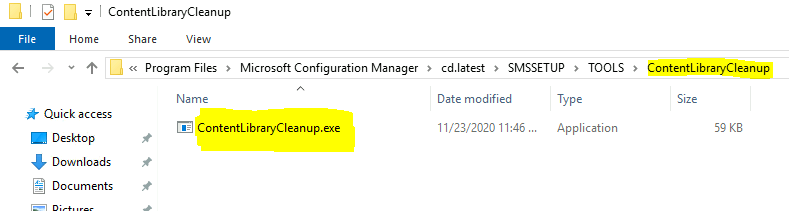
The Content Library Cleanup Tool command-line tool is part of the CD.latest folder.
- F:\Program Files\Microsoft Configuration Manager\cd.latest\SMSSETUP\TOOLS\ContentLibraryCleanup\ContentLibraryCleanup.exe
How to Use the SCCM Content Library Cleanup Tool
You can copy the ContentLibraryCleanup.exe from the site server to the remote DP. Once copied to a remote distribution point, you can run the tool from that DP server. The following are some of the examples that you can use.
| Scenario | Command Line Example | Details |
|---|---|---|
| What-If @ DP | ContentLibraryCleanup.exe /dp DPserver1.MEMCM.com | DP Server FQDN |
| What-If @ Secondary server DP | ContentLibraryCleanup.exe /dp DPserver1.MEMCM.com /ps PrimaryMEMCM.com /sc ABC | Primary Server FQDN and Primary server site code |
| Deletion @ DP | ContentLibraryCleanup.exe /dp DPServer.MEMCM.com /delete | Remote DP FQDN |
| Silent Switch to Delete @ DP | ContentLibraryCleanup.exe /q /dp DPServer.MEMCM.com /delete | /q silent switch |
| Enable Logging with What-If | ContentLibraryCleanup.exe /dp DPServer.MEMCM.com /log C:\Users\Administrator\Desktop | /log to enable logging |
| Enable Logging with Deletion | ContentLibraryCleanup.exe /dp DPServer.MEMCM.com /delete /log C:\Users\Administrator\Desktop | /Log /Delete deletion with logging |
What If Option with the Content Cleanup Tool
First, we need to analyze the content from the DP to reduce the risk. You can use the What-if mode to identify the orphaned content that would be deleted from the distribution point.
I recommend running the Content Library Cleanup tool’s what-if mode before the deletion. The following are the steps completed by the content library cleanup tool with the What-If parameter.
- Are you sure you want to proceed (What-If mode)? ‘y’ = yes / ‘n’ = no:: Y
- Gathering information…
- Loading information from distribution point…
- Analyzing local files, 0.00% complete…
- Analyzing local files, 100.00% complete…
- Loading package data from provider…
- Loading local package data…
- Loading distributed packages from provider…
- System.InvalidOperationException: This content library cannot be cleaned up now because package MEM00020 is not fully installed.

Errors with the Content Library Cleanup Tool
The above screenshot shows an error with the What-If mode. You need to complete the package distribution before you can proceed with using the SCCM DP content library cleanup tool. The screenshot below shows one more error.
NOTE! – If any of the package distribution is failed, then you can’t run this tool. It would be best if you fixed the package distribution for the DP, and then you can run the cleanup tool.
Content Library Cleanup Tool Error – System.InvalidOperationException: This content library cannot be cleaned up now because package MEM00020 is not fully installed.
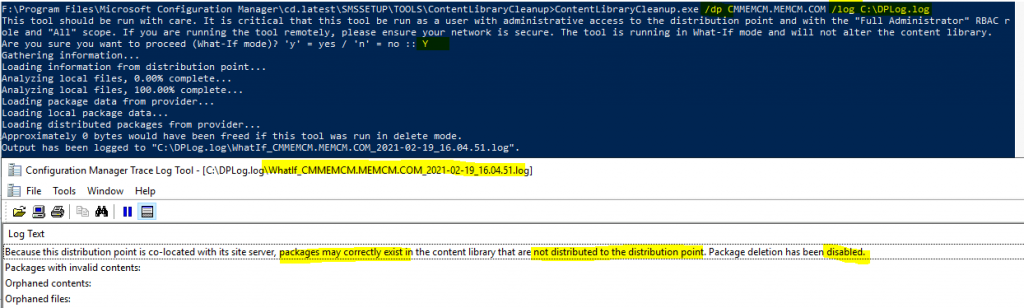
Primary and DP on same server Error—Approximately 0 bytes would have been freed if this tool had been run in delete mode. Because this distribution point is co-located with its site server, packages may correctly exist in the content library that is not distributed to the distribution point. Package deletion has been disabled.
Resources
SCCM package distribution failed to remote DP
We are on WhatsApp now. To get the latest step-by-step guides, news, and updates, Join our Channel. Click here – HTMD WhatsApp
Author
Anoop C Nair is Microsoft MVP! He is a Device Management Admin with more than 20 years of experience (calculation done in 2021) in IT. He is a Blogger, Speaker, and Local User Group HTMD Community leader. His primary focus is Device Management technologies like SCCM 2012, Current Branch, and Intune. He writes about ConfigMgr, Windows 11, Windows 10, Azure AD, Microsoft Intune, Windows 365, AVD, etc.




Discussion