






ConfigMgr CMPivot Query to Fetch WSUS Server Details of the Clients | SCCM | Configuration Manager
Let’s discuss ConfigMgr CMPivot Query to Fetch WSUS Server Details of the Clients | SCCM | Configuration Manager. Let’s look at a ConfigMgr CMPivot query that Fetches the WSUS server Details of the Clients, which might help you troubleshoot software updates.
I have many blog posts related to CMPivot queries, and some of them are listed below. These posts explain how to start running CMPivot queries against Online clients.
CMPivot uses a subset of the Kusto Query Language (KQL). Microsoft Docs provides more details about KQL.
I don’t recommend using the All System collection in a production environment with many devices. Instead, use the collection with fewer devices to try out the query.

Table of Contents
Launching CMPivot Query Tool
Let’s understand how to launch the CMPivot query tool.
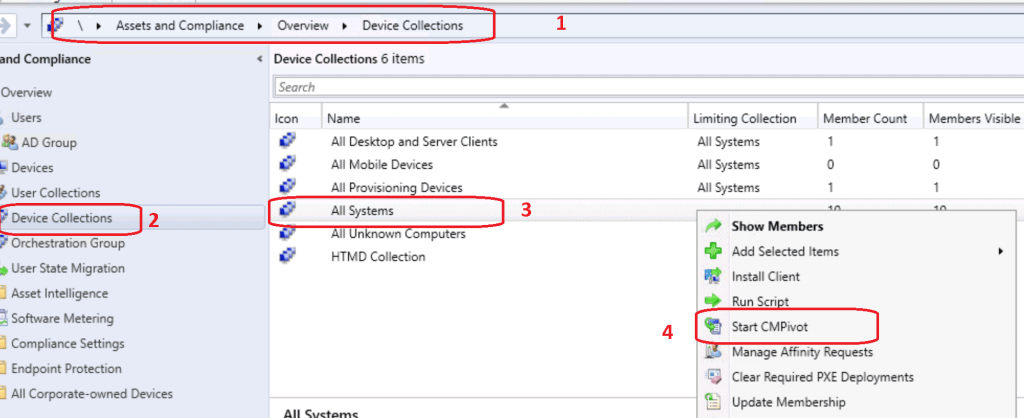
- Navigate to the device collection against which you want to run the CMPivot query.
- Select All Systems or any collection from which you want to run the CMPivot.
- You can also use the CMPivot standalone tool.
- Right-click on the All Systems collection.
- Select Start CMPivot.
- Out of Support Office 365 ProPlus
- Patches Installed in the Last 90 Days
- Windows 10 English Language Devices
- Find Devices Missing Patches
- Devices with Greater than 15 GB Free Disk Space
Issues with CMPivot Query & Troubleshooting
I initially tried to get machines connected to a particular WSUS server using the CMPivot entity called CCMLog. However, the query didn’t work because of formatting issues.
Unfortunately, I couldn’t find a working CMPivot query. If you know how to use nested quotes (‘ ‘ ‘ ‘) in CMPivot, please let me know in the comments section.
The following query in KQL format didn’t work for me because the contains operator doesn’t support double quotes ‘WSUS Path=’http://CMMEMCM.MEMCM.COM:8530”
CMPivot Query Error – Failed to parse the query.
CcmLog('LocationServices') | where LogText contains 'WSUS Path='http://CMMEMCM.MEMCM.COM:8530''
| project Device, LogText, DateTime
I also tried splitting the contains operator text into two parts, as shown in the query below, but that didn’t work.
CMPivot Query Error – The Left and right sides of the logical expression must be Boolean.
CcmLog('LocationServices') | where LogText contains (('WSUS Path=') and ('http://CMMEMCM.MEMCM.COM:8530'))
| project Device, LogText, DateTime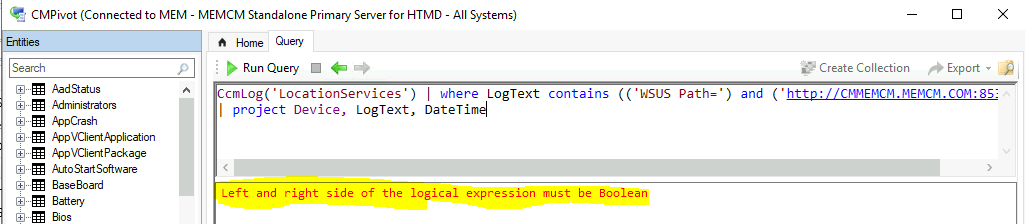
ConfigMgr CMPivot Query to Fetch WSUS Server Details
Let’s check the query we will use to CMPivot Query to Fetch WSUS Server Details from all online clients. There is also another CMPivot query that can look for the clients connected to one particular WSUS/SUP server.
- Check the query to find the clients connected to one WSUS/SUP server.
- Make sure to update the following query with your WSUS server and port number that is in use.
CcmLog('LocationServices') | where LogText contains 'http://CMMEMCM.MEMCM.COM:8530'
| project Device, LogText, DateTime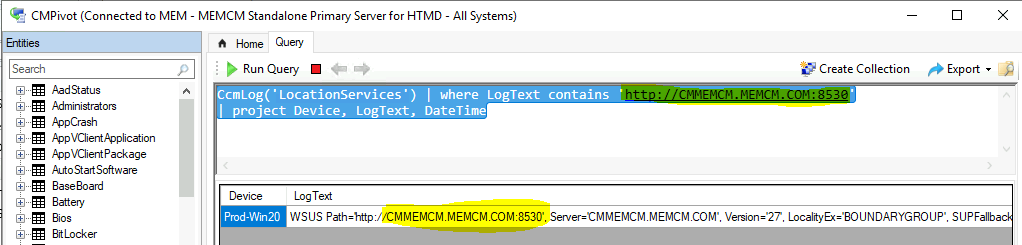
Check the query to find the list of all ONLINE clients and their WSUS server details.
CcmLog('LocationServices') | where LogText contains 'WSUS Path='
| project Device, LogText, DateTime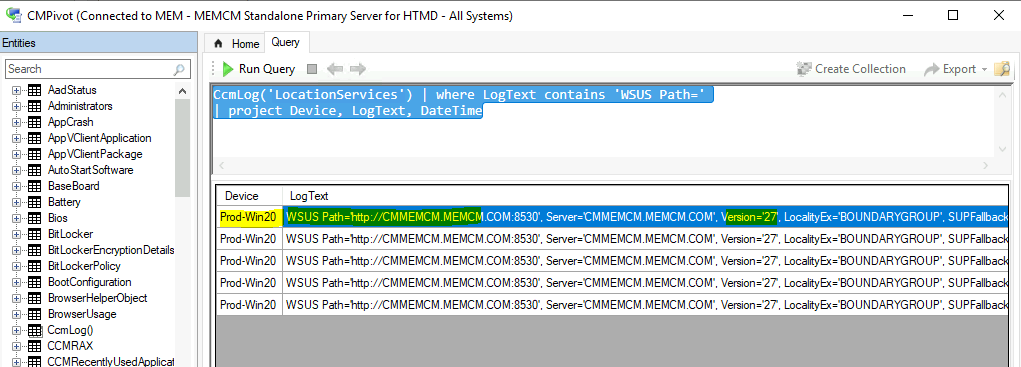
Results
With the ConfigMgr mentioned above CMPivot query, you can check the WSUS server details, WSUS Catalog version, SUP Fall backup option details, and port number.
So, if you want to perform software update troubleshooting on problematic clients, you can use the CMPivot entity called CCMLog.
| Device | LogText | DateTime |
|---|---|---|
| Prod-Win20 | WSUS Path=’http://CMMEMCM.MEMCM.COM:8530′, Server=’CMMEMCM.MEMCM.COM’, Version=’27’, LocalityEx=’BOUNDARYGROUP’, SUPFallbackIn=’0′ | 03-08-2021 12:22 |
| Prod-Win20 | WSUS Path=’http://CMMEMCM.MEMCM.COM:8530′, Server=’CMMEMCM.MEMCM.COM’, Version=’27’, LocalityEx=’BOUNDARYGROUP’, SUPFallbackIn=’0′ | 03-08-2021 12:22 |
| Prod-Win20 | WSUS Path=’http://CMMEMCM.MEMCM.COM:8530′, Server=’CMMEMCM.MEMCM.COM’, Version=’27’, LocalityEx=’BOUNDARYGROUP’, SUPFallbackIn=’0′ | 03-08-2021 12:22 |
| Prod-Win20 | WSUS Path=’http://CMMEMCM.MEMCM.COM:8530′, Server=’CMMEMCM.MEMCM.COM’, Version=’27’, LocalityEx=’BOUNDARYGROUP’, SUPFallbackIn=’0′ | 03-08-2021 12:22 |
| Prod-Win20 | WSUS Path=’http://CMMEMCM.MEMCM.COM:8530′, Server=’CMMEMCM.MEMCM.COM’, Version=’27’, LocalityEx=’BOUNDARYGROUP’, SUPFallbackIn=’0′ | 03-08-2021 12:22 |
Resources
- ConfigMgr CMPivot Architecture – https://www.anoopcnair.com/sccm-cmpivot-guide/
We are on WhatsApp now. To get the latest step-by-step guides, news, and updates, Join our Channel. Click here – HTMD WhatsApp.
Author
Anoop C Nair has been Microsoft MVP for 10 consecutive years from 2015 onwards. He is a Workplace Solution Architect with more than 22+ years of experience in Workplace technologies. He is a Blogger, Speaker, and Local User Group Community leader. His primary focus is on Device Management technologies like SCCM and Intune. He writes about technologies like Intune, SCCM, Windows, Cloud PC, Windows, Entra, Microsoft Security, Career, etc.




Discussion