






How to Enable WMI Tracing in Windows Server 2008 Windows Devices
How to Enable WMI Tracing in Windows Server 2008 Windows Devices. Do you know how to enable WMI tracing using Event Viewer? Here is a quick guide to enabling WMI tracing on Windows 7 and Windows 2008 R2 machines.
What is WMI? Windows Management Instrumentation (WMI) is the infrastructure for managing data and operations on Windows-based operating systems. Applications on your computer use WMI to send demands for data about your system configuration.
I’ve seen this topic discussed in the MMS session hosted by Jason and Kim (thanks to them for reminding me about it). There are more details about MMS videos.
However, my credits go to Microsoft CSS engineer Sudha N, because I initially heard about WMI tracing from her.

- Known Issue Error 0x800f0982 and Fix for Windows Server OS
- Emergency Fix for Windows Server Crashes Out-of-Band Updates Released by Microsoft
- Supported Windows Server OS for SCCM Servers
- Best way to Manage SCCM Client on Windows Server Core Machines
Table of Contents
How to Enable WMI Tracing in Windows Server 2008 Windows Devices
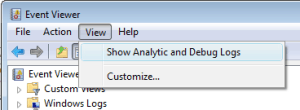
1. Open Event Viewer, click on View, then select Show Analytic and Debug Logs
2. Expand the Applications and Services Logs section and then the Microsoft \ Windows sections
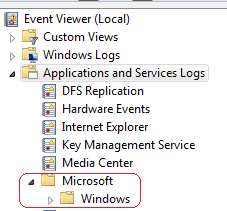
3. Expand Windows and find the WMI-Activity folder. Expand the WMI-Activity folder and Select Trace. Click on ” Enable Log ” on the Action Menu (right side).

4. From the Action Menu, Select Disable Log to stop WMI tracing.
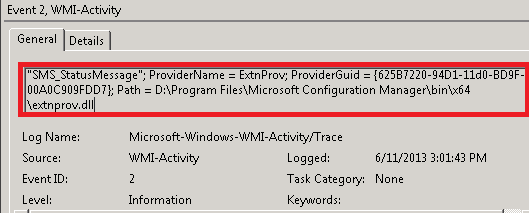
5. You could see all WMI-related details by enabling WMI tracing; this would greatly help troubleshoot WMI issues.
ProviderInfo for GroupOperationId = 232708; Operation = Provider::ExecQuery – select QueryID, Name, Expression, Comments from SMS_Query where TargetClassName = “SMS_StatusMessage”; ProviderName = ExtnProv; ProviderGuid = {625B7220-94D1-11d0-BD9F-00A0C909FDD7}; Path = D:\Program Files\Microsoft Configuration Manager\bin\x64\extnprov.dll
GroupOperationId = 232814; OperationId = 232817; Operation = Start IWbemServices::ExecQuery – references of {__Win32Provider.Name=”ExtnProv”}; ClientMachine = Local; User = ConfigMgr\Anoop.Nair; ClientProcessId = 0; NamespaceName = \\.\root\sms\site_IP0
How do I get WMI logs? Where are WMI logs?
Resources
- Free SCCM Training Part 1 | 17 Hours Of Latest Technical Content | ConfigMgr Lab HTMD Blog (anoopcnair.com)
- How To Disable SCCM Application Deployment | ConfigMgr | MEMCM – HTMD Blog #2 (howtomanagedevices.com)
We are on WhatsApp now. To get the latest step-by-step guides, news, and updates, Join our Channel. Click here – HTMD WhatsApp
Author
Anoop C Nair is Microsoft MVP! He is a Device Management Admin with more than 20 years of experience (calculation done in 2021) in IT. He is a Blogger, Speaker, and Local User Group HTMD Community leader. His primary focus is Device Management technologies like SCCM 2012, Current Branch, and Intune. He writes about ConfigMgr, Windows 11, Windows 10, Azure AD, Microsoft Intune, Windows 365, AVD, etc.




Discussion